If you find this manual useful,
how about a donation of
$3 to:
M. Butkus, 29 Lake Ave.,
High Bridge, NJ 08829-1701
and send your e-mail
address
so I can thank you.
Most other places would charge
you $7.50 for
a electronic copy
or $18.00 for a hard to read Xerox copy.
This will help me to continue to host this site,
buy new manuals, and pay their shipping costs.
It'll make you feel better, won't it ?
If you use Pay Pal, use the link below.
Use the above address for a
check, M.O. or cash.
Back to main
camera manual page
Yashica Y 16 PDF file
made from HTML page
- Better printing -
Yashica 16 in Word format
Description of the CLIP-LOAD
YASHICA Y16
This camera uses a film cartridge no longer available, so it's a nice shelf
item.
Read the following description carefully until you become fully familiar with
all these working parts.
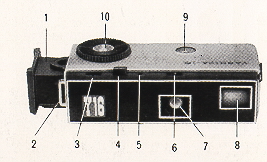 |
1. Film Magazine
2. Strap-holder
3. Shutter Speed Reading Window
4. Shutter Release Button
5. Cable Release Socket
6. Aperture Reading Window
7. Lens
8. Finder |
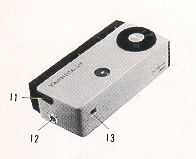 |
9. Film Exposure Counter
10. Film Advancing Disc
11. Slide-Lock for Magazine
12. Built-in Flash Terminal
13. Finder Eye Piece
|
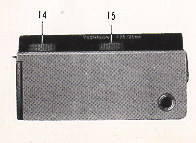 |
14. Shutter Speed Control Ring
15. Aperture Control Ring
16. Tripod Socket
|
A precision instrument capable of bringing you some of the finest photographs
you hove ever taken. Please read the following pages carefully. Fallow the easy,
step-by-step recommendations.
HOLDING THE CAMERA
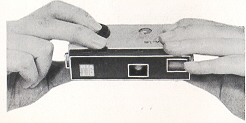 |
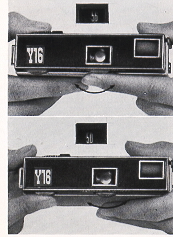
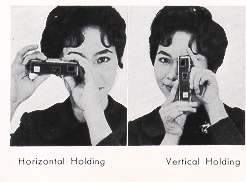
The YASHICA Y16 is held between the
forefinger and the thumb of the right hand, with the forefinger placed on
the Film Advancing Disc and the thumb on the bottom of the camera. The
camera is also held with the left hand in a similar manner as above. The
Shutter Release Button is operated with the middle finger. |
LOADING THE CAMERA
16mm roll film
24 exposure per roll in the CLIP-LOAD MAGAZINE
10 X 14mm size negative
Black and White or Color
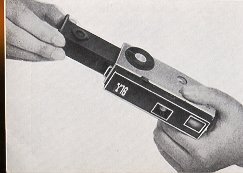 |
1. Insert a new CLIP-LOAD MAGAZINE (loaded with black and white or color
film) into the YASHICA Y16.
2. Make sure the side with the cogwheel is on top.
3. Advance the film by turning the Film Advancing Disc counterclockwise until it
stops. Press the Shutter Release Button. |
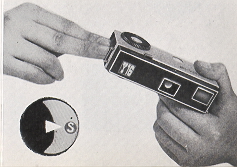 |
4. Repeat twice the operation of
advancing film with the Film Advancing Disc and pressing the Shutter Release
Button. The Exposure Counter will indicate "S" (start) opposite the white
triangle. Now advance the film again, and the Exposure Counter Dial will
register figure 1, which indicates that the film is in position for the
first exposure and the camera is ready to take the first picture. |
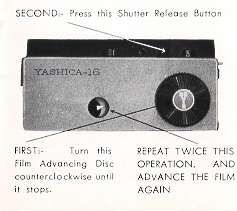 |
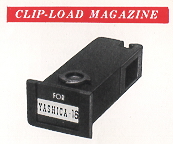
The CLIP-LOAD MAGAZINE
houses the film transport mechanism and 24 exposures of film. The magazine
will take both the perforated and non-perforated type of 16mm film,
available in black and white or color.
Using additional magazines and loading them with different types of film
will enable you to take photographs under all conditions with the YASHICA
Y16.
Changing magazines is done in a matter of seconds: advance the last exposed
frame of film by turning the Film Advancing Disc, push the Slide Lock
forward and the magazine will pop out from the camera, then insert the new
magazine into the slot and you are ready to shoot. |
 |
PICTURE TAKING PROCEDURE
 |
1. Turn the Aperture Control Ring to the left or to the right until the
desired number appears in the Aperture Reading Window.
2. Turn the Shutter Speed Control Ring and set the predetermined shutter
speed. The shutter speed should appear in the Shutter Speed Reading Window.
3. Sight the subject through the viewfinder and when you have composed your
picture gently press the Shutter Release Button. |
 |
The shutter speed controls the duration
of the exposure. Shutter speeds on your YASHICA Y16 with its metal plane
shutter are 1/25. 1/50, 1/100, 1/200 of a second and 'S'. The 'S' setting is
for taking pictures with an exposure longer than one second. Use a tripod or
brace when using the 'S'. It is advisable to set, before you advance the
film and wind the shutter by turning the Film Advancing Disc. |
VARIABLE SLOW SHUTTER SPEED AND TIME SETTING
When the Shutter Speed Dial is set at "S", the fine metal plane
shutter of the YASHICA Y16 offers variable slow shutter speed and 'Time'
setting, with its double tension action Shutter Release Button. If the Shutter
Release Button is depressed to the bottom in one gentle continuous action,
shutter speed will be about 1/10 of a second. Thus, variable slow shutter speeds
are possible by the pressure application and time lag between the first and
second tension on the button. For 'Time', the pressure on the button is removed
after the shutter blades are open and then re-applied after the required
exposure is made.
The Shutter Speed Reading Window, Aperture Reading Window, and Film Exposure
Counter are conveniently arranged on top of the camera, permitting you at a
glance to check for any possible errors in the settings before clicking the
shutter.
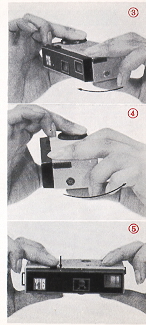
FILM WINDING
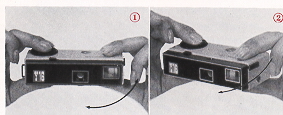 |
The Yashica Y16 incorporates an unique method of film
winding. The film is wound by holding the camera between the forefinger and
the thumb of the right hand, with the forefinger placed on the winding disc
and the thumb on the bottom of the camera. The camera is then pushed forward
with the left hand until it clicks. Bringing the camera back to its
original position, the shutter release will be approximately under the
middle finger of the right hand, and you are ready to shoot in an instant.
This operation transports the film, winds the shutter, and sets the exposure
counter all automatically. This action prevents double exposures. |
|
 |
UNLOADING FILM
When the Exposure Counter indicates 24, IT IS THE LAST EXPOSURE.
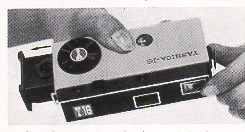 |
Before removing the CLIP-LOAD MAGAZINE
from the camera, advance the last exposed frame of film by turning the Film
Advancing Disc and clicking the shutter. Repeat this operation once again.
Then push the Slide Lock forward and the magazine will POP out. |
Immediately wrap with the original wrapper, the CLIP-LOAD MAGAZINE, without
removing the exposed film from it, and replace it in the film carton. This will
prevent any possible light leakage and damage to the film.
Note: When the Slide Lock is released, the Exposure Counter will reset
automatically to "S", or start.
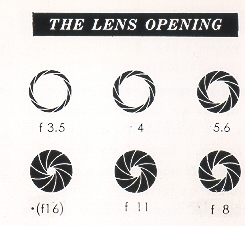 |
The lens aperture controls the amount of
light that will pass- through the lens onto the light-sensitive film.
YASHICA Y16, with its Yashinon lens, offers openings at f3.5, 4, 5.6, 8, 11
and~ll6). Notice that the lower the number, the larger the opening. f3.5 is
the largest opening, and~lfl6) the smallest. To set the lens opening, turn
the Aperture Control Ring by setting the desired number in the Aperture
Reading Window. |
TAKING FLASH PICTURES
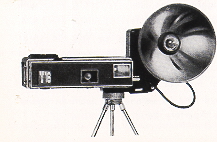 |
Your YASHICA Y16 offers X synchronization
As you become more proficient at taking pictures, you will want to acquire
accessories that increase the versatility of your camera. One of the first
accessories you will want will be a flash unit. Synchronization for flash is
built-in.
A standard FC connector plugs into the flash terminal. The YASHICA Y16
Flash Gun attaches to the camera with a bracket that screws into the
tripod socket |
SELF-TIMER
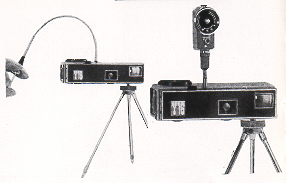 |
A Cable Release or a Self-Timer can be
fitted to your YASHICA Y16. Screw the Cable Release into the Socket
provided beside the Shutter Release Button. Your camera dealer will supply
the proper Cable Release for your Y16. |
FILTERS
Initially, you will find a yellow filter ideal for bringing out clouds in
landscape pictures and for general uses. An UV filter is suitable for color
photography and also to protect the lens. As you become more advanced, you will
want to use various filters, such as orange, green, etc.. for different effects.
(Special type of slip-on filters are available for your YASHICA Y16.)
Y16 ACCESSORIES & EQUIPMENT - for the YASHICA WAY of 16mm
photography
|
FILM: (loaded in daylight CLIP-LOAD MAGAZINE)
Y16 Black and White Film
Y16 Color Film
FOR PICTURE TAKING:
Filter
Flash Gun
Table Tripod
FOR FILM DEVELOPING:
Developing Tank
Transparent Negative Wallets |
FOR ENLARGING:
Magnifier Printer
Enlarger
FOR PROJECTING:
Slide Viewer
Slide Projector
|
EXPOSURE
Exposure means finding the right combination of lens-opening "aperture) and
shutter speed in relation to the sensitivity (ASA) of your film. (ASA
indicates American Standard Association. For example if you are using a film
of ASA 100 sensitivity, your correct exposure will be according to
the following table.
DAYLIGHT EXPOSURE TABLE
Your speed will be 1/100 with aperture numbers shown below.
| |
Bright Sun |
Hazy Sun |
Cloudy-Bright |
Cloudy-Dull or Open Shade (4) |
| Light Subject (1) |
f/16 |
f/11 |
f/8 |
f/5.6 |
| Average Subjects (2) |
f/11 |
f/8 |
f/5.6 |
f/4 |
| Dark Subject (3) |
f/8 |
f/5.6 |
f/4 |
f/3.5 |
(1) Light Subjects: Distant landscapes, near-by people with sea, beach and
snow scene. in the background.
(2) Average Subjects: Near-by people, houses, gardens, buildings and places not
in the shade. Advisable to use this class when light and dark objects are in
about equal proportions.
(3) Dark Subjects: People in cork clothing: trees, flowers, animals and large
buildings,
(4) Open Shade: Subjects shaded from the sun but lighted by a wide area of open
sky. The less the open sky the larger the lens opening.
If you are using an ASA 50 film, you will make a larger lens-opening or lower
your shutter speed (1/50). When in doubt, follow the film manufacturer's
recommendations, and you will be assured of good pictures.
 ,
M. Butkus, NJ.
,
M. Butkus, NJ.