and historical purposes, all rights reserved.
This page is copyright© by
 - NJ.
- NJ. This page may not be sold or distributed without the
expressed permission of the producer.
I have no connection with any camera company
The next page contains information on this camera.
If
the image below looks like your camera,
click below to see the PDF manual.
This camera manual library is for reference
and historical
purposes, all rights reserved.
This page is copyright© by
- NJ.
This page may not be sold or distributed without the
expressed permission
of the producer.
I have no connection with any camera company
On-line camera manual library - M. Butkus, Librarian
If you find this manual useful,
how about a donation
of $3 to:
M. Butkus, 29 Lake Ave.,
High Bridge, NJ 08829-1701
and send your e-mail address
so I can thank you.
Most other places
would charge
you $7.50 for a electronic copy
or $18.00 for a hard to read
Xerox copy.
<<<
IF YOU WOULD LIKE THIS OR ANY PDF FILE
PRINTED, BOUND AND MAILED TO YOU,
SEE
THIS OUTSIDE COMPANY'S OFFER >>>
RIGHT CLICK ON MANUAL BELOW,
CHOOSE " SAVE TARGET AS
"
SAVE TO FOLDER OF YOUR CHOICE
Problems opening PDF files
or printing problems
- click here
CLICK HERE TO CONTINUE TO
Ricoh R1 English PDF MANUAL
SCANNED FROM BOOK
CLICK
HERE TO CONTINUE TO
Ricoh R1 Manual de instrucciones
Ricoh R1 Mode d'emploi
Ricoh R1 Bedienungsanleitung
(Webmaster: the first part is an
illustrated guide)
Illustrated Ricoh R1
guide in HTML
Part 2
MAIN FEATURES
* Ultra Light compact and slim design
* 24 mm Super Wide Panorama and normal 30 mm Panorama switchable
in mid-roll
* Multi-AF system (Single AF possible)
* Red Eye Reduction Mode
* Creative Modes (including Super Night Mode)
BEFORE USING
- A fast film such as ISO 200 or ISO 400 is recommended to
prevent blurriness and to obtain a longer flash range.
- This camera has a high voltage circuit. Because it is dangerous,
do not attempt to take the camera apart.
- Do not hold the camera by the lens
- Before taking important pictures (at weddings, on tops abroad, etc.) test
the camera and learn how it works.
ATTACHING THE STRAP
1. Insert the small loop at the end of the Strap under the
Strap Holder. (Fig. 1)
2. Insert the other end of the Strap through the loop to
tie the Strap onto the Strap Holder. (Fig. 1)
INSERTING THE BATTERY
The camera will not operate unless the battery is in stalled.
It is important to make sure that the battery is installed correctly.
1. Insert your finger nail in the slot below the Battery
Compartment Cover on the side of the camera to open it. (Fig. 2)
2. Insert the recommended 3 volt lithium battery, placing
the black strip under it and checking that the + and—on the battery are aligned
according to the polarity diagram inside the battery compartment. (Fig. 3)
3. Close the Battery Compartment Cover by pushing it in the
direction of the arrow until it locks firmly in place. (Fig. 4)
* Do not remove the battery from the camera until you are
ready to replace it.
* When replacing the battery, do so as quickly as possible
within about three minutes to avoid erasing the
camera memory.
We recommend replacing the battery when there is no film in the camera.
* Approximately 1 minute after the battery has been removed.
the date will change to '92.- 1 -1
When the battery
has been replaced, make sure the correct date and time are showing. (only for databack
version)
Recommended Replacement 3V Lithium Batteries
Lithium battery (3V)
Panasonic CR-2, or equivalent
POWER SWITCH & CHECKING
THE BATTERY POWER SWITCH
Each time you push the Power Switch in the direction of the
arrow, it switches from OFF to ON, and vice versa.
The lens moves from the Storage Position to the original
Position, and the camera sets everything automatically. At the same time, the exposure
counter appears on the LCD panel when the film is set. (Fig. 5)
CHECKING THE BATTERY
1. When the battery is nearly exhausted, the symbol will appear. Replace with a new battery
as soon as possible. (Fig. 6)
2. When the battery is exhausted, the
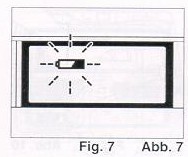 symbol will blink Replace with a new battery. (Fig. 7)
* In extremely cold temperatures, the do symbol may blink.
In cold temperatures, the battery voltage
is reduced. You
may be able to use the camera if you remove the battery and warm it up.
* If the battery voltage is insufficient, the shutter may
not release or the film may not advance
completely. In the
following cases, replace the battery:
1 ) When power switch does not switch on.
2) When the
symbol is blinking.
3) When the shutter does not release.
4) When Film Advance and Rewind cannot be done.
To avoid tripping the shutter inadvertently and wasting
battery power, always turn the Power Switch off when you are not taking pictures.
* If the camera is left unoperated (switches and buttons
are not operated) for about 3 minutes or more, the power automatically switches
off, the display disappears from the LCD Panel and the lens returns to the Storage
Position. The purpose of this function, called Auto Power OFF, is to prevent waste
of hatters Dower.
LOADING THE FILM
Always avoid direct sunlight when loading the film.
1. Push the Back Cover Latch Downward to open. (Fig. 8)
2. Load the film cassette into the Film Chamber and pull
out enough film leader to extend past the mark of the film leader position. (Fig.
9,10)
* If there is any dust on the inside lens surface, use a
blower to blow the dust away.
3. Make sure the film stays within the Film Guides and lies
flat. (Fig. 11,12)
4. Press the Back Cover shut so that the Back Cover Latch
returns to its original position. When you close the Back Cover the film is automatically
advanced, and the first frame is set in place. The Exposure Counter on the LCD Panel
displays the number of frames remaining to be exposed. (Fig. 13)
5. If the film has not advanced correctly and is not taken
up onto the Film Take-up Spool, the Exposure Counter will blink. (Fig. 14) The Shutter
Release will also lock so you cannot take a picture until the film is loaded properly.
(DX Film only)
Reload the film by following steps 1 - 4 shown above.
* Whether there is film in your camera or
not can be confirmed by either the Film Loaded Window or the Exposure Counter in
the LCD Panel.
* You can confirm that the Film-Wind or Rewind is working
properly by observing the Exposure Counter.
* You can load film in your camera with the Power Switch
off. However, the Loading Sign will disappear
after about
5 sec.
* Do not touch the inner lens with your fingers or the
edge of film.
* This camera's Pre-wind System automatically prewinds the
film to the end when you load it and rewinds it back into the film cassette as each
shot is taken. If the back cover is mistakenly opened before the film has reached
the end, close it immediately. The film will automatically rewind. When it has completely
rewound, the Film Counter will display "E". Remove the film and develop. (Webmaster:
any untaken picture in that roll will be ruined but the taken photographs are already
in the film can, safe from the light.)
* Sometimes more exposures can be taken than the standard
number of frames listed on the film. For this reason, the number of frames counted
in the Exposure Counter on the LCD Panel may sometimes be higher than the number
of frames listed on the film.
SETTING THE FILM SPEED
DX-coded film cassettes have black-and-silver patterns corresponding
to film speeds that the camera reads and automatically sets. Your camera accepts
DX films with speeds ranging from ISO 50 to 3200. (Fig. 15)
Most color negative films on the market are DX-coded. When
using DX-coded films, setting the film speed is not necessary. Your camera automatically
sets the correct film speed.
When using a film without a DX code, your camera will automatically
set itself to ISO 100.
HOLDING YOUR CAMERA
1. Always use both hands to steady your camera. (Fig, 16)
* When holding the camera vertically always position it with
the flash at the top. (Fig. 17)
* Be careful not to place your fingers over the lens, flash
or focusing windows. (Fig. 18)
* We suggest that you become familiar with your new
camera by shooting and processing at least one roll of film before using your camera
to record an important occasion.
* If the camera moves during the exposure, the whole picture
will be blurred. To help insure sharp pictures, hold the camera steadily and properly.
VIEWFINDER
(Fig. 19)
1. Field of View Frame:
The display will change depending on the creative mode being
used (Normal shooting, close shooting, Panorama Mode, 24 mm Super Wide Panorama
Mode, close shooting with 24 mm Super Wide Panorama Mode). The subject you wish
to photograph should be contained within the inner frame.
2. Auto Focus Mark
These marks indicate the Auto Focus Area. In Single
Auto Focus Mode, the camera focuses on the subject at the center spot of the marks
AUTO-FOCUS SHOOTING
(MULTI AUTO-FOCUS)
1 Set the subject you wish to take within the AutoFocus Area
in center of the Viewfinder. (Fig. No. 19, Viewfinder)
* When the subject is 0.35 . 1 m (1.1 ft.-3.3 ft.) away,
the frame in the viewfinder will be displayed as shown above. The subject you wish
to photograph should be inside the blue area shown in the picture.
2 Press the Shutter Release Button gently to avoid camera
shake
3. If the subject is closer than 0 35 m (1 1 ft.) the AF
Monitor will blink and the shutter will lock to prevent out of focus pictures. (Fig.
20)
4. This camera measures distance from subject to camera at
7 zone within the autofocus area. Among those spots focusing will be adjusted to
the closest subject This function will help avoid out-of-focus pictures.
* When focusing, only one of the 3 marks will be displayed
to indicate focused spot.
* There may be rare cases when accurate focusing is difficult
or impossible. (For instance, with dark subjects
that do
not reflect light well, completely uniform subjects, or subjects taken under low
light conditions
through glass.) At this time the Green AF
monitor blinks to indicate that accurate focusing is difficult.
However, you can release the shutter and the focus is set at 2.5 m (8.2 ft.). In
these cases. it is best to
use the Pre-Focus technique to
"lock" the focus on a more "normal" subject at the same distance.
While holding focus, turn your camera back to the original subject and shoot.
(See Single AF Mode for more details.)
SINGLE AF MODE ( PRE-FOCUS SHOOTING)
With this camera, the subject closest to the camera and located
inside the Auto-Focus mark in the viewfinder will be focused.
Your camera's
multi autofocus system will provide excellent results in most shooting
conditions. However, when the subject you wish to focus on is not in the Multi-AF
area in the viewfinder, or when there is another subject in front of the main subject
you wish to focus on in the AF area, you should use pre-focus shooting. You should
use pre-focus shooting This will ensure a sharply focused image of your subject.
1. Press the Mode Button until the [*] symbol appears in
the LCD Panel. (Fig. 21) In the viewfinder,
Single AF [ ]
mark appears. (Fig. 22)
2. To pre-focus, move the camera so that one of the subjects
is within the Single Auto-Focus
Mark ( [ ] ) (Fig. 23)
Press the Shutter Release Button halfway so that the AF Monitor lights up.
Keep holding your finger halfway down on the Shutter Release Button.
3. Now return the camera to its original position so that
your main subjects are composed to your liking within the Field of View Frame again,
and press the Shutter Release Button fully to take the picture. (Fig. 25)
When the subject is difficult to focus on:
1. When you are photographing subjects that are difficult
to focus on, find another subject at the same distance from the camera. You can
pre-focus on that subject in the same way as described above.
* When you release your finger from the Shutter Release Button,
the pre-focus setting is cleared, so that you can pre-focus again as many times
as you wish.
* To cancel the mode, press the Mode Button and either remove
the mark from the LCD panel or press the Power Switch OFF.
AUTO FILM REWINDING
1. After the end of the film has been reached, the film will
automatically rewind.
2. When the film is fully rewound, the motor stops automatically
and "E" is displayed in the
LCD Panel. (Fig. 26) Open the
Back Cover to unload the film.
* If you wish to rewind the film before reaching the end
of the film, push the Manual Film Rewind Button with a pen, etc. (If the Film Rewind
Button is pressed with a pen whilst it is rewinding, the film leader will not be
wound into the film cassette and will remain outside.) (Fig. 27)
* Be careful not to touch the inner lens surface with your
fingers or the edge of film.
* If the power is not "ON", the film cannot be rewound even
if Manual Rewind Button is pressed.
FLASH PHOTOGRAPHY
1. If additional light is required, the built-in Flash automatically
activates.
* Recommended Flash Shooting Range
(ISO 100)
Normal: 0.35 m-about 2.7 m (1.1 ft.-8.9 ft.)
Panorama: 0.35 m-about 2.7 m (1.1 ft.-8.9 ft.)
Super Wide P: 0.35 m-about 1.2 m (1.1 ft.-3.9 ft.)
(ISO 400)
Normal: 0.35 m-about 5.4 m (1.1 ft.-17.7 ft.)
Panorama: 0 35 m-about 5.4 m (1.1 ft.-17 7 ft.)
Super Wide P: 0.35 m-about 2.3 m (1.1 ft.-7.5 ft.)
* To increase shooting range, use higher speed film such
as ISO 400.
* To check if the subject is within the recommended flash
shooting range, press the Shutter Release Button halfway. When Red Flash Monitor
turns on steadily, it is within the range, and when it ,
it warns that the subject is out of the range.
* As the flash shooting range decreases when using 24 mm
Super Wide Panorama, the
Red Flash Monitor is more likely
to flash, warning that the subject is out of the range.
2. When the Flash is still charging, the Red Flash Monitor
will blink and the shutter will be locked. (Fig. 28)
Wait until the red LED turns off in order to use the flash.
AUTO BACKLIGHT CONTROL/AUTO FILL FLASH
When taking pictures of backlit subjects, important details
are often lost in the shadows. Your camera automatically compensates for these lighting
situations. If the subject is backlit and within about 3 meters (10 feet) of the
camera, the Flash activates automatically and the shadows are lightened up using
automatic daylight fill-flash Thus, with backlit subjects, natural looking pictures
can be taken easily and automatically. With the Super Wide Panorama, the flash shooting
range will decrease and the Auto Back Light Control may be less effective.
(Fig. 29)
Frame the subject in the center of the viewfinder to activate
compensation.
FLASH MODES
The following Flash Modes can be selected by pressing the
Flash Button: — Red Eye Reduction Mode — Flash-Off — Flash-On — Slow Svnchro
RED EYE REDUCTION MODE
Minimizing the Red-Eye Effect Selecting this mode makes it
possible to minimize the red-eye effect that sometimes occurs when taking portrait
photographs with flash. Now it's easy for anyone to take superior shots of people.
1. Press the Flash Button until the (eye symbol) appears
in the LCD Panel (Fig. 30) 2. Press the Shutter-Release Button. The flash system
will begin its Pre-Flash Cycle. After a brief delay, the Main Flash will then fire.
* Be sure to hold the camera still after pressing the Shutter
Release Button
* You should advise your subjects that you
are using Red Eye Reduction flash and they should wait for a second.
* This mode is not cancelled when the camera
is switched off.
To cancel this mode, press the Flash Button again for any other
selection.
(Webmaster: what this does is use the flash to fire
a few low power flashes to close the iris of the subjects before the main flash
goes off. This take about 2 seconds and people tend to move after the first
flash.)
Reducing Flash
Output
The Flash adjusts the flash brightness to prevent
excessively overexposed pictures when photographing, for example, fair-skinned subjects
at close range. This function works similarly in any of the Flash Modes.
FLASH-OFF MODE
This mode forcibly prevents automatic firing of the flash,
thus allowing available light photography in museums, churches, etc. where flash
photography is prohibited.
1. Press the Flash Button until the (circle around the flash
symbol) appears in the LCD Panel. (Fig. 31)
2. Press the Release Button and the Shutter will be tripped
without flash.
* To cancel this mode, press the Flash Button until there
is a different mode symbol (or none) on the LCD Panel, or push the power switch
off.
* In dim light, the camera's shutter speed will be automatically
reduced up to 2 sec. To prevent a blurry picture, hold the camera steadily or use
the tripod, and press the Shutter Release Button gently.
* When the Super Night Mode has been selected, the Flash-Off
Mode cannot be selected.
FLASH-ON MODE
This forcibly trips the flash when you want to photograph
subjects with sunlight to their side or back. It lets you take more natural looking
pictures by softening harsh shadows.
Example 1: When the Flash-On Mode is set
Example 2: When the Flash-On Mode is not set
1. Press the flash Button until the S symbol appears in the
LCD Panel. (Fig. 32)
2. Press the Release Button. There will now be flash every
time the shutter is tripped.
* The camera will follow a daytime SYNCHRO-Sunlight Exposure
program in cases of bright light.
* To cancel this mode, press the Flash Button until there
is a different mode symbol (or none) on the LCD Panel, or push the Power Switch
off.
* When the Super Night Mode has been selected, the Flash-On
Mode cannot be selected.
SLOW SYNCHRO MODE
Use this mode indoors, at parties and in lighted rooms when
you want both the subject and the background to
be sharp. (Example 3)
With Auto-Flash and Flash-On modes the background may be
dark because of the limited range of the flash
light. (Example 4)
1. Press the Flash Button until the S symbol appears and
blinks in the LCD panel. (Fig. 33)
* To cancel this mode, press the Flash Button until there
is a different mode symbol (or none) in the LCD panel, or push the power switch
off.
* In dim light, the camera's shutter speed will be automatically
reduced up to 2 sec. To prevent a blurry picture, hold the camera steady or use
the tripod, and press the Shutter Release Button gently. (Hold extra steady
in 24 mm Super Wide Panorama mode. )
CREATIVE MODES
* Super Night Mode
* Single AF Mode
* Infinity Mode
SUPER NIGHT MODE
With the Super Night Mode, beautiful pictures can be taken
at night. The camera automatically selects the
optimum settings for pictures
of night scenery, pictures of people at night (slow synchro photography), and
evening or day landscape pictures. (Example 5)
1. Press the Mode Button until the "moon with person" symbol
appears in the LCD Panel. (Fig. 34)
2. To prevent the camera from moving, stabilize it with a
tripod.
Then, gently press the Shutter Release Button to take a picture.
For taking photos of people against a background of night
scenery, the camera will first focus on co (infinity) and open the Shutter for up
to 2 sec. without flash. After closing the Shutter, the camera will then focus on
the people and take another picture with the flash.
* By doing this, beautiful pictures focused on both the night
scenery and people are possible.
(The people have to be within
4 m (13 ft.)).
* When taking pictures of night scenery with no subjects,
the camera will focus on 00 (infinity). The flash will not fire, and the shutter
will open for 2 sec. (when there is no object within 4 m (13 ft.)).
* When taking pictures of landscapes in bright daylight,
the camera will focus on ~ (infinity) and set itself to Auto Exposure.
* If people are taken in bright daylight, the camera will
set itself to Flash-On mode, for fill-flash pictures
* To cancel this mode, press the Mode Button until a different
mode symbol (or none) is displayed in the LCD Panel, or push the Power Switch off.
* When this mode has been set, only the Auto Mode or the
Red Eye Reduction Mode can be selected.
Reference:
To prevent blurry pictures from slow shutter speeds, we recommend
the use of a tripod or remote electronic shutter.
* You may wish to advise your subjects not to move until
the flash fires, to prevent blurred pictures.
* Also, we recommend that your subject sit on a bench or
lean on a fence etc. to be stable during one sec.
* As the flash shooting range decreases when using the 24
mm Super Wide Panorama (0.35 m (1.1 ft.)
about 1.2 m (3.9
ft.) using an ISO 100 film), we do not recommend using the Super Night Mode.
INFINITY MODE
This camera's passive Auto-Focus system uses the contrast
of the subject to focus and allows you to shoot sharply focused images of distant
images. However, in some distant images where there is little contrast, such as
a snow scenery, sky, or misty mountain, it can be difficult to focus. By using this
mode, you can obtain sharply focused pictures of distant images.
1. Press the Mode Button until the C.] symbol appears in
the LCD Panel. (Fig. 35)
2. Press the Shutter Release Button and the shutter will
be tripped without flash.
* In dim light, the camera's shutter speed will be automatically
reduced up to 2 sec. To prevent a blurry picture, hold the camera steady and press
the Shutter Release Button gently. For best results use a tripod or remote electronic
shutter.
PANORAMA PICTURES
When Panorama pictures are shot, only the middle portion
of the film frame is exposed, and the resulting frame is lengthened to create an
impressive panorama effect. The number of frames per roll of film does not change.
When shooting Panorama pictures with this camera, you can either use the normal
Panorama (30 mm) or the Super Wide Panorama (24 mm) to shoot even wider pictures.
1. Slide the Panorama Switch next to the Viewfinder to the
"P" position/wide "P" position. (Fig. 36, 37)
2. The field of view changes to the Panorama Field of View
Frame. (Fig. 38 P , 39 WIDE
P )
3. Compose your picture within the Panorama Field of View
Frame and take the picture.
4. Return the Panorama switch to the original position. *
When the subject is 0.35-1 m (1.1 ft.-3.3 ft.) away, lightly press the Shutter Button
to expose the shooting range frame in the viewfinder as shown in the picture. Compose
your picture within this frame before shooting
* To prevent blurry pictures, we recommend a fast film of
ISO 200 or 400.
Notes on 24 mm Super Wide Panorama
The Super Wide Panorama can be used to shoot a wide picture
of a landscape.
1. When shooting with the normal mode or the normal Panorama,
the lens' F setting is set at F3.5.
However, with the Super
Wide Panorama, it is set at F-8.0 and the following points must be taken into account
(1 ) The range of the flash is shortened (0.35 m (1.1 ft
)-1.2 m (3.9 ft.) /lSO 100).
(2) When shooting a dim lit picture, the shutter speed is
slower (up to 2 sec ) and the camera may shake,
and possibly
blur the photo
2. Recommendations:
(1 ) We recommend that you use a high film speed such as
ISO 400
(2) When shooting indoors, use the normal Panorama.
Panorama Format Prints
Date and time can be imprinted during Panorama shooting.
You can shoot a roll of film in three possible ways, as follows:
A. Standard pictures only
B. Panorama pictures only
C. Both Standard and Panorama pictures combined.
In cases B and C, be sure to tell your photo lab which kind
of pictures you want.
* When Panorama pictures are shot, only the middle portion
of the frame is exposed.
* Processing for B and C may cost more and take longer than
A. Therefore, please consult your photo lab.
* The conditions for development of film differ according
to the area. Therefore, please consult the store
where
you bought the film regarding details.
* For B and C, be sure to attach the included Panorama Seal
to your film.
* If you run out of the included Panorama Seals, you can
order them from your camera dealer.
USING THE SELF-TIMER
1. Compose your picture with the camera on a steady support.
2. Press the Self-timer/Remote Control Button. The mark (clock
image) appears in the LCD panel
to indicate that the camera
is set to the self-timer mode. (Fig. 40)
3. Press the Shutter Release Button. (Fig. 41 )
The Self-Timer LED on the front of the camera will light steadily for approximately
8 seconds Then the LED will blink for about 2 seconds to indicate that the Shutter
is about to release. After a total of about 10 seconds have elapsed, the
Shutter will release. (Fig, 42)
* If you wish to cancel the self-timer once it has started,
press the Self-timer/Remote control Button Again.
Using the Self-timer for Flash Photography:
With Self-Timer photography the built-in Flash will fire
automatically whenever there is insufficient light.
* You may not be able to activate the Self-Timer when the
Flash is just beginning to recharge. Wait until the flash has charged and try again.
* If the distance between subject and camera is too close,
the AF Monitor will blink. At that time, the Self-Timer will not activate. Move
back a little and try again.
REMOTE CONTROL UNIT (RC-3/RC-3N) (SOLD SEPARATELY)
1. When you have decided the composition of your picture,
and placed the camera on a steady support, press the Self-timer/Remote Control Button.
(Fig. 40)
The mark (clock image) appears in the LCD panel to indicate
that the camera is set to the Remote Control mode.
* Focus Lock cannot be used during Remote Control shooting.
2. Aim the transmitter of the Remote Control Unit toward
the front of your camera, and press the
Transmit Button.
(Fig. 43) When the signal is received, the camera is focused automatically,
the
Self-timer LED lights up and after about 2 seconds the
Shutter is released. (Fig. 42)
3. When you are finished shooting with the Remote Control
Unit, press the Self-Timer/Remote Button on your camera to cancel Remote Control
shooting.
* The camera is focused when the signals from the Remote
Control Unit are received.
* When the power is switched off, either by Auto Power Off
or by the Power Switch, remote control
shooting is cancelled.
* Be careful to keep the transmitter of the Remote Control
Unit clean.
* The operating life of the built-in battery of the RC-3/
RC-3N is about 2 years. If the camera stops responding to the Remote Control Unit,
it is probably because the battery has run down. Bring the Remote Control Unit to
your Ricoh dealer.
* Operating distance is within about 3.5 m-5 m (11 ft -16.4
ft.), which varies depending on the angle of transmission to the camera.
For another shot, repeat the procedure 2 above.
(OPTIONAL) DATABACK
SETTINGS
Nomenclature of the Date Imprinting Feature (Fig.
44)
(1) Display Panel
(2) Month Indication
(3) Imprint Mark
(4) Set Button
(5) Selector Button
(6) Mode Selector Button
Imprinting mode
Examples of Date Imprinting (Fig. 45)
(1) 1996 November 3rd.
(2) November 3rd. 1996
(3)
3rd. November 1996
(3) 3rd. 15:59
(4) No Imprinting
The Date Imprinting
Mode can be divided into 5 types: Date, Time, and No Imprinting. Selecting
Imprinting Mode (Fig. 45, 46)
Each time the Mode selector button is
pressed, the display changes as shown below.
(1) Date (Year/Month/Day)
(2)
Date (Month/Day/Year) ~
(3) Date (Day/Month/Year)
(4) Time (Day/Hour/Minute)
(5) No Imprinting
Checking imprinting
After shooting,
the Imprint Mark flickers in the Display
Panel for a few seconds for correct imprinting. The mark and the letter "M" are
not imprinted on the picture.
Resetting the Date and Time
1. Each time the Selector button is pressed, the flashing
digits change in the order of Year, Month, Day, Hour, Minute and Colon (:).
(Fig. 47)
2. When the digits to be reset flash, press the Set Button
until the desired digits appear. When the Set button is kept pressed, the digits
change rapidly. ( Fig, 48)
3. Imprinting is not possible while the camera is in Reset
Mode. When resetting is complete, press the Mode Selector Button until the Imprint
Mark appears in the Display Panel.
(Fig. 49)
Accurately setting seconds
1. Press the Mode Selector Button for Time Display Mode.
2. Press the Selector Button so that the colon
flickers.
3. Press the Set Button according to set the seconds to O.
4. Press the Mode Selector Button.
* It is recommended
that the Second digits be adjusted after adjusting the Minute digits.
Notes on Date Imprinting Feature
* At temperatures below 0°C (32°F), the
battery performance deteriorates. The Date Imprinting
Feature
may not function correctly and imprinting may become impossible.
* When the battery is replaced, the display panel sometimes
shows wrong digits. Reset the digits for correct indication.
* The date is sometimes illegible if it is imprinted on the
following objects.
(1 ) "Warm"-colored objects, such as red, yellow, orange,
etc.
(2) Objects with details similar in size to the imprinted
date (gravel, leaves, etc.)
(3) Objects of high luminance (sky, white wall, etc.)
* Imprinting is not possible in the following modes.
(1 ) Print Off Mode
(2) Reset Mode
(3) Battery Check Display Mode (The display panel flashes.)
PROPER CARE OF YOUR CAMERA
* If there is dirt on the lens or Distance Measuring Window
and in the camera body, do not attempt to
remove it with
your fingers. Use a blower to blow the dust away, or wipe the surface gently
with camera lens tissue or a soft cloth. (Fig. 50)
* Camera malfunction can be caused by impact, humidity, salt
etc. After using the camera at the
beach or places where
there is salt spray, high humidity or chemicals, wipe it off carefully. (Fig. 51,
52)
* Take care not to expose the camera to sudden changes in
temperature, as this may cause condensation
on the lens and
film or inside the body, or other malfunctions. (Fig. 53)
* Do not expose the camera for a long period of time to extremely
high temperatures, such as in
your car or on the beach, as
this may ruin your film or cause other malfunctions. (Fig. 54)
* When using a tripod, do not try to force a long screw into
the socket. The screw length should be
less than 5.7 mm (1/4
inch). (Fig. 55)
* Do not place the camera near equipment that has strong
magnetic fields such as a television or radio. (Fig. 56)
MAJOR SPECIFICATIONS
Type: Fully automatic 35 mm Autofocus
Lens Shutter Ultra Compact Camera with Super Wide Panorama
Lens: 30 mm f/3.5 Lens 4 elements,
4 groups
24 mm f/8 Lens 6 elements, 6 groups (24 mm Super Wide Panorama)
Focusing: Passive type 7 zone Multi-Autofocus
with 3 point indication single AF possible.
Distance measuring range; 0.35 m (1.1 ft.) oo on (infinity)
Shutter: Programmed Electronic Shutter,
2 - 1 /400 sec.
Self-Timer: Electronic type with LED indicator.
Operating delay approx. 10 sec.
Viewfinder: Reverse Galilean type with LCD
bright frame.
Panorama Viewfinder Mask appears in Panorama Mode
Exposure Adjustment: Dual SPD Photocell.
Programmed AE with Automatic Backlight Control.
Coupling range EV2-15 (ISO 100)
Film speed: ISO 50-3200. Compatible
with DX Code System.
Non DX films are set to ISO 100
Film Load/Wind/Rewinding: Ricoh Auto-Load
System, film prewinds to the last frame number
when back cover closed.
Exposure Counter: Counts down number of
exposures left.
Built-in Flash: Electronic Flash automatically
activates in dim light and backlight Modes; Auto,
Red Eye Reduction (pre-flash), On, Off, Slow Synchro (Soft flash in all modes)
Flash Range: ISO 100 (Normal/Panorama) 0.35
m-about 2.7 m (1.1 ft.-8.9 ft.)
(Super Wide Panorama) 0.35 m-about 1.2 m (1.1 ft.-3.9 ft.)
ISO 400 (Normal/Panorama) 0.35 m-about 5.4 m (1.1 ft.-17.7 ft.)
(Super Wide Panorama) 0.35 m-about 2.3 m (1.1 ft.-7.5 ft.)
Flash Recycling: About 5 sec.
Other Features: Super Night Mode,
Single-AF Mode, Infinity Mode, Remote Control possible with optional Remote Controller
RC-3/RC-3N, Date Imprinting (Date Version), Super Wide Panorama (Switchable in midroll)
Power Source: 3V lithium battery x
1 CR-2
Dimensions: 117 mm(W) x 61 mm(H)
x 25 mm(D), 4.6 in. (W) x 2.4 in. (H) x 1 in. (D)