and historical purposes, all rights reserved.
This page is copyright© by
 ,
M. Butkus, NJ.
,
M. Butkus, NJ.This page may not be sold or distributed without the
expressed permission of the producer
I have no connection with any camera company
This camera manual library is for reference
and historical
purposes, all rights reserved.
This page is copyright©
by
,
M. Butkus, NJ.
This page may not be sold or distributed without the
expressed
permission of the producer
I have no connection with any camera company
On-line camera manual library
If you find this manual useful,
how about a donation
of $3 to:
M. Butkus, 29 Lake Ave.,
High Bridge, NJ 08829-1701
and send your e-mail
address
so I can thank you.
Most other places would charge
you
$7.50 for a electronic copy
or $18.00 for a hard to read Xerox copy.
If you use Pay Pal, use the link below.
Use the
above address for a check, M.O. or cash.

www.PayPal.me/lynnbutkus
Venmo is @mike-butkus-camera Ph 2083
<<< IF YOU WOULD LIKE THIS OR ANY PDF FILE
PRINTED, BOUND AND MAILED TO YOU,
SEE THIS OUTSIDE COMPANY'S OFFER >>>
Back to main camera manual page
CLICK HERE
TO CONTINUE TO
MS WORD Mamiya ZE-2 Quartz Document
CLICK HERE
TO CONTINUE TO
Mamiya ZE-2 Quartz PDF
made from HTML Page
The PDF shows all the images on one page, better printing.
MAMIYA
ZE LENSES
Mamiyalite
ZE Flash
English
Mamiyalite
ZE Deutech
Mamiyalite Mode D'Emploi
Mamiyalite ZE Manual de Instrucciones
Mamiyalite ZE istruzioni per l'uso
Mamiyalite ZE Gebruiksaanwijzing
Mamiyalite
ZE Navod k obsluze
CLICK HERE TO
CONTINUE TO
Revue AM Quartz PDF MANUAL
AKA: Mamiya ZE-2
Revue AM Quartz
Bedienungsanleitung
Revue AM Quartz Mode D'Emploi
Revue AM Quartz Gebruiksaanwijzing
Revue AM Quartz istruzioni per l'uso

 |
 |
 |
 |
 |
 |
 |
 |
 |
 |
 |
 |
 |
 |
 |
 |
 |
 |
 |
 |
 |
 |
 |
 |
 |
 |
 |
SPECIFICATIONS
Type of camera:
Picture format: 24mm x 36mm.
Shutter: Self-timer:
Sync contact: Metering
system:
Metering range: Exposure compensation:
Film speed range: Viewfinder information display: Viewfinder magnification ratio: Focusing screen: Film advance: Exposure counter:
Film rewind: Power source: Power switch: Flash synchronization:
Winder coupling:
Dimensions:
Weight: Specifications
and design are subject to change without notice.
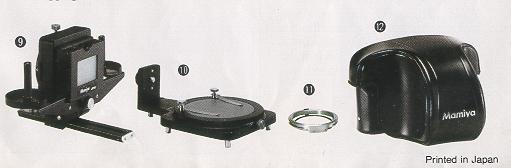
ACCESSORIES FOR YOUR ZE-2 Filters
12. Eveready
Case ZE
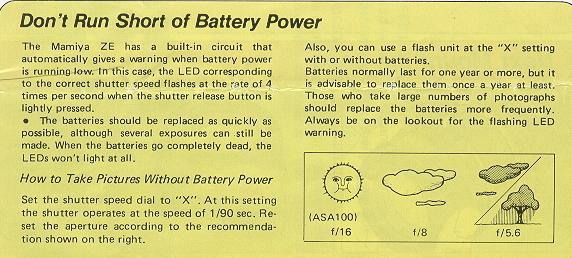
DON'T RUN SHORT ON BATTERIES How to Take Pictures Without Battery
Power Set the shutter speed dial to "X". At this setting the shutter operates
at the speed of 1/90 sec. Reset the aperture according to the recommendation shown
on the right. GETTING THE MOST FROM YOUR BATTERIES
Electronically
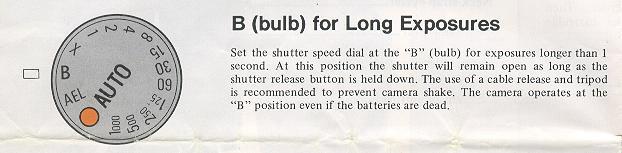
controlled metal focal plane. Speed range from 1 sec. to 1/1000 sec. at AUTO position;
Manual speed from 1 sec. to 1/1000 sec. in one stop increment with click stop at
each nominal position, plus mechanical speeds of X (1/90 sec.) and B.
Slow shutter speed warning:
Buzzer sounds when shutter speed drops below
the slowest safe speed for hand-held shooting with the lens in use.
Approx. 10-second delay.
X-sync terminal and hot-shoe.
TTL center-weighted, open-aperture
metering using SPD (silicon photo diode).
ASA 12 - 3200.
Manual rewind with rewind lever.
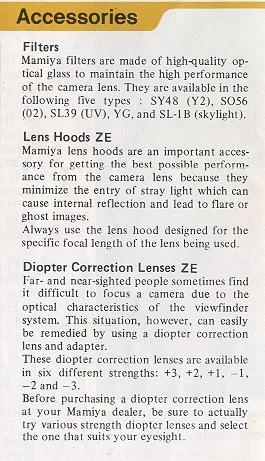
Lens Hoods
ZE
Mamiya lens hoods
are an important accessory for getting the best possible performance from the camera
lens because they minimize the entry of stray light which can cause internal reflection
and lead to flare or ghost images. Always use the lens hood designed for the
specific focal length of the lens being used.
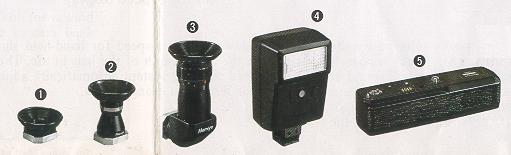
Diopter Correction Lenses ZE
These diopter correction lenses are available in six different
strengths: +3, +2, +1, -1, --2 and -3.
Before purchasing a diopter correction
lens at your Mamiya dealer, be sure to actually try various strength diopter lenses
and select the one that suits your eyesight.
1.
Rubber Eye-cup ZE with Adapter
This adapter is required for attaching the diopter correction lenses to the camera.
The rubber eye-cup helps to prevent stray light entering the viewfinder while taking
photographs.
To attach the diopter correction lens, first remove the mounting
ring located inside the eye-cup by turning it counter-clockwise; then put the lens
in place and replace the ring.
2. Magnifier ZE
The magnifier is a useful
aid for critical focusing as required in copy work, close-up photography, and similar
applications. The size of the image is doubled and only the center part is visible
for more accurate work. The magnifier also features diopter adjustment from -5 to
+5.
3. Angle Finder
ZE
The angle finder
is useful when shooting at low angles and for copy work. Click stops are provided
every 90°, but full 360° rotation is possible for viewing even from the side or
from below. The angle finder also features built-in diopter adjustment from -4 to
+4.
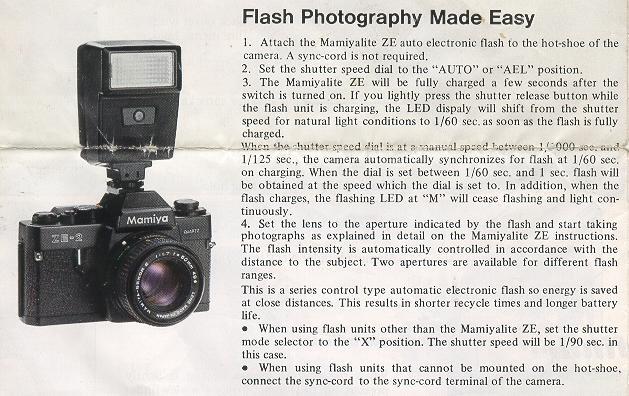
4. Mamiyalite
ZE
The Mamiyalite
ZE is a compact auto electronic flash with a Guide Number of 17 (ASA100, meters)
and contact for hot-shoe synchronization. Two auto ranges and manual operation are
available using the selector switch.
When used with the Mamiya ZE, the LED at
the 60 position inside the viewfinder lights when the flash unit is fully charged
and the shutter speed is automatically set to 1/60 sec.
Angle of coverage: 45°
vertical, 60° horizontal. Attaching the wide-angle diffuser provides coverage for
a 28mm wide-angle lens.
Batteries used: Four alkaline or
Ni-Cad penlight batteries.
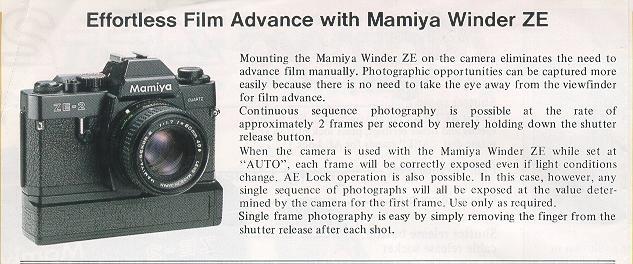
5. Mamiya Winder ZE
The Mamiya Winder
ZE provides continuous sequence photography capability at speeds of up to approximately
two frames per second. Since there is no need to operate the film advance lever,
additional photographic opportunities can be captured because the subject can be
followed continuously without taking the eye away from the viewfinder.
Batteries
used Four alkaline or Ni-Cad penlight batteries.
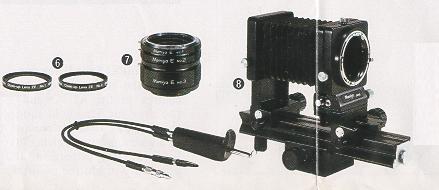
6. Close-up lens ZE
The close-up lenses
ZE are convenient attachment lenses which screw directly to the filter threads of
the master camera lens enabling swift and easy conversion to close-up photography.
Two models are available:
Close-up lens No. 1 having +2 diopters, and Close-up
lens No. 2 having +4 diopters.
7. Auto Extension Rings ZE
A set of three extension rings
are intended for close-up photography and mount between the camera body and lens,
directly coupling with the ZE camera metering system and the lens automatic diaphragm.
Three different lengths of the rings can be used individually or in combination.
8. Auto Bellows
ZE
This is an easy
to operate, precision bellows type close-up attachment. Automatic aperture stop-down
coupling is possible using a double cable release. And the front standard can be
swiveled 360°, permitting simple reversing of the lens for large magnification ratios
with images that are sharp to the very edges. Shift control also enables control
of perspective. And the camera can also be rotated at the back for a choice of vertical
or horizontal format with easy operation. The focusing rail allows the entire bellows
unit to be shifted back and forth for sensitive adjustment of distance . and focusing.
9. Slide Copier ZE
This device is mounted on the front of the Auto
Bellows for making copies of slides. Convenient film trays are provided for copying
film strips The slide stage also moves vertically and horizontally for easier cropping
of 35mm slides.
10. Bellows Stand ZE
Used
with the Auto Bellows, the Bellows Stand is used for copying small objects such
as stamps, coins, insects, etc.. Clips are provided for holding subjects on the
platform. And the platform rotates for precise positioning. The platform is also.
finished to provide 18% reflectance, convenient for measuring exposures. A clear
glass platform is also included for backlighting of subjects.
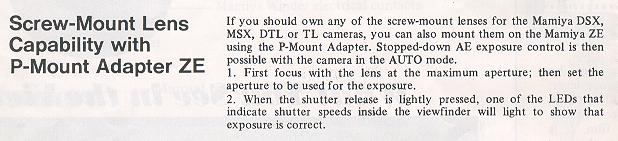
11. P-Mount Adapter ZE
for Mamiya TL/SX Lenses:
This adapter
is used for mounting Mamiya DSX, MSX, DTL and TL lenses on the Mamiya ZE camera.
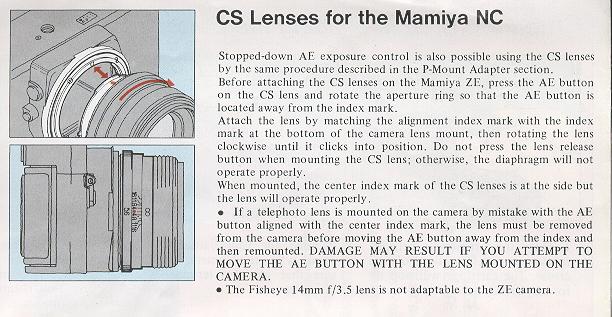
Stopped-down AE exposure control is possible using this adapter.
<<<< Additional information
not in the manual:
I just wanted to point out that not all Mamiya
M42 lenses are safe to use with the P adapter for the Auto-XTL. If you attempt to
use the SX type lenses with the Auto-XTL P adapter, the aperture sensing pin will
dig into the P adapter face since it is not perfectly flush with the outer surface
edge of the SX lense. Furthermore, since the entire moving surface of the aperture
ring of the SX lense comes to rest against the P adapter face, it will lock down
the aperture control of the lense and make it impossible to turn, therefore preventing
SX lens f-stop manipulation.
Mamiya M42 AUTO lenses seem to be safe choices as are M42 Yashica-Yashinon,
M42 Meyer-Optik and M42 Zeiss MC Sonnar (S) lenses. Any aperture ring that rotates
at the extremity of a lens should be avoided. Of course the SX lens works perfectly
well with the "ZE" P adapter for Mamiya ZE series lenses which it was designed for.
Lenses with Auto and Manual switches like Zeiss MC Sonnar work well with the
Auto-XTL P adapter in conjunction with its Auto Aperture pin. Lenses that have
no Auto Aperture and only manual control of aperture appear to work equally
well like Meyer-Optik Orestor M42.
Robert A. Genna, Connecticut teacher and photographer, 10-23-04 >>>>>>
This info was provided by a reader:
I have not seen a reference to this effect in any
description of the ZE-X. Furthermore, I have seen no references for the Mamiya ZM
camera allowing adapters that permit the use of lenses from the DSX, MSX,
DTL and TL series of cameras. The ZM does allow 645 series lenses to be used
on "ZE" and "ZE-2" cameras utilizing their "645 adapter ZE". I have however installed
the Mamiya "ZE" P adapter to an Auto Mamiya-Sekor 1:1.8 f=55mm
M42 mount lens with it's f-stop aperture switch set in manual mode on the Mamiya
ZM in auto shutter mode with good operational results. >>
· The batteries should be replaced as quickly as possible,
although several exposures can still be made. When the batteries go completely dead,
the LEDs won't light at all.
Also, you can use a flash unit at the "X" settings, with or
without batteries.
Batteries normally last for one year or more, but it
is advisable to replace them once a year at least. Those who take large numbers
of photographs should replace the batteries more frequently. Always be on the lookout
for the flashing LED warning,
· When replacing batteries,
use 1.5V silver oxide types (Eveready S-76, UCAR S-76, Ray-O-Vac RS-76, Mallory
MS-76, or equivalent. Although 1.3V mercury batteries are the same shape and size,
they will not operate the camera normally.
· Be sure to replace all four
batteries at the same time. Do not mix new and old batteries or batteries of different
types or brands.
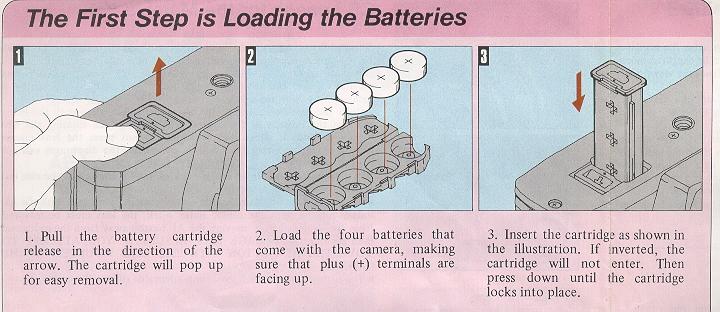
· When loading batteries into the battery cartridge, be
sure the plus and minus terminals are located properly. Before loading the batteries,
be sure to wipe the terminals of the batteries and the cartridge with a dry cloth
to remove any soiling or finger marks, etc.
· Never take apart silver oxide batteries,
short them, or throw them into fire.
HANDLING CAUTIONS
* Be sure that the shutter
release button isn't pressed down when carrying the camera or when putting it away
as the LED display will stay on and drain the batteries.
* The depth of
the tripod socket is 2-3/16 in. (5.5 mml. If a tripod is used with a mount screw
longer than this, the internal mechanisms of the camera may be damaged. Do not use
excessive force when mounting the camera on a tripod.
* Avoid strong vibration
and shock since this may cause adverse influence on the delicately adjusted parts
of the camera. Be careful not to drop the camera or allow it to strike against objects.
* Do not keep the camera for extended periods where temperature is above
100°F (40°C) or below 5°F (-15°C), or where there is excessive humidity or salt
in the air. The camera mechanism or film can also be damaged if the camera is left
for a long time in a place where there is napthalene or formalene gas. Always store
color film at the designated temperature.
* Never touch the surface of the
mirror or lens with the hands. Any dust should be blown off with a blower or wiped
off by lightly applying a soft cloth. Be especially sure to never rob the surface
of c mtrror.
* Always clean the camera carefully after photographing at
the beach or other place where there is salt in the air. Clean the many plastic
parts by gently wiping with a soft, dry cloth. Never use solvents when cleaning.
* Inspect the camera periodically when it is not being used. Be sure to
inspect moving parts before trying to take important photographs. This includes
the film advance and shatter operation, electronic flash synchronization, etc. Test
shots should also be taken if possible to discover any irregularities that may exist.
(Incidental damage which results in this camera malfunctioning will not be compensated)
* Do not try to repair or lubricate the camera if some irregularity is discovered.
Leave this to your Mamiya dealer.
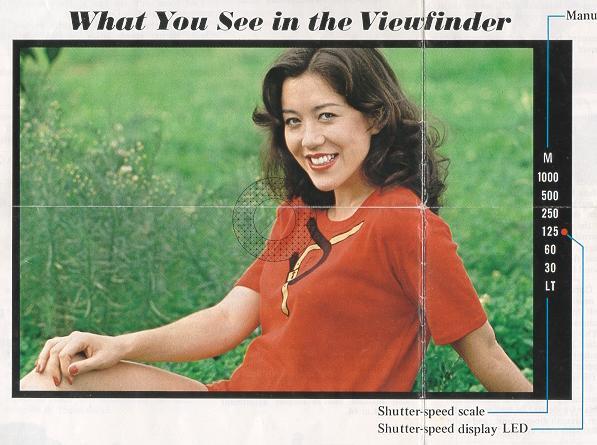
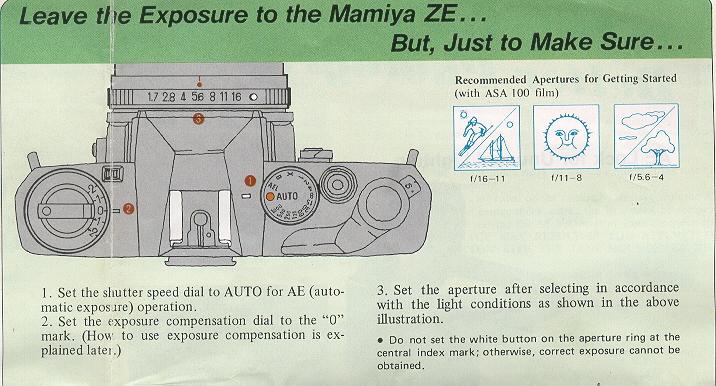
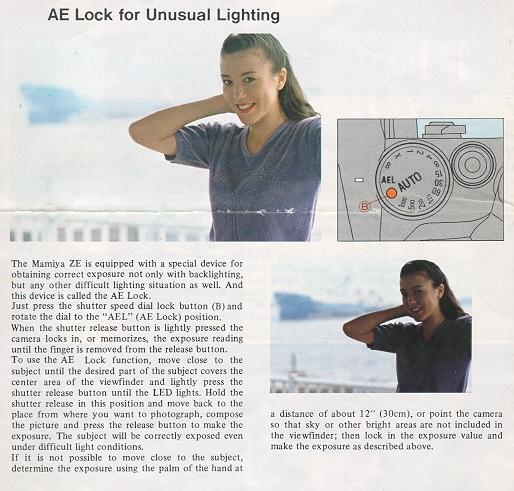
When the shutter release
button is lightly pressed, an LED lights inside the viewfinder to indicate the correct
shutter speed automatically selected by the camera in accordance with the aperture
setting.
* The 1/1000 LED flashes at the rate of 8 times per second to indicate
overexposure. To obtain correct exposure, turn the aperture ring until the LED stops
flashing.
* The "LT" LED flashes and the buzzer sounds at the rate of 8
times per second to indicate underexposure. Again, turn the aperture ring until
the LED stops flashing. If it does not, use of the Mamiyalite ZE is recommended.
* The "LT" LED also lights to indicate when the shutter speed is set in
the range below 1/30 sec. down to I sec. To shoot at the slow shutter speeds indicated
by the "LT" LED, it is recommended to use either a tripod or the Mamiyalite ZE to
prevent blurring.
* Flashing of any of the shutter-speed LEDs at the rate
of 4 times per second indicates that the batteries should be replaced.
*
As long as the shutter release button is pressed, the LED display continues indicating
the same shutter speed after the exposure is completed for easy checking of whether
or not exposure was correct.
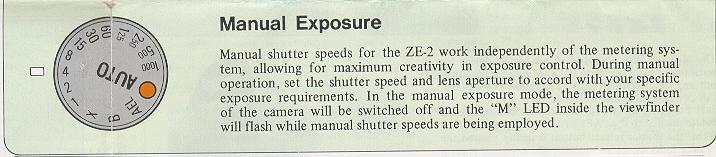
* The "M" LED flashes at the rate of 8 times
per second to indicate the shutter dial is set at a manual speed.
Slow Shutter Speed Warning
When the shutter speed automatically selected
by the camera in the AUTO and AEL (AE Lock) modes is too slow for hand-held shooting,
a buzzer will sound at the rate of I time per second warning you to set the lens
to a wider aperture (giving you a faster shutter speed), or to mount the camera
on a sturdy tripod to avoid the possibility of blurred pictures.
The safe slowest shutter speed for hand-held
shooting varies with the focal length of the lens in use. The slow shutter speed
warning stem automatically adjust for this variation when you change lenses.
Load the batteries
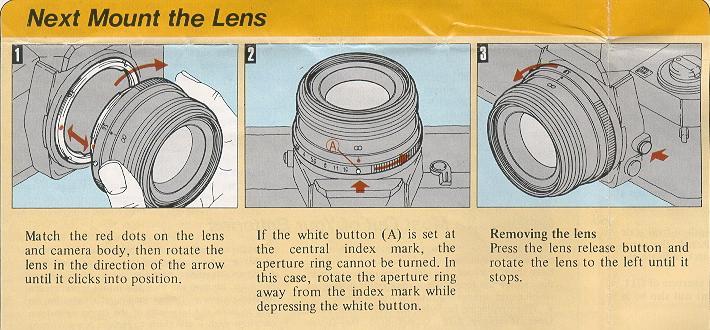
Mount the lens
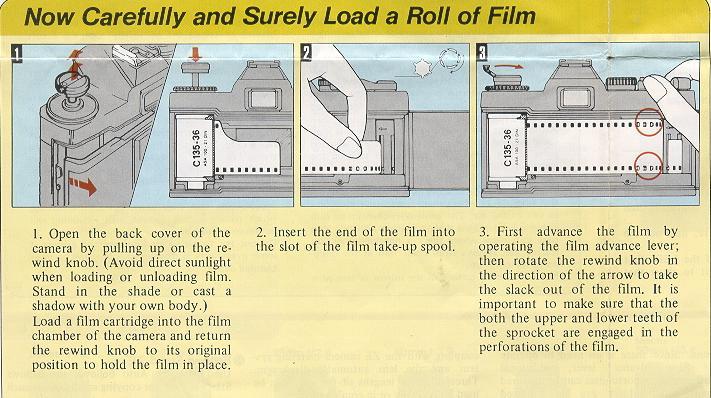
Load the film
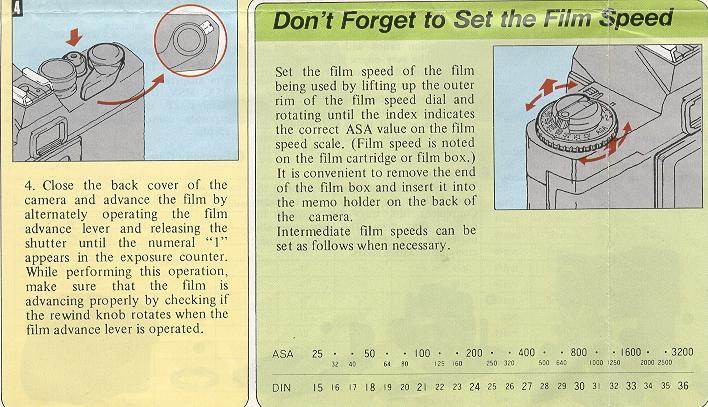
Set film speed
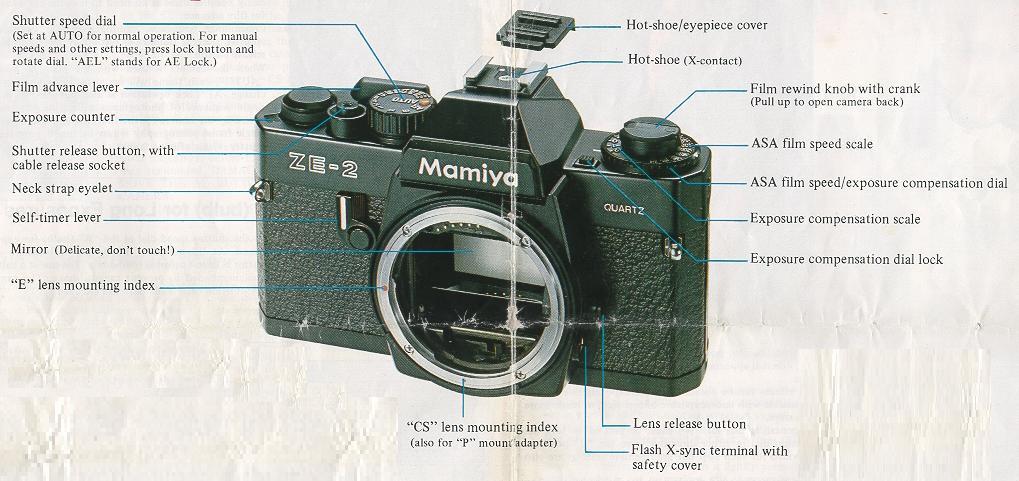
ZE-2 front body parts
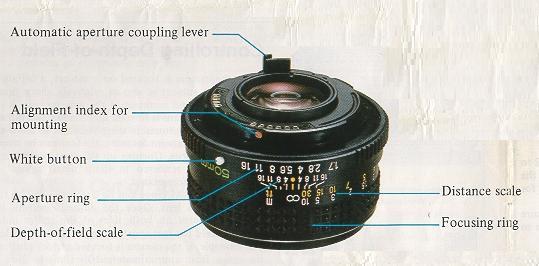
ZE-2 lens parts
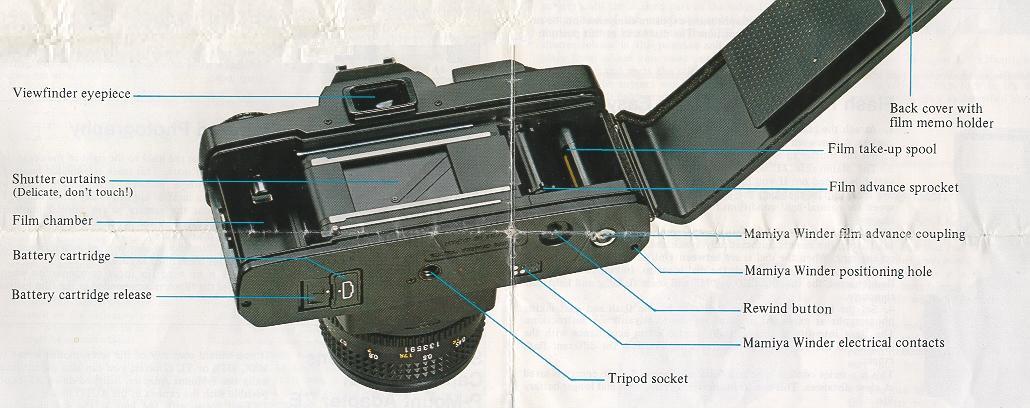
ZE-2 rear body parts
Viewfinder
Auto Exposure
Manual Exposure
Focusing
Holding the camera
Battery Power
Handling Cautions
Mamiya-Sekor E Lenses
Getting the most from your batteries