and historical purposes, all rights reserved.
This page is copyright© by
 ,
M. Butkus, NJ.
,
M. Butkus, NJ. This page may not be sold or distributed without
the expressed permission of the producer
I have no connection with any camera company
Konica FP-1 Program
Konica FP-1 Bedienungsanleitung
Konica FP-1 Mode D'Emploi
Konica FP-1 Manual de Instrucciones
Konica FP-1 Gebruiksaanwijzing
On-line users manual
Posted: April 21st 2003 / 10-3-2021
This camera manual library is for reference
and historical
purposes, all rights reserved.
This page is copyright© by
,
M. Butkus, NJ.
This page may not be sold or distributed without
the expressed
permission of the producer
I have no connection with any camera company
On-line camera manual library
Back to main on-line manual page
If you find this manual useful,
how about a donation
of $3 to:
M. Butkus, 29 Lake Ave.,
High Bridge, NJ 08829-1701
and send your e-mail
address
so I can thank you.
Most other places would charge
you
$7.50 for a electronic copy
or $18.00 for a hard to read Xerox copy.
If you use Pay Pal, use the link below.
Use the
above address for a check, M.O. or cash.
CLICK HERE FOR
Konica
FP-1 WORD DOCUMENT
Click here for
Konica FP-1
PDF
version made from file below
Konica
FP-1 Program English only
PDF manual scanned from book
Konica
FP-1 Bedienungsanleitung
Konica FP-1 Mode D'Emploi
Konica FP-1 Manual de Instrucciones
Konica FP-1 Gebruiksaanwijzing
Problems opening PDF files
or printing problems
- click here
|
|
|
|
|
|
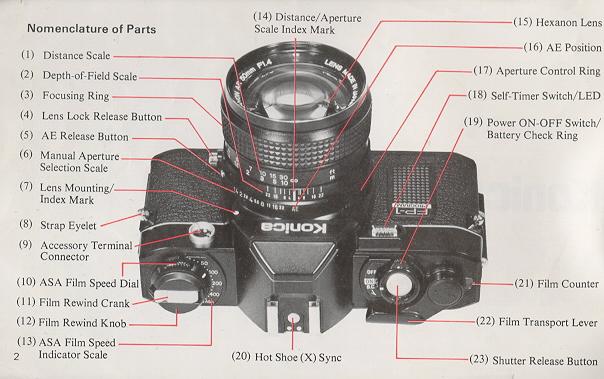
Thank you for your purchase of a Konica FP-1 .
The Konica
FP- I is a programmed Automatic-Exposure (AK) Through-the-Lens (TTL) Single Reflex
Lens Camera which automatically selects both the aperture and shutter speed at the
instant the shutter is released. Due to the incorporation of various electronic
components the Konica FP-I is one of the easiest to use camera ever made.
The use of the optionally available Auto-Winder F converts the Konica FP- I into
an fully automatic loading and advancing camera. The availability of a vast array
of lenses and accessories enables you to broaden your picture-taking range.
Contents
|
Nomenclature of Parts- .. 2 Operating Instructions 6 How to Attach Strap .. 8 Mounting and Dismounting of Lens ... 9 Inserting Battery .. 10 Power ON/OFF Switch and Battery Check Ring 11 Film Loading .. 12 AE (Automatic Exposure) Photography .. 15 Focusing .. 16 Holding the Camera .. 17 LED Information in the Viewfinder .. 18 |
Film Rewind .. 20 Photographing with Self-timer .. 21 Exposure Compensation .. 21 Electronic Flash Photography ... 22 Photography with the Auto-Winder .. 24 Accessories ... 27 Programmed Automatic Exposure .. 35 Precautions for Use.. 36
|
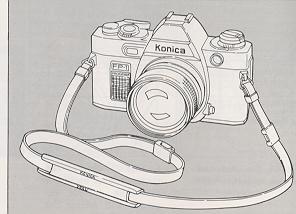
| 1) Open the metal fastener and detach
the tip of the strap.
2) Put the strap through the triangular ring of the Strap Eyelet (8) on the front of the camera body. |
 |
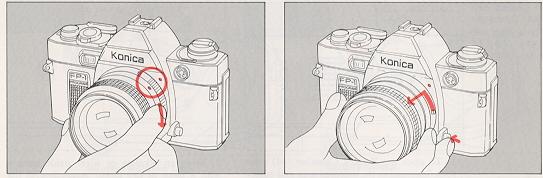 |
| To attach the lens, align the red dot of the lens with the Lens Mounting Index Mark (7) (red dot) of the camera body and lightly sink the lens into the camera body. Hold the lens and turn it clockwise until it stows with a clicking sound. | To remove the lens, hold the base of the lens and turn it counterclockwise while the Lens Lock Release Button (4) is kept depressed. Remove the lens when the red dot of the lens comes in line with the red dot on the camera body. |
| When the lens is removed from the camera body the front and rear caps should be placed on the lens to prevent accumulation of dust or scratching of lens cements. The body cap should also be placed on the camera body to prevent damage to internal camera parts. Internal camera parts should not be touched under any circumstances. |
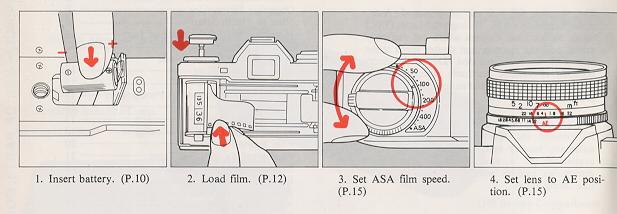
Use a 6V alkaline battery 4LR44 (Eveready No. 537) or a silver oxide battery
4SR44 (Eveready No. 544).
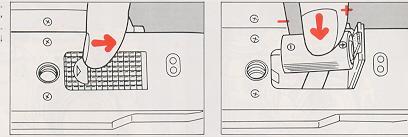
| 1) To open
the Battery Chamber (34) place your fingernail in the indented area and
push it in the direction of the arrow.
|
2) Wipe an alkaline or silver oxide battery with a piece of dry cloth. According to the " +" and "--" position marks indicated inside the battery chamber, place the battery and close the cover. |
| Caution |
| · When pictures are to be taken with the temperatures less than 0°C (32°F), use new battery. In this situation, the performance of the battery will be lower than at normal temperature. Keep them warm. |
| Even if an under-exposure warning appears at the temperature standing at less than 0°C (32°F), the battery will be usable at normal temperature. |
| When you know you will use the camera at a cold place, make sure that you will have spare battery and keep them warm with your body or in some other means to prevent a drop in the battery performance. |
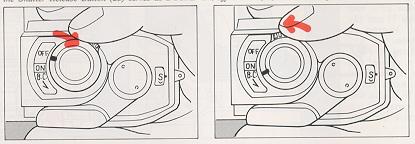
The Power On/Off switch and Battery Check Ring
The ring around the Shutter Release Button (23) serves as a power On/Off
Switch (19) and a battery checker.
|
|
|
| Shutter Release Lock
1) Turn the ring and bring the index mark in line with ON, and your camera
will be ready to take pictures.
2) When the index mark is aligned with OFF, the battery will be switched off to prevent the shutter from being released. It will also prevent a rundown of the battery. If the battery is switched off after the film is wound, racing may be prevented. |
Battery Check Look
through the finder while pushing the battery check ring in the direction
of the arrow. The lighting of the green LED in the left-hand side of the
field of view indicates a full voltage. If the LED is not turned on, replace
the battery with a new one. · The battery will generally last for one year or so. Make sure that you check the battery when your camera has not been used over a long span of time. |
Film Loading
The Konica FP-I uses all standard 35 mm 12-,
20-, 24-, 36-exposure film cassettes.
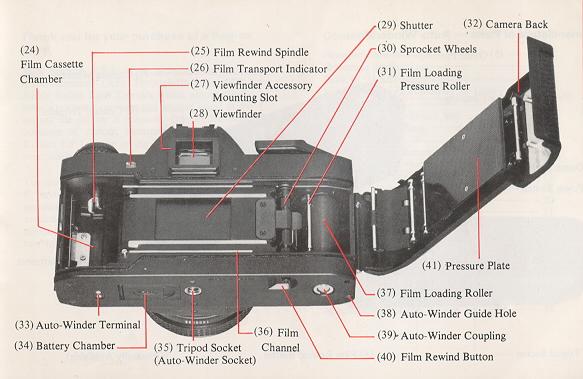
Your Konica FP- I features a unique, film loading system so designed that a roll
of film can be loaded with ease and certainty. Just follow there six easy steps.
 |
|
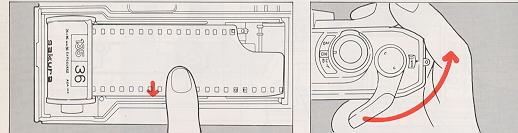
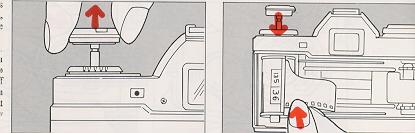
| 1) Pull up the Film Rewind Knob (12) until back cover opens. | 2) Insert a cassette
into the Cassette Chamber (24) and push the film rewind knob down to the
original position. A slight turn of the knob may be needed for it to be
properly seated. |
|
|
|
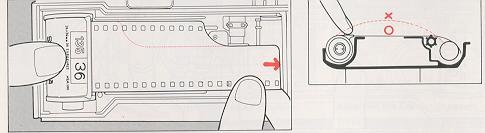
| 3) While lightly holding
down the film cassette, pull out the film and place it onto the Film Loading
Roller (37).
· For films with longer leaders, pull out the film until the first
two or three perforations on the upper portion of the film appear. |
· Should you wish to load a film
cassette with a torn leader simply cut the leader at a right angle to the
film and follow the previous loading instructions.
4) Make sure that the film does not warp and that the film outlet of the cassette is not lifted out. |
|
|
|
| 5) Place the film leader onto the lower Film Channel (36). | 6) Push down the Camera Back (32) and make sure that it is tightly closed. Turn the Film Transport Lever (22) until it does not move any further. Let it return to original position. By repeating this step until the lever will no longer move you have automatically advanced your film to frame #1. |
| Film Transport Indicator |
| · If the film is being advanced properly, the Film Transport Indicator (26) will turn each time the film transport lever is wound. This feature is a positive indicator of proper film advance and rewind. ** Missing Picture |
AE (Automatic Exposure) Photography
|
|
||
|
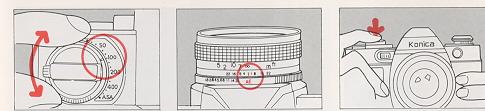
Setting of ASA Film Speed Turn the ASA Dial (10) and align the ASA speed of the film loaded in your camera with the index mark ON the ASA Speed Indicator Scale (13)
|
Setting Lens to AE Position For AE (Automatic Exposure) photography turn the lens Aperture Control Ring (17) to the AE Position (16). A safety lock will prevent accidental change. |
Ascertain the Correct Exposure |
Wind the Film
When the shutter has been
released advance the film to the next frame by turning the film transport lever
until it does not move further.
Focusing
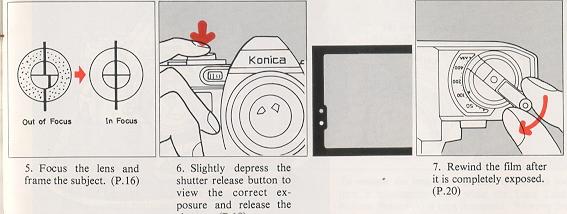
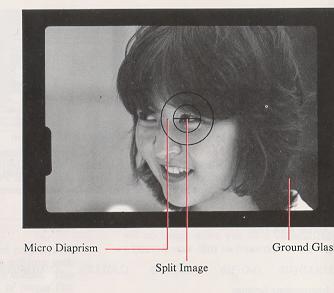
When looking
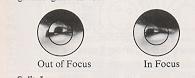
through the viewfinder you will see three different focusing areas. A split image
is provided at the center of the field of view. Around the split image is a micro-diaprism
and remaining portion is a round class screen.
|
|
| Split Image -- Turn the focusing ring until the upper half of the subject is in line with the lower half. |
| Micro-Diaprism -- Turn the focusing ring until the image stops flickering and is clearly visible. |
| Ground Glass -- Should be used for focusing of close-up or telephoto lenses. |
Holding the Camera
| To take sharp, clear pictures, it is important to accustom yourself to the proper grip of your camera so that it will not be jarred when a picture is taken. |
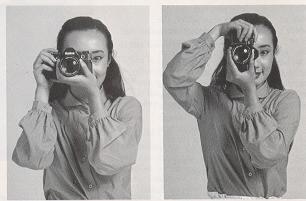 |
| Hold your camera as illustrated pressing it firmly against your face. Keep the elbow of the arm which is supporting the camera tightly against your body. | |
| A slow shutter speed will be selected when the subject is in a situation where the light is dim. If possible, use a tripod and a Konica Cable Switch (optionally available). |
LED Information in the Viewfinder
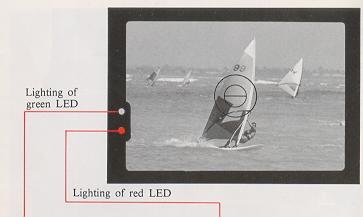
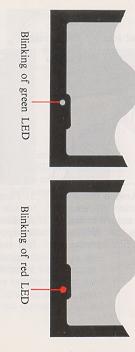
| The Konica FP-I is a fully programmed AE camera with an ideal program in which the shutter speeds vary in non-stage progression from 1/30 to 1/1000 see and are coupled to the variable apertures in three stages from f/2.8 to 5.6 and 11 to select the correct combination of shutter speed and aperture. For this reason, a lens mounted on this camera which is brighter than f/2.8, serves in the same capacity as an f/2.8 lens, and the smallest aperture value is f/l 1. While looking through the finder, slightly depress the shutter release button, and the green or red LED in the left hand side of the field of view will light up or blink, providing information on the correct exposure and other photographing data. |
 |
|
Indication of the Correct Exposure
The green LED will light up when the subject is within the correct range of exposure. In this situation, depress the shutter release button, for a properly exposed photograph.
|
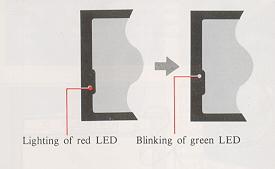
Under- exposure Warning The red LED will light up when the subject is in a situation where the light is dim. This is an under-exposure warning. Switch your camera to the flash mode.
|
 |
 |
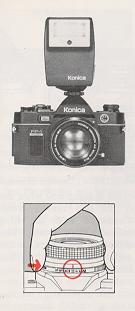
Indication for Completed Recharge
of the Electronic Flash Unit
When a Konica X-18 Auto Electronic Flash or other Konica dedicated electronic
flash unit is fitted to the hot shoe clip of your Konica FP-I, the green
LED will blink, indicating the completed recharge of the electronic flash
unit. |
| Manual Indication
While depressing the AE Release Button (5) of the lens move the aperture ring from the AE position to the aperture indicated on the electronic flash unit. The red LED will blink and the shutter speed will be set to 1/100 sec. Use this system for electronic flash photography with an electronic flash unit other than a dedicated one. |
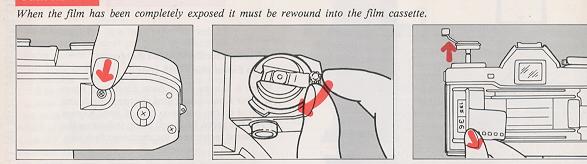
Film Rewind
|
|
||
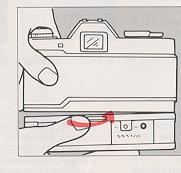
| 1) Push the Film Rewind Button (40) on the bottom of the camera body inwards, and the button will lock. | 2) Flip up the Film Rewind Crank(l1) and turn it in the direction indicated by the arrow. The film transport indicator will turn assuring you that the film is being returned to the film cassette. | 3) Film rewind is completed when the tension on the film rewind crank suddenly reduces and the film transport indicator stops turning. The film rewind button will return to the original position when the film transport lever is turned. |
Photographing with Self-Timer
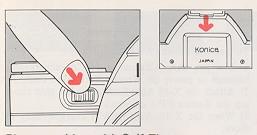
| Push down the Self-Timer LED (18) and
the self timer will be put into operation. The LED will blink at a continuously
faster rate advising the subject as to when the shutter will be released.
Self timer duration is approximately 10 seconds.
|
 |
| · The self-timer can not be used
while a Konica Cable Switch or other accessory is attached to the accessory
terminal connector.
|
|
| · Shield the eyepiece, when the self-timer is to be used, or when a picture is to be taken with the eye away from the eyepiece, place the eyepiece cap in the accessory grooves so that stray light will not fall into the eyepiece. Otherwise, the correct exposure will not be assured. |
Exposure Compensation for Backlight Photography
| When used in normal AE settings your Konica FP-I will give you correctly exposed photographs. However, in a situation where the subject is in front of a bright background. |
 |
| 1 In a situation where the subject
is dark against a bright background scene. The AE responds to the
overall bright background and in some cases the subject may appear dark
(underexposed). Reduce the ASA number by 1/2.
Example: ASA of film 100, change ASA scale to 50. |
|
| 2 In a situation where the subject
is bright and background dark. reverse the above instructions.
Double the ASA number.
Example: ASA 100 to 200. |
|
| · After special exposure photography, be sure to reset the ASA speed dial to the correct ASA of the film in use. |
Electronic Flash Photography
|
|
|
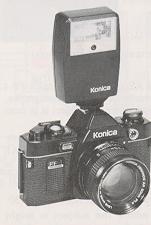
At night or in a dimly light room where AE photography is unsuitable, the use of the Konica X-18, X-24, X-36 Auto electronic flash are recommended. The X-18 flash was especially designed for use with the Konica FP- I camera to eliminate complicate exposure calculations. |
To Use the Konica X-18 Auto Flash
| 1) Use two AA Alkaline or Ni-Cd rechargeable batteries
to power the Konica X-18 Auto flash.
|
| 2) Attach the X-18 Auto flash to the hot shoe clip atop
the Konica FP-I camera.
|
| 3) When the X-18 Auto flash is charged-ready to shoot;
a. the shutter speed will automatically change to l/l00th second flash sync speed. b. the aperture will automatically change to f/5.6. c. the green LED in the viewfinder will blink indicating that the flash is ready. d. the ASA information will be automatically transferred from the camera to the X-18.
|
| · With flash photography using the self-timer, check that the charge is complete before depressing the self-timer switch. |
|
|
|
|
|
|
| Use of Other Types of Electronic
Flash Units An electronic flash with a hot shoe, such as the Konica X-28, X-20 and
X-14, may be electrically connected simply by fitting it to the hot shoe
clip. 1) The shutter speed will automatically charge to l/100th second flash
sync speed. 2) Set the lens aperture manually per the instructions of the electronic flash unit. |
3) For manual flash units, determine the correct aperture to set by dividing the guide number of the flash by the camera to subject distance. Example: Using ASA 100 film with a Konica X-20 flash, you will get a guide number (GN) of 64 (ft.), divided by the distance (16 ft.) results in a lens aperture of f/4 (64 . 16=4). |
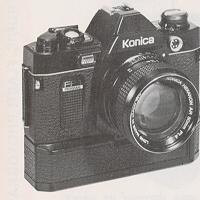 |
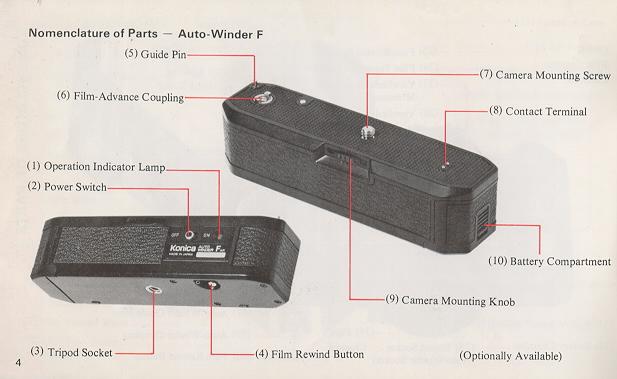
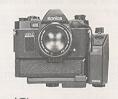
The Auto-Winder F. used in conjunction
with the Konica FP- I makes possible auto-loading and continuous shooting
at 1.5 frames per second.
|
|
|
|
Mounting to the Camera
Turn the Auto-Winder Power Switch (2) to "OFF", insert the Guide Pin (5) into the guide hole on the bottom of the camera body, line up the mounting screw and tighten the Mounting Knob (9) firmly.
|
|
|
|
|
|
Auto- Loading 1) Please be certain to turn "OFF" the Auto-Winder Power Switch (2). 2) Load the film the same as is normally done without the Auto-Winder;
that is, pulling out the film lead for enough to cover the roller. 3) Close the back cover and turn "ON" the Auto-Winder power switch. The Auto-Winder's red Operation Lamp (1) will turn on and the film will be automatically advanced to frame 1. The film transport indicator turns at this time, indicating that the film is moving properly. |
|
|
||
|
|
||
| Film Rewind
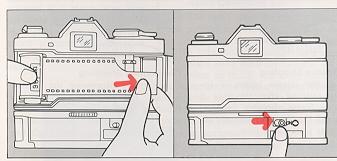
1) When finished shooting a roll, the Auto-Winder will stop and the operating indicator lamp will come on. Turn "OFF" the Auto-Winder power switch. 2) Rewind film by firmly depressing the Rewind Button (4) on the bottom of the Auto-Winder. The Auto-Winder does not have to be removed when rewinding. |
Single Frame Shooting If the shutter release button is immediately released after the shot is taken, one frame shooting becomes possible with the film automatically advancing one frame at a time. |
Continuous Shooting
Continuously depressing the Shutter Release Button permits continuous shooting. Linked up with a shutter priority AE meter moving objects in a location with strongly varying light can be continuously shot. |
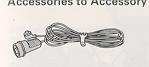
Accessories to Accessory Terminal Connector with Auto-Winder F Mounted
|
|
|
|
| Remote Control Switch
With a remote control switch fitted to the accessory terminal connector, the shutter may be released at a place away from the camera. The cord is 15 feet in length, making it possible to shoot pictures in succession, while you stay away from your camera.
|
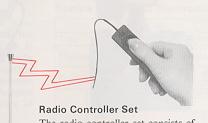
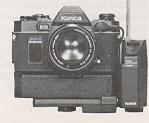
Radio Controller
Set
The radio controller set consists of a receiver, which is fitted to the accessory terminal connector, and a transmitter, which is held at a place away from the camera. At a place up to 230 feet away from the camera, the shutter may be released while an FM signal is transmitted. As this unit is fitted to the camera with a bracket, which is available as an accessory, a Konica X-18 or X-24 Auto flash unit may be used at the same time. Two AA alkaline batteries each are used for both receiver and transmitter. |
Interval Timer
The interval timer is so designed that the shutter may be released at a fixed interval, ranging from 2 sec. to 60 min. A bracket, available as an accessory, is used in fitting the interval timer to the accessory terminal connector. A Konica X-18 or X-24 Auto flash unit may be used at the same time. The interval timer is usable for various purposes, such as the documentary photographing of flowering, ecological features of fauna and flora and changes in the phenomena of nature. Two alkaline batteries are used for the power source. |
|
||
The Konica Electronic Flash that displays its power ability with
an Auto-Winder F
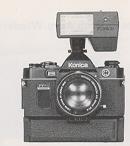
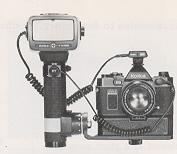 |
||
| In the range of the Konica Auto electronic flash units, the New X-24 and X-36 are available, in addition to the X-18. Like the X-18, both units are so designed that the data on the aperture, shutter speed and ASA speed are automatically transmitted between them and the camera. | Konica New X-24 Auto Electronic
Flash The New X-24 is a flat-type electronic flash unit for which four AA alkaline or Ni-Cd rechargeable batteries are used as its power source. The three modes of f/5.6, f/ 11 and manual photographing may be selected with an f-stop selector. When the New X-24 is fitted to a Konica FP- I and the recharge is completed, the photo graphing mode is automatically changed. Here, the shutter speed is automatically set at 1/100 see and the aperture at f/5.6 (All). The data on the EAST film speed is automatically fed from the camera. |
The flash angle is so designed as to
cover the picture field of a 35 mm wide-angle lens. The use of a Wide Adapter
makes it possible to cover that of a 28 mm wide-angle lens. In a situation
where portraits are to be taken at a distance of 6.6~10 ft. in a room with
few light obstacles, the New X-24 is so designed that pictures may be taken
in succession with ASA 400 film and new (fully charged) batteries.
|
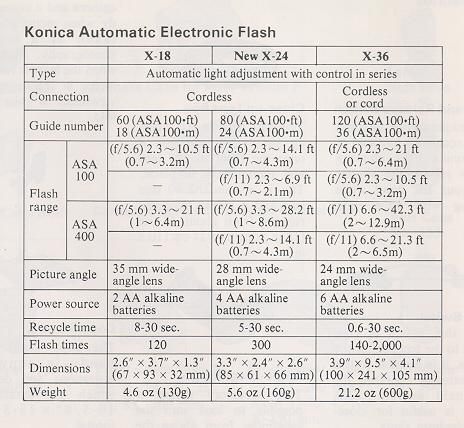 |
Konica X-36 Auto Electronic Flash The X-36
uses six AA alkaline or Ni-Cd rechargeable batteries or a layer-built battery
pack for its power source. It is a powerful grip-type electronic flash unit.
Like the X-24, it has the three modes of f/5.6, f/11 and manual photographing.
When it is fitted to a Konica FP- I and the recharge is completed the X-36
is automatically set to ASA100 see with f/5.6 (f/11). The flash angle covers
the picture field of a 35 mm wide-angle lens. The use of a Wide Adapter
makes the X-36 to cover that of a 24 mm wide-angle lens. The flash interval is about 0.6 see with AA alkaline batteries, about 0.4 see with Ni-Cd rechargeable batteries and about 0.3 see with a layer-built battery pack, thus making it possible to shoot flash pictures in succession with an Auto-Winder. The use of a remote control facilitates photographing with bounced flash lights and photographing with multiple flash units. In manual photography, the amount of light may be controlled with a variable dial, making it simple to take daylight fill-in flash pictures. |
Accessories 1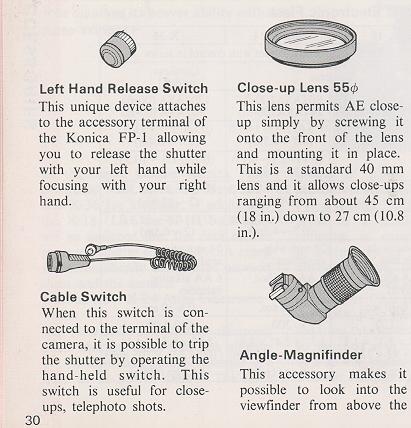 |
Accessories 2 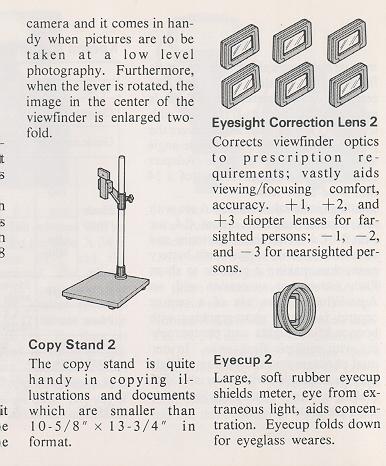 |
Small camera case 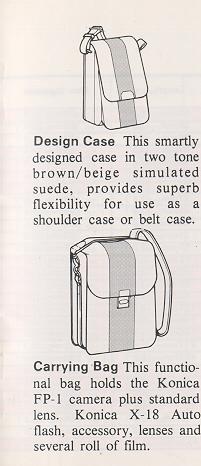 |
Camera Cases 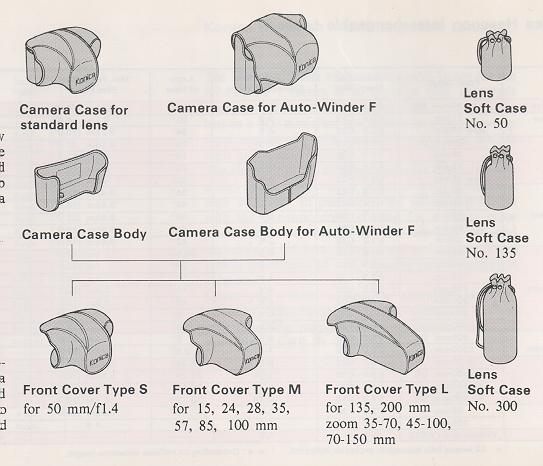 |
| Konica Hexanon Interchangeable
Lenses
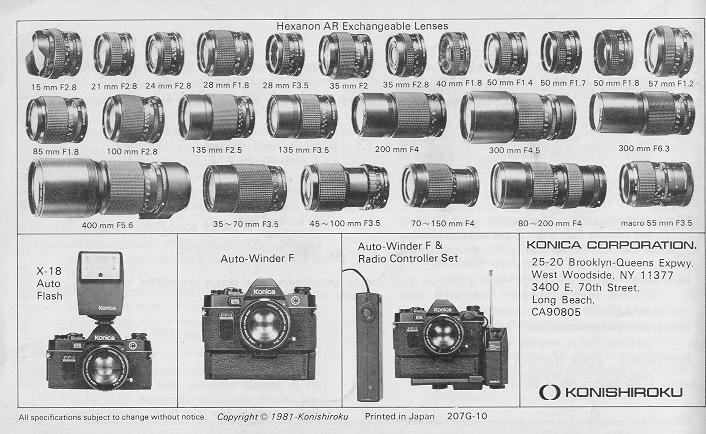
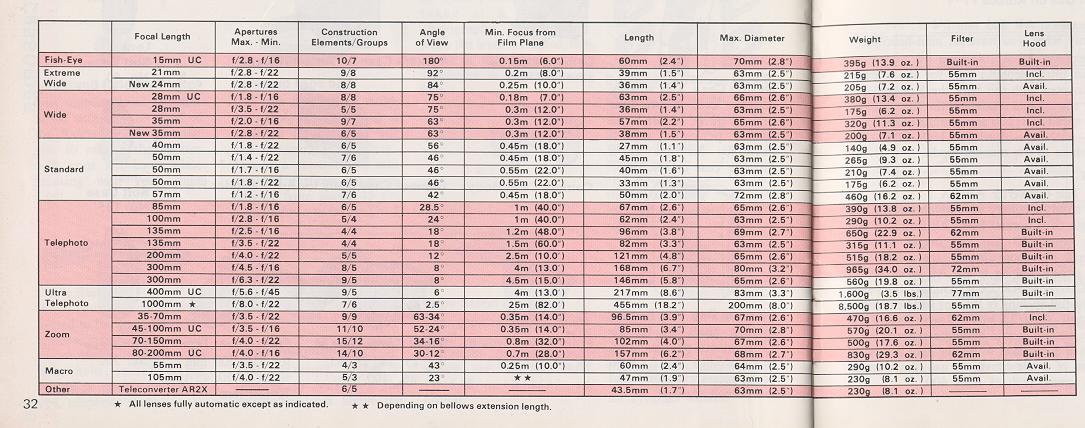
The Hexanon series of interchangeable lenses for the Konica FP-I comes in all types of fully automatic aperture AE lenses, ranging from a 15 mm fish-eye lens to a 400 mm ultra-telephoto lens; zoom lenses in focal lengths of 35-70 mm, 70-150 mm and 80-200 mm, and macro lenses. The Hexanon series of interchangeable lenses features a high image resolution, a beautiful delineation and a high contrast. In particular, the series is provided with the dynamic color coating for a better color penetration, depending on the composition and materials of the lens. Flare, ghost and other adverse effects are eliminated and the color reproducibility is enhanced. Select yours from among the abundant Hexanon series of interchangeable lenses, depending on the photographing purpose, and broaden the range of your Konica FP-l's versatility. |
| Selection and Use of Hexanon Interchangeable Lenses
|
| The Konica FP-l's programmed automatic exposure system is
so designed that shutter speeds are available in a range of 1/30 see to
1/1000 sec and f-stop values of f/2.8, V5.6 and f/11 and the correct exposure
is determined with a combination of shutter speed and aperture.
Even a lens, brighter than f/2.8, may be used as one with V2.8 at its
full opening and with the smallest aperture at f/11. An f/3.5, f/4 or f/5.6
lens, darker than f/2.8, may be used as it is. On the Konica FP- I, any of the Hexanon series of interchangeable lenses
may be used. In the manual mode, the shutter speed is constantly set at 1/100 sec.
The apertures from the value at the full opening of the lens to f/11 are
usable. For example, an V1.4 lens may be used only as an f/2.8 lens in the
AE mode, but in the manual mode, it may be used with U1.4 at 1/100 sec.
When the Konica FP- 1 is to be used, note that the use of some of the Hexanon interchangeable lenses is limited. |
Hexanon Interchangeable Lenses with Limits on Use on Konica FP-1
Macro Hexanon AR 105 mm f/4
Usable only when you have an auto-helicoid. Reflex Hexanon ARM 1000 mm f/8
This is an ultra-telephoto lens for the manual mode. Mounted with this lens,
the Konica FP-I serves for the manual mode and the shutter is set at a fixed speed
of 1/100 sec. Adjust the amount of light with the built-in ND filter for photographing
in the manual mode.
Caution
Hexanon Tele-Converter AR 2X
This is a handy auxiliary lens which
doubles the focal length of a normal lens. All standard and telephoto lenses, 40
mm and bigger in focal length, and all zoom lenses are usable for telephoto photographing
in the AE mode.
If a Tele-Converter AR 2X is mounted, the f-stop value at
the full opening of the lens will be reduced by two stops. The f/2.8 lens will serve
as an V5.6 lens. The pictures would be under-exposed for a subjection in a situation
where the light is dim, so for the use of a tale-converter, use film with an ultra-high
speed, such as ASA 400.
Konica FP-1's Programmed Automatic Exposure (AK)
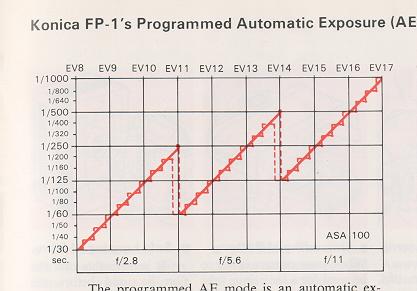 |
The programmed AE mode is an automatic exposure system with a combination of shutter speed and aperture which is determined for a given brightness. In the programmed AE mode of the Konica FP- I a combination of shutter speed and aperture is determined in a range of EV 8 (f/2.8 with 1/30 sec.) to EV 17 (f/11 with 1/1000 sec.) with ASA 100.The combinations are shown in the figure given below. The shutter speeds are available with a non-stage progression from 1/30 see to 1/1000 see, whereas the apertures are variable in the three stages of f/2.8, f/5.6 and f/11. For example, when fine weather (EV 17) gradually becomes cloudy, the shutter speed becomes proportionately slow from 1/1000 see with the aperture remaining at f/l 1. |
The Konica FP-l's programmed AE system not only selects the aperture but also selects a shutter fast enough to prevent camera shake, thus enabling even a photographic notice to use this camera without apprehension.
Specifications for Use
Specifications of the Konica FP-1
Type:
35 mm focal plane shutter TTL-Programmed AE single-lens reflex camera.
Film: 35mm film in cassette.
Picture size:
24 x 36mm.
Standard lens: Konica Hexanon
AR 40mm f/1.8 Konica Hexanon AR 50mm f/1.4 Konica Hexanon AR 50mm f/1.7 Konica Hexanon
AR 50rnm f/1.8 Konica Hexanon AR 57mm f/1.2
Mount: Bayonet-type
Konica mount II
Aperture mechanism: Programmed AE-type
fully automatic apertures with three stages of f/2.8, f/5.6, and f/11.
Shutter: Digital-controlled, vertically travel electronic metal
focal plane shutter. The shutter speeds are available with a non stage progression
from 1/30 sec. to 1/1000 sec.
Shutter speeds: 1/30 ~ 1/1000
sec. Synchro: Hot shoe synchro socket, automatically set to. 1/100 sec. with exclusive
Konica X-18, X-24, X-36 Automatic Electronic Flash. Manually set to 1/100th
sec. with electronic flash other than X-18, X-24, X-36.
Self-timer: Digital-controlled electronic self-timer
Finder: Pentaprism eye-level finder, magnification X 0.67 (at infinity
with 40mm standard lens), field-of-view ratio 90%, real-image alignment system with
split image, microdiaprism and ground glass.
Viewfinder information:
LED indicator for aperture in use from f/2.8~f/11 advises correct exposure
in AE photography.
Lighting of green LED: Indication of
the correct exposure.
Lighting of red LED: Under exposure
warning. Blinking of green LED: Indication for completed recharge of the electronic
flash unit. Blinking of red LED: Manual indication.
Exposure adjustment:
Center weighted metering system with CdS (Cadmiun Sulphide) photo cell.
· The programmed AE mode is an automatic exposure system with a combination
of shutter speed and aperture is determined for a given brightness.
·
Manual aperture lens (stopped-down metering): System of alignment with fixed point
coupled to film speed, shutter speed (1/100 sec.) and lens aperture.
AE coupling range: In the programmed AE mode of the Konica FP-I,
a combination of shutter speed and aperture is determined in a range of EV 8 (f/2.8
with 1/30 sec.) to EV 17 (f/11 with 1/1000 sec.) with ASA 100.
Coupled
film speed range: ASA 25-800
Film loading: Unique
Konica film loading system will advance film to first frame without releasing shutter.
Fully automatic film loading system when used with Konica Auto-Winder F.
Film wind: In an arc of 138° with a lever on the camera
top, automatic film wind with Auto-Winder F.
Film
transport confirmation: A flicker indicator confirms film is properly
winding.
Film rewind: Crank type with rewind button returning
to the original position with loading of new film.
Film
counter: Positive type. Resets to start with opening of back cover.
Power source: 6V alkaline battery 4LR-44 or silver
oxide battery 4SR-44 (Eveready No. 544).
Others:
Accepts Konica Auto-Winder F for single frame or rapid sequence photography at 1.5
f.p.s. Auto-Winder F batteries serviceable for 40 rolls of 36-exposure film (with
AA alkaline batteries).
Dimensions and weight: 140 x 89
x 45 mm, 495g (w/o battery) body only.
· All specifications
and design are subject to change without notice.
Lenses available