and historical purposes, all rights reserved.
This page is copyright© by
 ,
M. Butkus, NJ.
,
M. Butkus, NJ.This page may not be sold or distributed without
the expressed permission of the producer
I have no connection with Konica Co.,
This camera manual library is for reference
and historical
purposes, all rights reserved.
This page is copyright© by
,
M. Butkus, NJ.
This page may not be sold or distributed without
the expressed
permission of the producer
I have no connection with Konica Co.,
On-line camera manual library
If you find this manual useful,
Back to main camera manual page CLICK HERE FOR COLOR
Contents: Important Notes on Usage a ....................4 Basic Manipulation for EE Photographing a. ..................6 Name of Each Part a ... 8 Flash Photography a . ...................21 Before the Shutter is Released a .................25 Holding Your Camera Steady a .....................32 In Taking Portraits with Behind-the-Subject Lighting ~ ..................................36
Use of Self-Timer. ........................38 B (Bulb) Exposure ......................39 Accessories ....................40 Electronic Flash, Cube Flash, Marine C35, 46mm Rubber Hood,
Hard Case. Neck Strap and Filters Major Specifications of KONICA C35 Automatic 46
how about a donation
of $3 to:
M. Butkus, 29 Lake Ave.,
High Bridge, NJ 08829-1701
and send your e-mail
address
so I can thank you.
Most other places would charge
you
$7.50 for a electronic copy
or $18.00 for a hard to read Xerox copy.
This will help me to continue to host this site,
buy new manuals, and pay
their shipping costs.
It'll make you feel better, won't it ?
If you use Pay Pal, use the link below.
Use the
above address for a check, M.O. or cash.
Click here for
Konica
C35 Automatic PDF version
from this file - better printing
Konica C35 Automatic PDF SCAN
(direct from manual - English only)
Loading of Mercury Battery ......................10
Film Loading a ...... 14
Electric-Eye Photography a ...............20
Film Rewinding .......................34
1. The KONICA
C35's CdS meter operates on a mercury battery. Place the mercury battery which is
available as an accessory to your camera into the mercury battery chamber and look
into the viewfinder, If the meter needle is seen swinging, it means that the CdS
meter is functioning correctly.
2. If some object other than an accessory
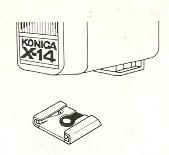
is inserted into the accessory clip the camera will be automatically set
to flash exposure. So do not try to put into the clip anything other than
a flash or electronic flash unit.
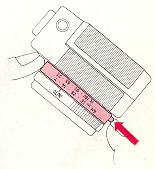
3. When turning the guide number
ring, make sure that the guide number button is kept pressed down.
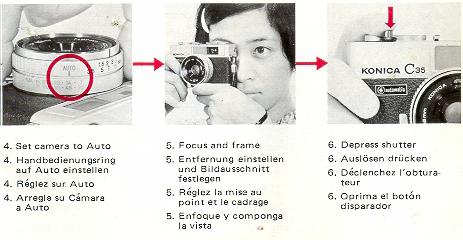
Basic Manipulation for EE Photographing
Loading of Mercury Battery
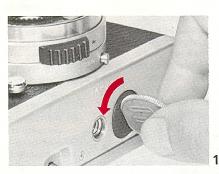 |
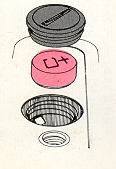
The KONICA C35's CdS meter operates on a mercury battery. Completely wipe the mercury battery, which is available as an accessory, with a piece of dry, clean cloth and then place in the mercury battery chamber. 1. Take off the lid of your camera's Mercury Battery Chamber (19) by turning it counterclockwise with a coin. |
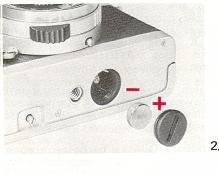 |
2. Insert the mercury battery so that the "+" side of the mercury battery comes in contact with the "+" side of the cover. Put the cover on the chamber, turn it clockwise and screw it up tightly. · The life of a mercury battery exceeds one year when it is put to normal use. Instead of gradually dropping according to the frequency of its use, a mercury battery tends to suddenly drop in voltage when its life has practically expired. · When it is found that the meter needle does not swing when your camera is trained at a bright subject, replace the mercury battery with a new one, |
· The meter of your camera takes a 1.35V Mallory PX-675
or Eveready EPX675.
(webmaster - see my site on
what to do for replacements for mercury batteries )
Note that there
are batteries similar in shape to but different in voltage from a mercury battery.
· When your camera is not to be used for a long period of time, take
out the mercury battery and keep it in a dry place.
Film
Loading
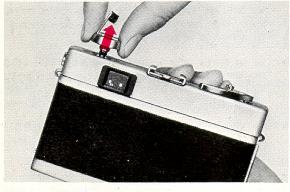 |
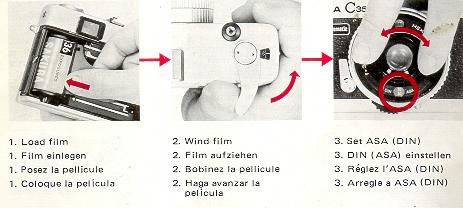
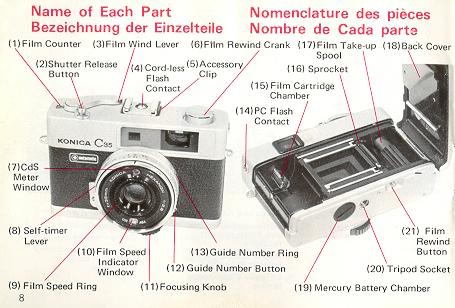
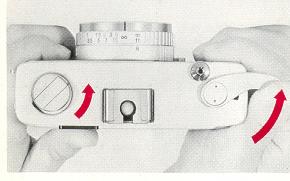
1. Flip up the Film Rewind Crank (6)
and forcibly pull it up, and the Back Cover (18) will open and the film
counter will indicate the mark "S" (start). |
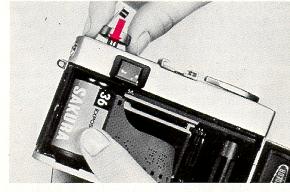 |
2. While the crank is kept drawn, load a roll of 35mm cartridge film (for 20 or 36 exposures) into the Film Cartridge Chamber (15) and return the crank to the original position. |
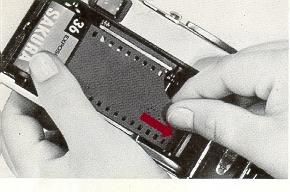 |
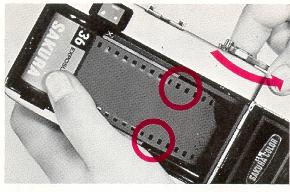 |
|
4. Turn the Film Wind Lever (3) and ascertain that perforations on both sides of film are in gear with the film Sprocket (16), before the back cover is closed. · When the film is correctly transported the film rewind crank turns. |
|
 |
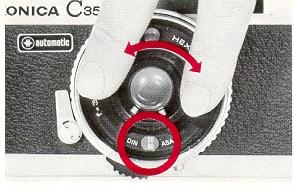 |
5. Repeat the winding of film and the depression of the Shutter Release Button (2) until the number "1" appears in the Film Counter (1) 6. Turn the Film Speed Ring (9) and set your camera to the speed of the film you use in your camera. Note any intermediate point between film speed readings is unusable. |
|
Electric-Eve Photography
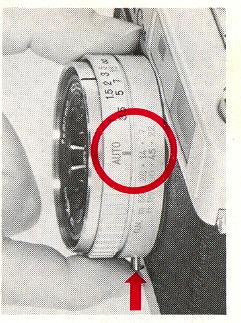 |
Pictures may be taken in the electric-eye system as long as the index mark "AUTO" is aligned with any (guide number) on the Guide Number Ring (13). Once tfiu index mark "AUTO" has been brought into line with the guide number of your flash bulbs, it makes it possible for you to take pictures in flash photography. (The guide number is 90 with ASA 80 to 125 for flash cubes and 45 for the MONICA Electronic Flash X-14.) !n setting the guide number, push down the Guide |
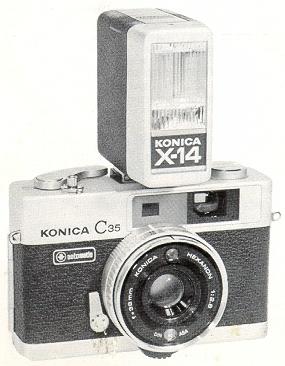 |
When you use an X-14, clip it into the accessory clip of your camera,
and your camera will shift from EE to flash photography as long as the guide
number is set to 45 (when film with ASA ratings from 80 to 125 is used).
The aperture will be automatically adjusted in conjunction with focusing.
· When pictures are not to be taken in flash photography, make sure that the flash unit is detached from the accessory clip of your camera. If the flash unit remains clipped into the accessory clip, the electric-eye system does not
|
To Enjoy Flash Photography
1. In using the MONICA Electronic
Flash X-14, set your camera to the guide number 14 in advance, and no other adjustment
will later be required. Clip the electronic flash light into the accessory clip
of your camera, and you will be ready to take pictures. Take pictures at a subject-to-camera
distance of 3.3 to 15 feet.
2. When a flash gun or electronic flash light
with a cord is used, make sure that it is fitted to the Accessory Clip (5) and the
tip of the cord is inserted into the PC Flash Contact (14) on the side of your camera.
The guide number is indicated on container of the flash bulbs. Set your
camera to this guide number.
· When the index mark "AUTO" has been aligned with any figure larger than
14, there are some restrictions over the taking of pictures at close distances in
flash photography for the correct exposure. So pictures cannot be taken at 3.3 feet
in this situation. For the taking of pictures at the close distance of 3.3 feet,
bring the index mark into line with 14.
Before the Shutter Is
Released
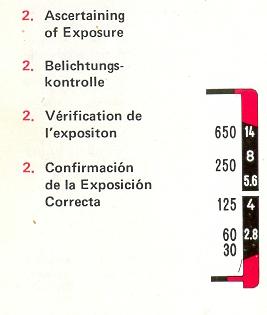
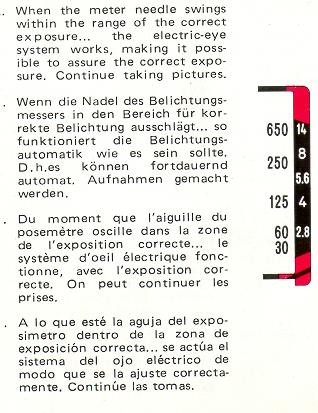
1. Look through the finder While looking through the finder,
you may be able to
(1) ascertain the exposure,
(2) focus the lens and
(3) frame the subject.
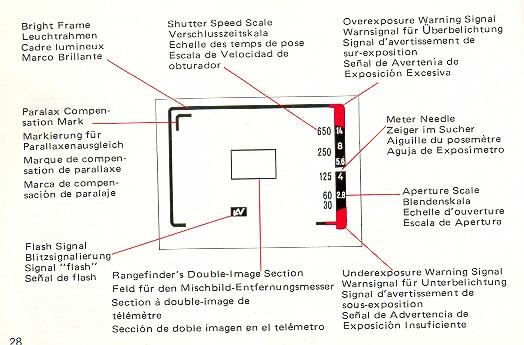
2. When either an electronic flash unit or a flash gun has been clipped
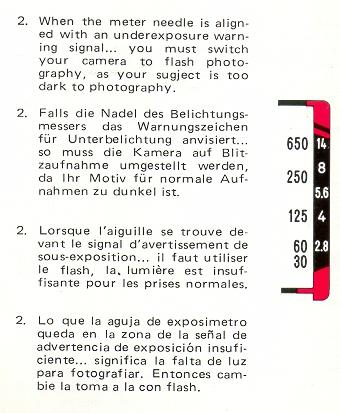
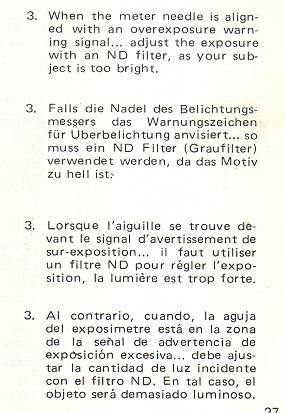
into the accessory clip of your camera, the Flash Signal will appear in the finder.
 |
 |
 |
 |
3. Focusing: While looking through the finder,
turn the focusing knob, put together the double image visible at the bright, yellow-colored
center of your finder. This means that the lens of your camera is perfectly focused
on your subject. Depress the shutter button without too much force.
Bright Frame: The scope of area in the bright frame will be photographed.
When your subject is situated at a point 3.3 feet from your camera, put your subject
within the inner Paralax Compensation Mark.
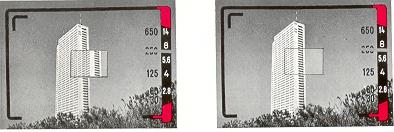 |
|
The lens is out of focus (note the double image is split). The lens is in focus (note the double image is aligned). |
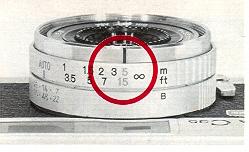
In the event that the Meter Needle points to f/5. 6 or a higher
stop on the aperture scale when pictures are taken outdoors during the daytime,
bring the reading 15 feet inscribed in green on the distance scale in line with
the index mark, and the lens of your camera will be focused on anything situated
within a range of 10 feet from your camera to infinity. This feature is recommended
for snap-shots.
Holding Your Camera Steady
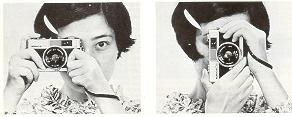
To obtain well-focused pictures, it is imperative that your
camera is held steady to prevent your camera from being accidentally jarred when
the shutter button is depressed. Hold your camera in both hands and put it to your
face to assure its stability. To release the shutter, gently depress the shutter
button with your finger.
Film Rewinding
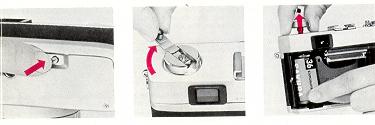
1. When a predetermined number of pictures have been taken, push down the Film
Rewind Button (21) on the bottom of your camera.
2. Flip up the Film Rewind Crank
(6) and turn in the arrow marked direction, and the film will be rolled back into
the film cartridge.
3. When there is a sudden drop in the pressure felt in your
hand and the film rewind button stops turning, open the back cover and take out
the cartridge.
In Taking Portraits with Behind-the-Subject Lighting...
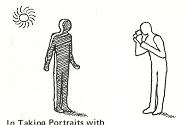
When a man is photographed with behind the-subject lighting or his background
constitutes the skies or the shining water surface, the pictures will be under-exposed.
In this situation, train your camera downwards and slightly depress the shutter
button so that the meter needle may be temporarily fixed. With the needle kept stationary,
train your camera at your subject and fully depress the shutter button, and you
will be able to take a clear picture of your subject.
· Another way
would be to set the film speed scale to ASA 40, instead of 80.
Use of Self-timer
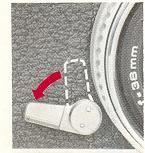
Turn the Self-timer Lever (8) to the full extent and set it. Depress the shutter
button, and the shutter will be released in about 10 seconds.
· Do
not depress the shutter butter while standing in front of your camera. Otherwise,
the correct exposure will not be assured.
· Do not forget that the
film wind lever has been wound before a Picture is taken.
(Bulb) Exposure
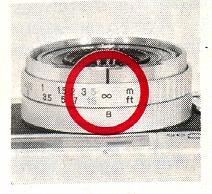
While the guide number button is depressed, rotate the guide number ring and
bring the reading "B'' in line with the index mark for B (bulb) exposure shooting,
With B exposure, the shutter will remain open as long as the shutter button is kept
depressed. This method is fitted to the taking of pictures with long exposure at
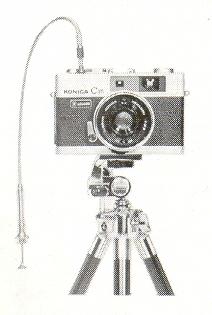
night. The lens is fully opened at f/2.8. For B exposure, use a tripod
and the KONICA cable release.
· X-14 Electronic Flash
Extremely small cordless electronic flash, Guide Number 45 with ASA 80/125 film.
Permits shooting distances to 16 feet with C35. Approximately 200 flashes with standard
AA Alkaline batteries.
· X-20 Electronic Flash
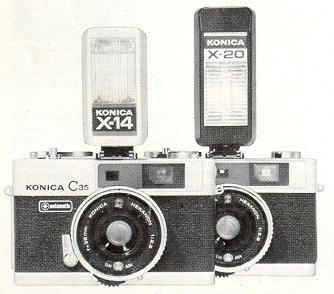 |
Exceptionally compact electronic flash permits cordless or cord-type operation. Guide Number 64 with ASA 80/125 film permits shooting distances to 23 feet with C35. Up to 200 flashes with standard AA Alkaline batteries. |
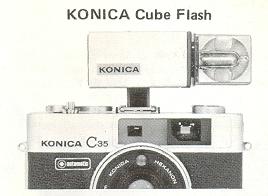
|
A flash cube designed to flash 4 bulbs in a successive manner this gadget also servers as a small flash gun using an AG-type adapter. |
Explore the Secrets of the Seabed
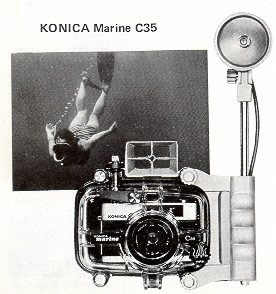 |
The KONICA Marine C35 is the full fledged underwater camera which makes it possible to enjoy picture-taking at a water depth of up to 44 yards. Film wind and focus adjustment can be done with ease from the outside. This camera comes in with an easy-to-aim underwater finder. With the grip and flash gun designed specifically for this camera, you will be able to take beautiful color pictures of deep sea beds. There is no danger that you will lose your camera, as it floats on the water even when you have accidentally dropped it into the water. This photographic device is also usable on the beach and in the rainy day, as it is proof against water. |
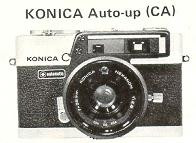 |
Equipped to the lens of your camera, the Auto-up makes It possible for you to take close-up pictures at 3.3 to 1-2/3 feets, while the ranger finder is coupled as in normal photography. This accessory facilitates the taking of close-up pictures of men and flowers and the copying of books and painting. |
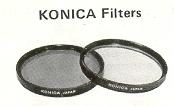 |
In practical use, there is no need to compensate for the exposure factor of the filter used. |
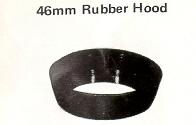 |
Folding-type rubber lens hood to prevent harmful reflecting light. |
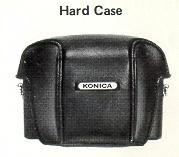 |
Sturdy case designed specifically for KONICA C35 Made of black leather. |
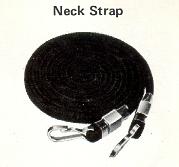 |
Used for hanging your camera from your neck or shoulder. |
Major Specifications of Konica C35 Automatic
Type: 35mm EE camera with lens-shutter
Film:
35mm film in cartridge
Picture Size: 34x 26mm
(1"x 1-1/2")
Lens: Hexanon 38mm f/2 8 (3-groups and 4 elements
Focusing: Turning all groups of lens in helicoid
action in an arc of 48 degrees closest taking distance 3 .3 feet.
Shutter: Copal Mat special automatic programmed shutter, B.
1/30, 1/650 sec., non-stage speed change, B exposure permissible at full lens opening,
Automatically set to 1/25 sec. in taking pictures with flashes, X contact and built
in self-timer.
Exposure Adjustment: Automatic exposure
adjustment with system using CdS, 1.35V mercury battery used as power source EE
coupling range EV8 (f/2.8, 1/30sec.) to EV17 (f/;4.3, 1/650sec. with ASA 100 film.
Film speed scale, ASA 25 - 400
Finder: Bright frame, magnification 0.46X,parallax compensation
mark, shutter speed and aperture scales, exposure warning signals and flash signal
visible in Viewfinder.
Range finder: Single-eye double-image
alignment, color compensation glass, effective base line 12mm.
Flash:
Auto Flashmatic System with automatic switch with flash gun or electronic
flash light inserted into accessory clip, guide numbers (feet) 22, 32, 45, 65, 90,
130, 180. cordless flash contact and PC flash contact socket.
Film
Wind: Winding in one action with camera top lever, shutter self winding
in an arc of 132 °, pull-out angle 30°, double exposure prevention.
Film Counter: Automatic film counter. Indicates number
of pictures taken.
Film Loading: KONICA EL System
Film Rewind: Rewound with crank as rewind button is kept
depressed. Rewind button automatically returns to the original position.
Filter: Screw-in type, 46mm in screw
diameter.
Dimensions: 4-2/5" x 2-3/4" x 2"
Weight: 13-2/5 ounces.