www.PayPal.me/butkus
Venmo @mike-butkus-camera Ph
2083
<<<
IF YOU WOULD LIKE THIS OR ANY PDF FILE
PRINTED, BOUND AND MAILED TO YOU,
SEE THIS OUTSIDE COMPANY'S OFFER >>>
Back
to my main Camera Manual page
Problems opening
PDF files or printing
problems - click here
Konica Autoreflex T 1
(first version with differences described below)
CLICK HERE FOR
Konica Autoreflex T 2 PDF VERSION
English SCANNED DIRECTLY FROM MANUAL
Konica Autoreflex T Bedienungsanleitung
Konica Autoreflex T Mode D'Emploi
Konica Autoreflex T Manual de Instrucciones
Konica Autoreflex Instructions
Konica Autoreflex T 1 / FTA - On/Off switch on
back of camera,
small button by shutter button called "override"
due to limited meter.
Konica Autoreflex T2 / FTA2 - On/Off switch at
shutter button,
override switch removed due to better metering system.
The lettering name on the models are the same
Wein mercury battery replace for PX_675 or
EPX-675
Konica Autoreflex A lenses
Click here for PDF version of
HTML file below
- better printing
This camera takes mercury batteries no longer available.
Look for replacement Wein Air batteries or adapters that use standard button
batteries.
PX_675 or EPX-675

FEATURES OF KONICA AUTOREFLEX T
1. Incorporates
a fully automatic exposure control system which makes possible high levels
of EE (Electric-Eye) photography.
2. Equipped with a variable TTL (Through-The-Lens) system which measures
light in the most ideal manner depending on the coverage angle of an interchangeable
lens.
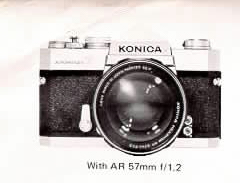
3. The viewfinder is bright and the light metering system is of the full
lens opening type. The lens may be stopped down for light metering, wherever
necessary.
4. Incorporates a polymechanical viewfinder which makes it possible to
check all data for photographing at an instant.
5. Color Dynamic Coating which gives fully display to excellent effects.
6. A system camera which makes possible multipurpose photographing with
an ample series of interchangeable lenses and accessories.
CONTENTS
|
Basic Manipulation for EE Photographing ......... 6
Major Specifications of KONICA Autoreflex T ....... 9
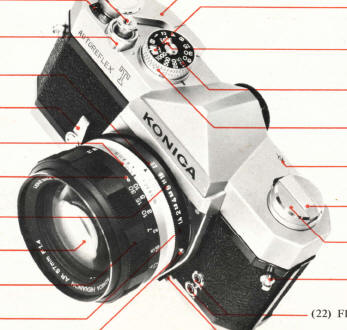
Name of Each Part ..................... 10
Loading of Mercury Battery Cells
(Meter Switch/Check of Batteries)
Film Loading
(Set Film Speed)
Shutter
Aperture
Metering Systems of TTL Meter . . .
Looking at Meter inside Viewfinder .
Electric-Eye Photography
|
(Manual Picture-Taking)
Training of Camera . .,
Focusing . . . .. . . .
Depth of Field .....
Use of Self-Timer . .
Film Rewind ...............
Synchroflash Photography ......
B (Bulb) Exposure . .
Lens Interchange . . .
Photographing in Stopped-down Metering System
HEXANON Interchangeable Lenses .......
Accessories . . . .. . . . . . .. ...
Maintenance of Camera and Lens .
|
.
BASIC MANIPULATION FOR EE PHOTOGRAPHING
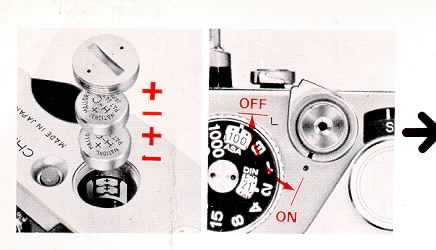
1. Insert mercury batteries and put ON the meter switch.
2. Insert film and set the film sensitivity speed.
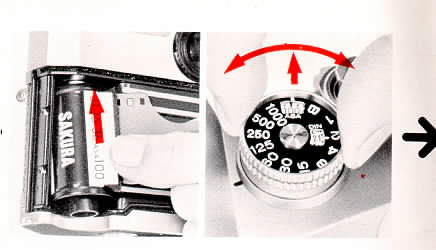
3. Set your camera to the EE mark.
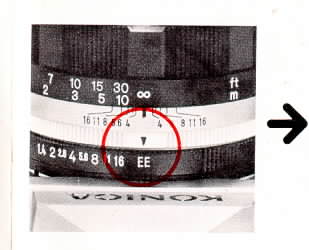
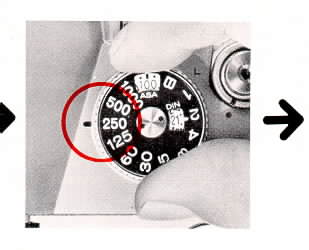
4. Determine a shutter speed. (1/125 sec. for outdoor shooting and l/30
sec. for indoor)
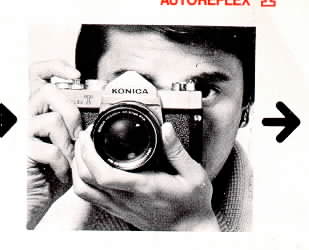
5. Focus and frame.
6. Check the exposure.
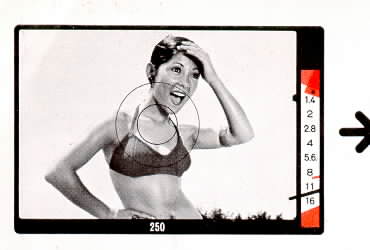
7. Depress the shutter button to take a picture.
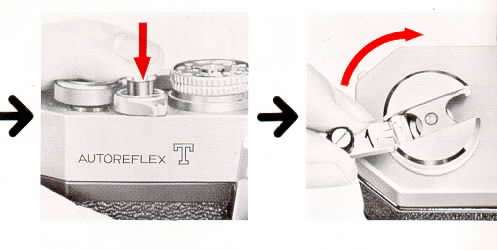
8. After a roll of film has completely be taken rewind the film.
MAJOR SPECIFICATIONS OF KONICA AUTOREFLEX T
Type: 35mm SLR equipped with focal plane shutter and TTL-EE
system.
Film: 35mm film in cartridge, 20 or 36
exposure.
Picture Size: 24 x 36mm. (1" x 1-1/2").
Standard Lens: HEXANON AR 57mm f/1.2 (6-group and
7-element), AR 57mm f/1.4 (5-group and 6 element), AR 57mm f/1.8 (5-group
and 6 element). Equipped with EE lock and closest taking distance 1-1/2R
(0.45m), Color Dynamic Coating.
Mount:
KONICA Mount 11 of bayonet type, diameter 47mm, flange back 40 .5mm.
Aperture Device: Fully automatic EE aperture, smallest
aperture f/16. Equipped with a manual aperture device for checking depth
of field.
Shutter: Up-and-down running metal focal plane High
Synchro shutter "Copal Square S" with speeds of B 1 to 1/1000
sec. Speed scale calibrated in equally graduated 1: 2 progression, single-spindle,
non revolving dial, built-in self-timer, M and X synchro. M, FP and MF coupled
to all speeds with M and electronic light to 1/125 sec. with X.
Viewfinder: Eye-level viewfinder using pentaprism. Fresnel
lens also used. Built-in rangefinder focusing lens with Micro Dia Prism
of real-image dispersion alignment type. Polymechanical Viewfinder in which
shutter speed scale, aperture scale, meter needle, exposure warning marks,
mark indicating f-number at full lens opening, manual indicator mark, index
point for stopped-down metering and battery check mark are all visible.
Exposure Adjustment: Variable TTL system using 2 super high
sensitive compound CdS cells. Fully automatic EE aperture lens (light metering
at full opening): preference given to shutter determination for EE picture-taking.
For manual picture taking in automatically controlled correct aperture system,
film speed, shutter speed, correct aperture coupled to f-number at full
lens opening are read. Manual pre-set aperture lens (stopped-down metering):
shutter speed, film speed and aperture are set to index points (zero method).
Two 1.3V mercury batteries used as electric source, battery switch and check
device.
EE Coupling Range: EVI. 5 (f/1.2 with 1/2 sec.) EV18
(f/16 with 1/1000 sec.) with ASA 100 for f/1.2 lens.
Film Sensitivity Range: ASA 25 to 1600, DIN 15 to 33.
Film Loading: KONICA EL Type (patented Konireel Used).
Film Wind: Film wound with top lever in one action (winding
in are of 162 degrees with 30 degrees play), double exposure prevention.
Film Counter: Automatic return type indicating number
of pictures exposed.
Film Rewind: Crank type. Rewind button automatically returns.
Dimensions and Weight: With f/1.2: 5-3/4"(w)x3-3/4"(h)x3-3/4"(t),
43ozs.
With f/1.4: 5-3/4"(w)x3-3/4"(h)x3-1/2"(t), 36ozs.
With f/1.8: 5-3/4',(w)x3-3/4"(h)x3-1/2"(t), 34ozs.
Without
lens: 5-3/4"(w)x3-3/4"(h)xl-1/4"(t), 26ozs.
The KONICA Autoreflex T's TTL meter takes two 1.3V mercury battery cells
as its electric source. Wipe the separately enclosed mercury battery cells
with a piece of dry and clean cloth and put them into the mercury battery
chamber.
(Webmaster: this is a mercury battery, not available for sale
in the U.S.
Check my web page for
Mercury
Battery Replacements.
There are several options.
1. Turn the cover of the Mercury Battery Chamber (39) counterclockwise
with a coin or something alike and detach it from the chamber.
2. Insert the two cells into the mercury battery chamber the "+"
side up, as indicated in the figure printed on the seal inside the chamber.
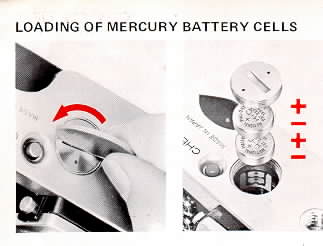
3. Turn the cover of the mercury battery chamber clockwise and make sure
that it has been screwed tightly.
Meter Switch
The meter-switch will be put ON when the Lock Lever (3) placed under
the Shutter Button (1) is turned so that it comes in alignment with the
red index point.
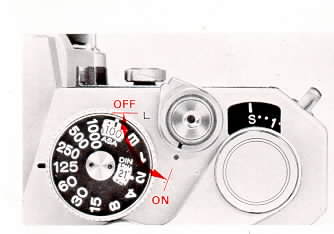
Unless pictures are to be taken, set the lever to "L" and the
switch will be kept put OFF, preventing the mercury battery cells from accidentally
running down. At the same time, the shutter button wi be locked. Use this
system when the camera is to be carried around with the film winding lever
wound.
Check of Batteries
The expected span of serviceability of a mercury battery cell will be
over one year in normal use. With the span of its serviceability getting
to a close, its voltage will suddenly diminish. The degree to which the
cells have run down may be checked while pictures are taken, but it will
also be possible to check it in the following manner.
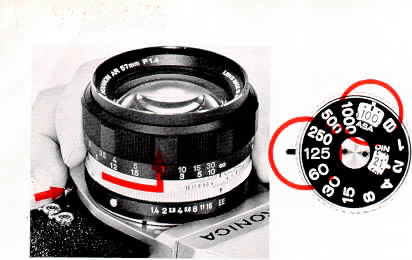
1. While the Lens Interchanging Button (23) is depressed, turn the lens
counterclockwise and detach it From the camera. (Refer to Page 54.) There
is no need to dismount your lens, if it is not an automatic aperture one
with an EE mark.
2. Grip and lift up the place outside the Shutter Speed Dial (17) and
set the film speed to ASA 100.
3. Turn the shutter speed dial and set it to 1/125 sec.
4. While looking into the viewfinder, depress the Battery Check Button
(27) on the bottom of your camera. The capacity of the battery cells will
be adequate if the Meter Needle (45) is found to be swinging under the Battery
Check Mark (46). If the meter needle is no longer able to reach the mark,
replace the battery cells with new ones.
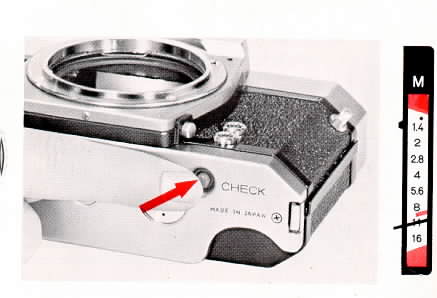
As mentioned above, every index point for the battery check is
indicated in red. In a word, the essential thing will be for the meter needle
to swing under the red mark after the film and shutter speeds are aligned
with the red marks.
The meter takes two 1.3V National H-C, Mallory PX-675 or Eveready EPX-675
mercury battery cells. Care must be exercised in selecting the cells as
there are cells which look identical in shape but differ in stipulated voltage,
such as battery cells. Make sure the battery cover has holes in it.
The replacement require "air" to operate !
See this link on a Wein Air replacement battery.
In the event that your camera is not to be used over a
long span of time, take out the mercury battery cells and keep them in a
place free from moisture.
FILM LOADING
The KONICA Autoreflex T takes 35mm rod film, which comes
in a cartridge. For film loading, avoid the direct sunlight and do it in
the shade. If there is no shade, one way would be to use the shadow of your
body.
1. Put the Back Cover Lock (24) and open the Back Cover.
2. Put a film cartridge into the Film Chamber (26) as
though it skid into the chamber at a slant from above the underside.
3. Pull out the film while the cartridge is lightly pressed
down and then choose any slit of the Film Take-up Spool (32) into which
the film tip may be inserted with ease and insert the film into the slit.
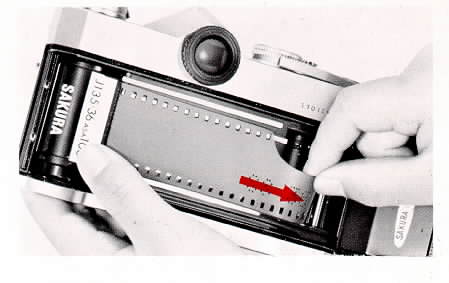
4. While lightly pressing down the cartridge, turn
the Film Winding Lever (13) and take up the film on the spool. Ascertain
that the teeth of the Sprocket (31) are in gear with film perforations before
the back cover is closed. Depress the back cover with a finger tip, and
it will be closed with ease.
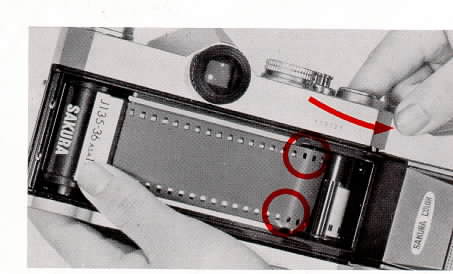
5. Flip up the Film Rewind Crank (19) and turn it in the
direction indicated by an arrow mark on it to reduce the slack of the film.
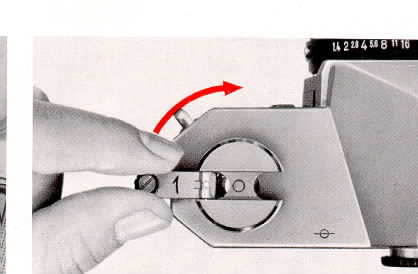
6. Turn the film winding lever until it does not move
further and depress the Shutter Button (1). Repeat this action tin the figure "1"
comes in alignment with the index mark in the window of the Film Counter.
(2). If the him is transported in the correct manner when the film winding
lever is turned, the Film Rewind Knob (20) will revolve counterclockwise.
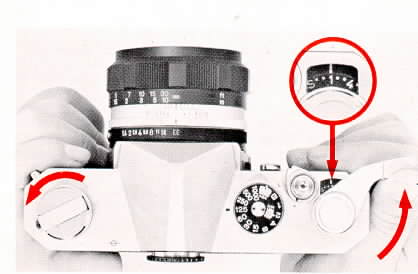
If it does not turn counterclockwise, rewind
the film (see Page 48) and turn the film winding lever until
it does not move further and the film will be transported by one frame and
the shutter charged at the same time. The mirror and the automatic aperture
will also be set. Simultaneously, the film counter will advance by one reading.
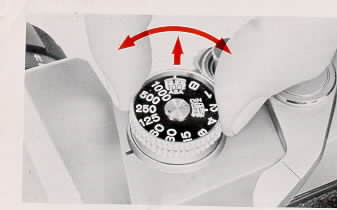
7. Set Film Speed (ASA)
The ASA and DIN scales visible in the film speed indicator
window indicate the degrees to which film is sensitive to light. The film
speed of your film is indicated on the box in which it is contained and
in its instruction booklet. (Figures in brackets refer to intermediate points
of sensitivity.)
SHUTTER
A shutter is designed to control the amount of light reaching
the film surface in terms of time and photographically to fix an image of
a subject on it. The shutter speed scale has calibrations of B and I to
1/1000 sec. and the denominator of each speed is indicated on the shutter
speed dial. The shutter speed may be adjusted simply by bringing a reading
in line with the index mark
Shutter speed calibrations are also visible in the viewfinder,
thus making it possible to ascertain the speed while looking through the
viewfinder.
"B" stands for bulb exposure and is used when
there is the need for the exposure of over one second. (Page 53)
The red figure of "125" is the maximum shutter
speed for synchronization with an electronic light.
Do not turn the shutter speed dial when the shutter button
is depressed.
APERTURE
The lens aperture is designed to control the amount of
light reaching the film surface in terms of area and the depth of field
(see Page 40). Your camera's EE system will automatically determine the
correct aperture value, once the EE mark on the aperture ring is aligned
with the index mark. Manual aperture is also usable (Page 35). In either
event the fully automatic aperture system will work and the lens will be
stopped down to a determined f-number only during the split moment when
the shutter is depressed and then automatically return to the full opening
after a picture has been taken.
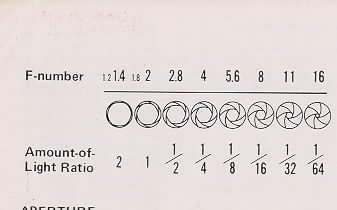
The amount of light going through the lens will reduce
in proportion to a rise in the aperture value. The correlation, as indicated
in the above figure, is such that the brightness of the lens reduces by
half in proportion as the aperture enlarges by one reading.
The lens having the EE Release Button (12) at its aperture
ring is equipped with an EE lock. In the event that the camera is released
from the electric eye system and used for manual aperture, depress this
button and turn it.
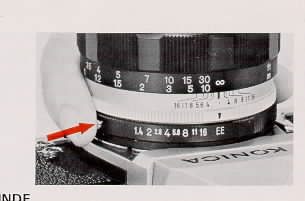
The aperture is continually variable, and therefore an
intermediate point between readings on the aperture ring is usable.
METERING SYSTEMS OF TTL METER
The KONICA Autoreflex T's TTL meter not only measures
light reaching the film plane through the lens but also incorporates a variable
metering system in which the spot metering method, the center spot metering
method and the all-frame average metering method are automatically selected,
depending on the coverage of the lens. This system makes it possible to
measure light with the lens kept at its full opening while looking through
the bright viewfinder and to measure light with the lens stopped down to
a desired f-number.
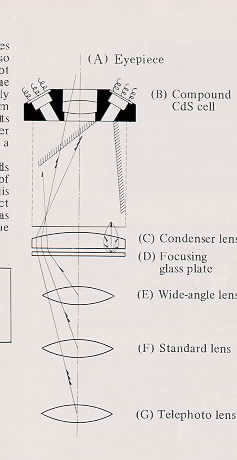
It is the most ideal metering system in which deep hoods
are fitted to the two compound CdS.cells on both sides of the viewfinder
. eyepiece and the light intake device is slanted inwards and in which the
brightness of a subject whose image is formed on the focusing glass plate
as indicated in the figure is measured while a curvature of the
NOTE: The KONICA Autoreflex T does not
take any fully automatic EE aperture lens prepared for the Autoreflex as
it is. Make sure that you use it after it has been remodeled into a lens
for use on the Autoreflex T (with f-numbers). Remodeling work is quite simple.
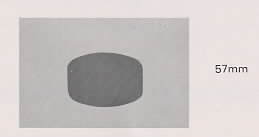
Sensitivity distribution invariable metering system
LOOKING AT METER INSIDE VIEWFINDER
F-NUMBER FOR CORRECT EXPOSURE: When the
Meter Needle (45) stops within the range of correct exposure, the f-number
on the aperture scale (47) to which the meter needle points is the aperture
to which the taking lens will be set when the shutter is released for a
shot.
CORRECT EXPOSURE RANGE: For an AR lens
which is not f/1.2 in brightness, the Mark Indicating the F-number (44)
at the Full Lens Opening shows the f-number at the full opening of the lens
used on your camera. If the meter needle is aligned with this red mark,
pictures will be under-exposed. The mark indicating the f-number at the
full opening of the lens win move down if the meter is not coupled. In other
words, the mark will also show the range where the meter is coupled. In
EE picture-taking, therefore, the area sandwiched between the upper and
lower red marks is the correct exposure range.
INDICATION OF SHUTTER SPEED SCALE: The
speed at which the shutter will be released is indicated on the Shutter
Speed Scale (42) in the lower part of the viewfinder
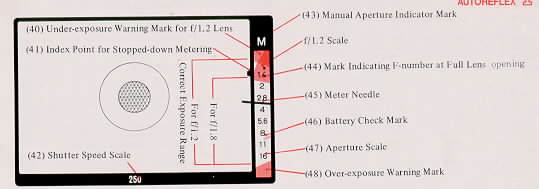
MANUAL INDICATOR MARK: When the EE device
is released and the camera is set to manual picture-taking or when the stopped-down
metering system is used, the Manual Aperture Indicator Mark (43) "M"
will appear over the meter window, showing that a picture is not to be taken
under EE system.
INDEX POINT FOR STOPPED-DOWN METERING:
For stopped-down metering, the meter needle will be brought in line with
the Index Point for Stopped-down Metering (41) to secure a correct exposure.
(Refer to "Stopped-down Metering" on Page 57.)
BATTERY CHECK MARK: The Battery Check
Mark (46) is used to check the serviceability of the mercury battery cells
which serve as the electric source of the meter. (Refer to 'Battery Check"
on Page 16.)
ELECTRIC-EYE PHOTOGRAPHY
(Light Metering at Full Lens Opening)
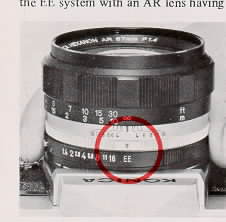
This method is commonly used when pictures are taken under
the EE system with an AR lens having the EE mark.
1. Set Your Camera to EE Mark.
Turn the Aperture Ring (11) arid bring the EE Mark (4)
in line with the index point. The EE lock will click into position.
2. Determine Shutter Speed.
Turn the Shutter Speed Dial (17), select a reading on
the Shutter Speed Scale (16) suitable for your subject and bring it in line
with the index mark. In normal circumstances, it is convenient to set the
shutter speed to 1/125 see, for outdoor shooting and 1/30 sec. for indoor
picture-taking.
3. Look Through Viewfinder.
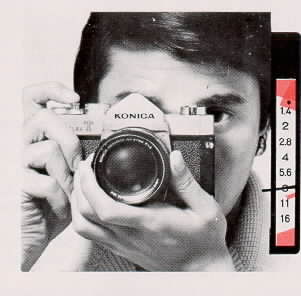
Train your camera at the subject look through the viewfinder,
focus the lens, flame your subject and look at the Meter Needle (45) in
the viewfinder. If the meter needle is not aligned with the upper or lower
red mark (exposure limit mark), You will always be able to secure correct
exposure.
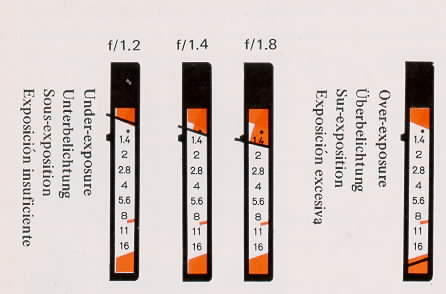
(Webmaster: depending on the lens installed, the top red mark will cover
more of the larger F-stops. In the overexposure image note the
red meter arm in the bottom of the metering range in the red.
Most other camera makers have the overexposure at the TOP of the metering
range)
When the meter needle indicates an under-exposure, choose
a slower shutter speed. When it indicates an over-exposure, select a faster
shutter speed. Correct exposure may be secured as long as the meter needle
is not aligned with the upper or lower red mark.
In the event that you want to give priority to the selection
of a lens aperture over a shutter speed because of a desired depth of field,
turn the shutter speed dial and make an adjustment so that the needle will
indicate the desired f-number. No intermediate points between shutter speed
readings are usable, so make sure that the shutter speed dial clicks into
position.
It will be quite meaningless even if the meter is visible
within the correct exposure range with the shutter speed dial set to the "B"
reading. Do not use this method.
(Webmaster: in real English - In BULB the meter
does not work. It's experience and using the setting off the film
box time to get a correct exposure.)
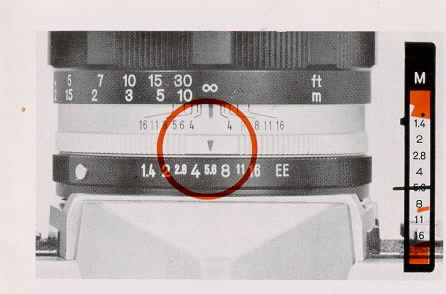
Manual Picture-Taking
When a picture is to be taken while using the manual aperture
button in ascertaining a depth of field or when it is to be taken with a
flash light, release the EE system and set your camera to manual aperture.
While the EE release button is depressed, turn the aperture ring, detach
the EE mark from the index mark and determine an exposure according to the
Manual Aperture Scale (8).
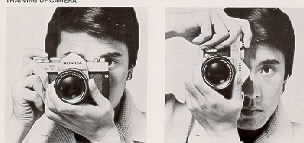
Hold Your Camera Tight
To take a sharp picture, the important thing is to hold
your camera in a stable manner to prevent it from being jarred when the
shutter button is depressed. Hold your camera in both hands and make it
stable by holding it against your face and pressing the elbow of your hand
supporting the camera against your body.
Particularly, it is more difficult to hold the camera,
the long side up than to hold it, the long side down. It would be advisable
to get yourself accustomed to the vertical holding of your camera.
In taking pictures at slow shutter speeds or with a telephoto
lens, the camera is likely to be jarred -if it is held in the hands. Here,
the use of a tripod and a cable release is advisable. The tripod win be
fixed to the Tripod Tap-hole (38) of the underside of the camera and the
cable release to the tap-hole of the shutter button.
Focusing is done by turning the Focusing Ring (10) and
watching the Micro Dia Prism (49) at the center of the viewfinder. When
the lens is not focused, the image on the micro die prism looks rugged.
The image is clearly visible, however, when the lens is accurately focused.
The image of the periphery is also clearly visible. When an interchangeable
lens, long in focal length, is used, it is difficult to observe the Micro
Dia Prism. For focusing, it is advisable to use the Mat Plane (50). To ensure
the accurate focusing of the lens, it is necessary to correct the eyesight
of the viewfinder. Eyesight adjustment lenses are available for short- and
long-sighted people.
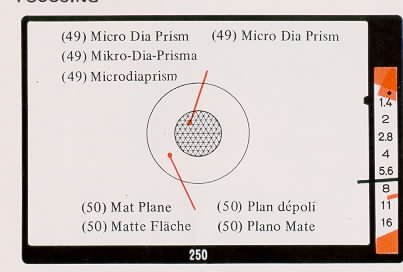
The viewfinder is of the single-lens-reflex real-image
type. Regardless whether the taking distance is far or short and whether
or not a lens is interchanged, the image visible in the field of view is
the same as that exposed on film.
DEPTH OF FIELD
When the lens is focused on a subject at some distance,
not only the subject but also a certain area around the subject will be
sharply delineated in a photograph, and this area is known as a depth of
field and has the following features.
a The bigger the f-number,
the larger the depth of field,
b. The further the distance at
which the lens is focused, the bigger the depth of field is.
c. When the lens is focused on a subject the depth
of field is bigger for the section in Wont of the subject than the area
behind the subject
d The shorter the focal length, the bigger the depth
of field
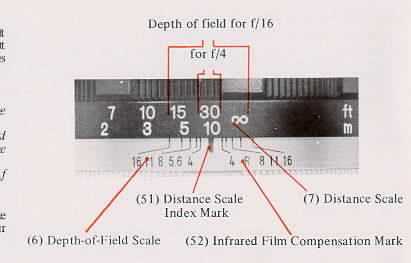
The depth of field may be ascertained either with
the depth-of-field scale or with the manual aperture, As for details, reference
is made to the table of depths of field.
Using Table of Depths of Field: The Depth-of-Field
Scale (6) is so calibrated that readings identical to those of the lens
aperture are provided on both sides of the Distance Index Mark (51). For
example, let us assume that the distance between the film plane and the
subject on which a 57mm f/1.4 lens has been focused is 30 feet. The depth
of field will be 22 to 46 feet for f/4 and 13 feet to on (infinity) for
f/16.
INFRARED FILM COMPENSATION MARK:
The point of focus is somewhat different in infrared photography
as compared to normal photography. After the lens has been focused as in
normal photography, read the calibration on the Distance Scale (7) aligned
with the Distance Scale Index Mark (51) and bring this reading in line with
the Infrared Film Compensation Mark (52) before the shutter is released
for a shot
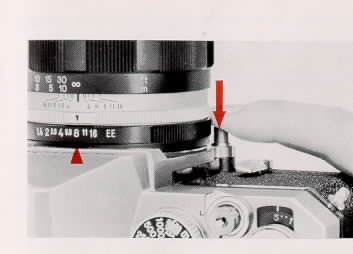
Using Manual Aperture: The AR lens having an EE mark is
equipped with a fully automatic aperture and therefore constantly set to
the full opening. If you want to ascertain the depth of field while looking
through the viewfinder turn the aperture ring to detach the EE mark from
the index mark and determine an f-number. While depressing the manual aperture
button (37), look through the viewfinder to ascertain the depth of field.
FOCAL PLANE MARK: The distances shown
on the distance scale are those between subjects and the Focal Plane Mark " "
(18) which indicates the position of the film plane.
"
(18) which indicates the position of the film plane.
(Webmaster: In English - the distance marks on the lens
means the distance from the subject to the film, not front of the lens)
(Two pages of detailed Depth Of Field tables were
omitted)
USE OF SELF TIMER
The self-timer of the KONICA Autoreflex T is usable in
EE manual and synchroflash photography. Use the self-timer when you are
to take pictures of your companions and yourself and when it is to take
the place of a cable release to prevent your camera from being accidentally
jarred
After the film winding lever has been wound, fully turn
the SelfTimer Lever (5) and set the selftimer (the self-timer may also be
set before the winding lever is wound).
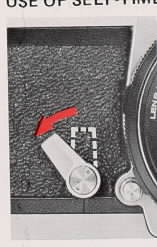
Depress the shutter button and the self-timer will be
put to operation. The shutter will be released in about 10 seconds.
Instead of fully turning it, the self-timer may be set
midway to reduce the time lag before the shutter release.
NOTE: When the self-timer is used in
EE photography, note that strong light accidentally comes in the camera
through the eyepiece as the shutter button is depressed and it leaves a
strong impact on exposure. When the shutter button is to be depressed, therefore,
look through the viewfinder or cover the eyepiece with a hand to prevent
strong light from accidentally coming through the eyepiece. When the shutter
button is to be depressed with your eye detached from the eyepiece, make
sure that you do not stand right in front of your camera. Otherwise, the
exposure will be determined on the basis of brightness of your clothing.
After a pre-determined number of pictures have been taken
on the film loaded in your camera, the film needs to be wound back into
the original cartridge.
If the back cover of your camera is opened without rewinding
the film, the film win be exposed to light and all of the film will become
useless.
When the winding lever no longer moves further after the
advance of the last frame of the film, do not try forcibly to rotate the
lever Put the lever back to the original position.
1. Depress the Film Rewind Button (36) on the underside
of your camera. Once it is depressed, the button will remain sunken.
2. Flip up the Film Rewind Crank (19) and turn it in the
direction indicated by an arrow mark on the crank. This action will take
the exposed film back into the cartridge.
3. The film rewind action comes to an end when there is
a sudden easing of the load on the film rewind crank. Avoid the direct sunlight
and open the back cover to take out the cartridge.
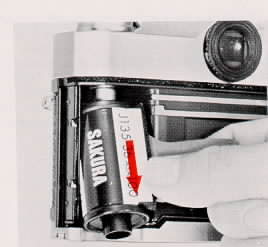
The film counter will return to the original position "S"
when the back cover is opened.
The film rewind button will also return to the original
position when the film winding lever is wound.
SYNCHROFLASH PHOTOGRAPHY
When pictures are to be taken during the night or in a
dark room which does not permit EE photography, or when there is the need
to use an auxiliary light during the daytime, use synchroflash bulbs or
an electronic light in taking pictures.
For synchroflash photography, use Accessory Clip 3 which
makes it possible to mount either a KONICA Cube Flash or a small electronic
light on the eyepiece assembly.
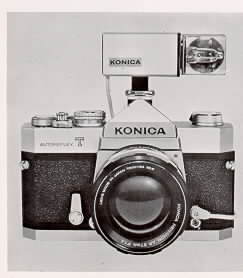
As your camera is equipped with a tap-hole each for Classes
M and X, insert the plug into Tap-hole "M" for bulbs of Classes
M, FP and MF (flash cubes) and into Tap-hole "X" for an electronic
light.
As for the KONICA Autoreflex T. the time lag is set at
18 millseconds for Class M and zero for Class X.
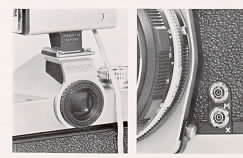
Exposure for Synchroflash Pictures
The Electric-Eye system is not usable for synchroflash
photography and your camera must be set to manual aperture. The required
lens aperture is computed by dividing the guide number of the used synchroflash
bulb or electronic light with the taking distance.
For example, let us assume that a bulb of Class M is used,
the guide number is 110 for the pre-determined shutter speed and the taking
distance is 10 feet. For a correct exposure, your camera win have to be
set to fill on the manual aperture scale, whereas 110 . 10 = 11. As regards
the shutter speeds with which each synchroflash bulb or electronic light
is synchronized, refer to the table.
B (BULB) EXPOSURE
Turn the shutter speed dial to align the "B"
mark with the index mark and release the shutter, and the shutter will be
kept during the moment when the shutter button is kept depressed. This process
is usable when there is the need to expose film for more than one second
The bulb exposure cannot be used in the EE system. Set
your camera to manual aperture.
To prevent your camera from accidentally being jarred,
the use of a tripod and a cable release is advisable. The KONICA Cable Release
designed exclusively for the cameras is equipped with a T stop, which makes
possible time exposure. In T exposure, the film win be kept exposed even
if the finger is detached from the release.
To Dismount the Lens:
While the Lens Interchanging Button (23) is depressed,
grip the silver part of the lens barrel and revolve it counterclockwise,
Pun out the lens when the red dots of the barrel and camera have been aligned
with each other.
To Mount a Lens:
Bring the red dot of the lens in line with the lens mount
index mark (red dot) on the camera body and gently sink the lens barrel
into the camera. Grip the silver part of the lens barrel and turn it clockwise
until it clicks into position.
NOTES:
When the lens is detached, see to it that dust will not
come in the camera and lens barrel and the lens surface will not be either
scratched or marred with fingerprints. Under any circumstances, do not touch
the inner parts of the camera.
When the lens is taken out of the camera over a certain
length of time, use a camera body cap and a mount cap which is snapped on
to the rear part of the lens.
When the lens is to be mounted on your camera, make sure
that the lens is sunken into the camera while the red dots of the lens and
camera are aligned with each other
PHOTOGRAPHING IN STOPPED-DOWN METERING SYSTEM
The AR lens provided with an EE mark is so designed that
light can be measured at the full opening of the lens with automatic aperture
either in EE or manual photography Exposure win be determined in the stopped-down
metering system for the following instances, however.
1. When an ARP lens equipped with manually preset aperture
or an ARM lens with manual click aperture is used
2. When automatic aperture cannot be put to use due
to the utilization of an extension ring and bellows.
3. When a KONICA FS, FP or FM, or a lens produced by
other camera manufacturer is used for the Autoreflex T together with a lens
mount adapter.
Exposure Determination
The aperture scale visible in the viewfinder is not usable
for the stopped-down metering system. Turn either the aperture ring or the
shutter speed dial and align the Meter Needle (45) with the Index Point
for Stopped-down Metering (41) situated at the reading "f/ 1.4"
to secure a correct exposure.
If the combination of aperture and shutter speed is improper,
the needle win not come in alignment with the index mark. Pictures win be
under-exposed when the needle is situated above the index mark and R will
be over-exposed when it is located under the mark. Here, make an adjustment
either with aperture or shutter speed.
In the stopped-down metering system, the eyepiece tends
to be affected by adverse light than in the system in which light is measured
at the full lens opening. Determine the exposure while your eye is put as
close to the eyepiece as possible. The needle swings in a very slow pace.
Take a picture after it has been ascertained that the needle is aligned
with the index mark.
In the event that a manually preset aperture lens is to
be used on your camera, set the preset aperture ring to the reading of the
smallest lens aperture in advance and then turn the aperture ring. This
action will make easier the manipulation.
Microphotogrphic pictures are also taken under the stopped-down
metering system. Make an adjustment either with shutter speed or according
to the brightness of the light source since no aperture is available.
HEXANON INTERCHANGEABLE LENSES
HEXANON-WECHSELOBJEKTIVE
OBJECTIFS HEXANON INTERCHANGEABLES
HEXANON DE OBJETIVOS INTERCAMBIABLES
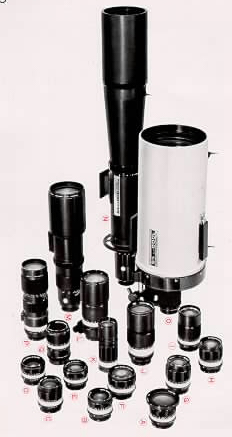
KONICA Filters
As the KONICA Autoreflex T is of the TTL type, there is
no need to worry about a filter factor according to the type of filter used
on your camera. It is advisable to use a filter to boost photographic effects.
| Color |
Name |
Effects |
| Colorless |
UV
(L 39) |
Absorbs only ultra-violet rays. Used for
color photography since it produces no effects on colors. Also serves
as a lens protector. |
Light Yellow
Yellow
Dark-Yellow |
Y I
(Y 44)
Y 2
(Y 48)
Y 3
(Y 52) |
Absorbs ultra-violet rays, purple and blue.
For landscapes, portraits and snapshots. Assures proper contrast
in brightness and dimensional effects. For black-andwhite. |
| Orange |
01
(056) |
Produces powerful contrast due to its wide
absorbing range. For mountains, distant scenes and architecture.
For black-and-white. |
| Red |
|
Extremely strong contrast. Daytime landscapes
sometimes look as if they were night scenes. Can be used with infrared
film. For black-and-white. |
| Yellowish green |
|
Brings film characteristics closest to the
human eyes. Shows colors naturally. For outdoor portraits as it
has the same characteristics as the light yellow filter. |
Light gray
Gray
Dark gray |
ND 2
ND 4
ND 8 |
Absolutely no effect on colors reduces light.
Used with both color and black-and-white. Light IS reduced
1/2
with ND2, 1/4 with ND4 and 1/8 with ND8. |
| Light pink SKYLIGHT |
|
Like the ND filter, it absorbs ultra-violet
rays Prevent distant scopes with sky and shades from becoming bluish
in color pictures. For color film. |
| Light amber |
A 2 |
Absorbs blue light from shadows; also from
cloudy scenes. Use to reduce color temperature for daylight type
color film. |
| Light blue |
B 2 |
Absorbs red from scenes taken at sunrise
and sunset. Raises color temperature for daylight-type color film. |
| Blue |
B 8 |
Used with flashbulbs (clear bulbs) and daylight-type
color film to reduce red tone and raise color temperature. |
| Dark blue |
B 12 |
Used with photo-reflector lamp (3,200K)
and daylight type color film to reduce red tone and to raise color. |
MAINTENANCE OF CAMERA AND LENS
In wiping the camera body and lens barrel, take off dust
with a brush and blower before they are cleaned with a piece of soft cloth.
Use a brush or blower in taking out dust inside the camera and do not go
as far as to wipe the mirror, which is a special plane mirror.
Use a soft brush in taking off dust on the surface of
the lens. in the event that it is marred with fingerprints or water drops
prepare a piece of wed washed, clean cotton cloth and dampen it with a small
quantity of absolute alcohol (it is advisable to mix it with ether). Lightly
wipe the lens surface in a whirlpool starting at the center.
To store the camera and lens, choose a place free from
moisture. Take out the mercury battery cells. The best and safest method
will be to keep them in a polyethylene bag together with a desiccant, such
as silica gel.
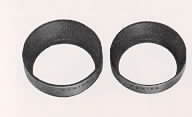
Lens Hoods
The use of a lens hood is indispensable to the prevention
of un-necessary rays From fading on the taking lens. It is advisable to
use a lens hood suited for the coverage of the lens mounted on your camera.
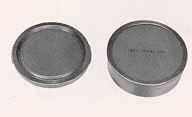
Body Cap and Mount Cap
The body cap is designed to protect the inner parts of
the camera and the rear part of the lens when the lens is detached from
the camera. It is of the bayonet type.
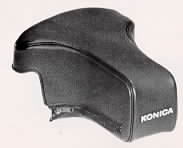
Semi-Hard Case Front Cover for 135mm Telephoto
Lens Usable even when a 135mm, 100mm or 85mm telephoto lens is
mounted on the camera.
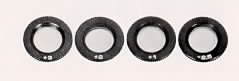
Eyesight Adjustment Lenses
For long- and short-sighted persons, it is advisable to
use an eyesight adjustment lenses on the eyepiece frame. It will become
easier to look into the viewfinder even without a pair of glasses, The lenses
come in the four types of +3, +2, +1 and - 2.5 Dioptrie,
Accessory Clip 3
Equipped the eyepiece assembly this is an adopter indispensable
for using a KONICA Cube Flash or a small electronic light in synchroflash
photography.

KONICA Cube Flash
A flash cube designed to flash 4 bulbs in a successive
manner this gadget also serves as a small flash gun using an AG-type adopter.
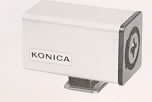
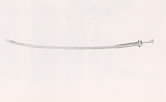
KONICA Cable Release
Use of the Konica Cable Release is advisable to prevent
the camera from being accidentally jarred when pictures are taken at slow
shutter speeds.
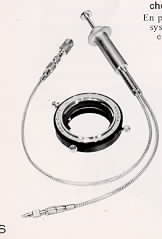
Auto Ring and Double Cable Release
The camera cannot be set to automatic aperture when the
extension ring and the extension bellows are in use. The use of the Auto
Ring and Double Cable Release makes it possible to take pictures in a semi-automatic
aperture system.
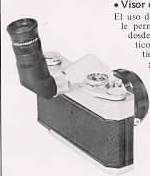
Angle Finder 2 The use of the Angle Finder
makes it possible to look into the viewfinder from above the camera. This
gadget is quite handy when pictures are taken at a low level, such as in
copying and microphotography.
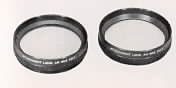
Attachment Lens 55mm
Simply by screwing this lens in on the taking lens, close-up
pictures may be taken under the EE system.
No. 1 for 64 to 32cm (25 to 12'A")
No. 2 for 36
to 26cm (14" to 11")
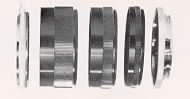
Extension Rings 2
Fitted between the camera and the lens, this ring is used
in taking close-up pictures of still objects or copying books. A set of
base rings and three intermediate rings will make it possible to take life-size
and smaller close-up pictures.
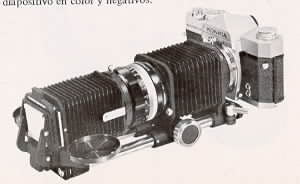
Extension Bellows 2
This bellows system is quite handy for taking pictures
of a subject in larger size than it actually is. As It may be optionally
expanded and contracted, this gadget IS fitted for use in taking close-up
pictures and photographing very small specimens, when the subject-to-camera
distance has to be changed in a successive manner.
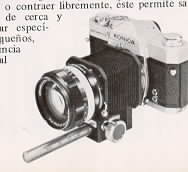
Extension Bellows 2D and Slide Copier
Being a deluxe version of the Extension Bellows 2, the
2D has a rail on which the bellows may be extended further. The Slide Copier,
used together with the 2D, is designed to copy color slides and negatives.
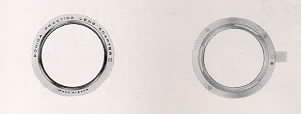
Lens Mount Adapters Fitted between the
lens and camera, this adapter is used for a lens other than the Autoreflex
T lens.
KONICA Lens Mount Adapter (For PM, FP
and FS)
Exakta Lens Mount Adapter 2 (For Exakta)
.
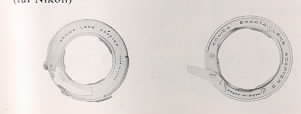
Praktica Lens Mount Adapter 2 (For
Pentax and Praktica)
N ikon Lens Mount Adapter
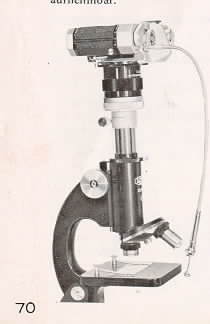
Microscope Adapter 2
This adapter makes it possible to take microphotographic
pictures only with the object and eyepiece lenses of ? microscope. While
looking through the camera finder, It IS possible to check the field of
view and whether or not the lens is accurately focused and to take pictures
while the subject is being observed.
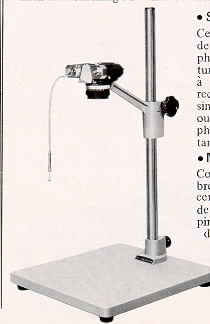
Copy Stand With a camera mounted on its
support stand, the Copy Stand makes it possible to copy prints, photographs
and paintings, less than 10-Sl8" x 13-3/4" in size, in an efficient
manner. The simultaneous use of the Extension Ring or Attachment Lens is
advisable for the copying of small-size pictures.
 ,
M. Butkus, NJ.
,
M. Butkus, NJ.