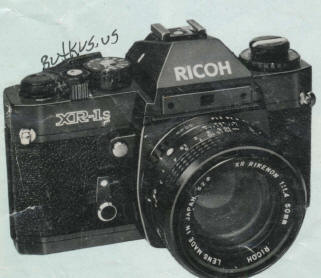
Ricoh XR-1 PDF VERSION
MADE FROM THIS HTML PAGE
This does not
have a winder ability
RICOH
XR-1s PDF MANUAL
MADE
DIRECTLY FROM THE ORIGINAL MANUAL
Ricoh XR-1s Mode d'emploi
Ricoh XR-1s Bedienungselemente
Ricoh XR-1s Manual de Instrucciones
This
model accepts an auto winder
Table of Contents
|
DESCRIPTION OF PARTS
BATTERY LOADING
BATTERY CHECK
FILM LOADING
SETTING FILM SPEED
METER/SHUTTER "ON-OFF" CONTROL
CORRECT EXPOSURE
SETTING SHUTTER SPEED
UNLOADING FILM
|
MULTI-EXPOSURE
TAKING FLASH PICTURES
USING SELF-TIMER
CHANGING LENSES
DEPTH OF FIELD
INFRARED PHOTOGRAPHY
INTERCHANGEABLE LENSES AND ACCESSORIES
PROPER CARE OF YOUR CAMERA
MAJOR SPECIFICATIONS OF XR-1
|
DESCRIPTION OF PARTS
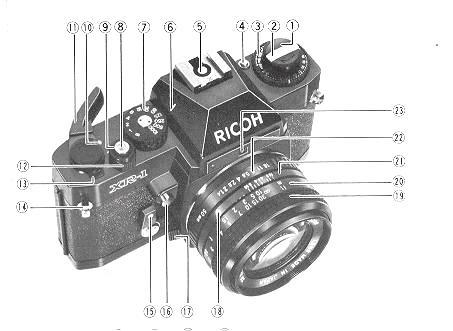 |
1. Film Rewind Knob/Back Cover Lock Release Knob
2. Film Rewind Crank
3. Film Speed Dial (ASA/DIN)
4. Film Speed Lock Button
5. Hot Shoe/Flash Contact
6 Shutter Speed index Line
7. Shutter Speed Dial
8. Cable Release Socket
9. Shutter Release Button
10. Meter/Shutter" ON-OFF" Index Mark
|
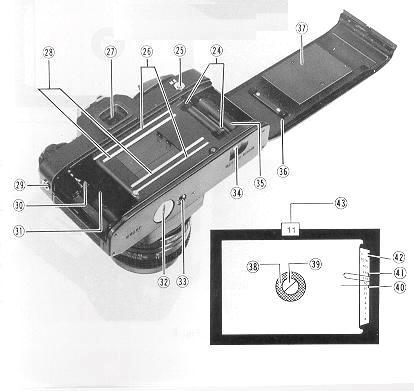 |
11. Film Advance Lever
12. Battery Check Ring
13. Exposure Counter
14. Neck Strap Eyelet
15. Self-timer Lever
16. Depth of Field Preview Button
17. Lens Release Lever
18. Lens Locator Node.
19. Focusing Ring
|
|
20. Distance Scale
21. Depth of Field Scale
22. F-Stop Ring
23. Aperture Relay Port
24. Sprocket Teeth
25. Multi-exposure Button
26. Film Guide Rail
27. Viewfinder Eyepiece
<<< update - I have been
told a Olympus eyecup
and other accessories will work on XR cameras >>>
|
28. Film Rail
29. "X" Flash Terminal
30. Film Rewind Shah
31. Film Chamber
32. Battery Compartment Cover
33. Tripod Socket
34. Film Rewind Release Button
35. Film Take-up Spool
36. Back Cover
37. Film Pressure Plate
|
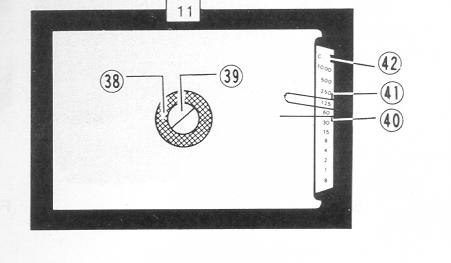 |
38. Microprism-image Band
39. Split-image Spot
40. Exposure Meter Needle
41. Shutter Speed Indicator
42. Battery Power Check Mark C
43. Aperture Readout Window
|
We are most gratified that you have selected the XR-1 which we are sure will
give you many delightful years of picture-taking pleasure. The XR- 1 is a 35
mm SLR camera which assures you of superb optics and outstanding mechanical
performance and reliability and which will justify your choice for years to
come.
Before Using Your XR-1 .....
Please read this instruction booklet carefully and familiarize yourself with
the equipment and its features thoroughly. Your pleasure in using your XR-1
will be greater if you know your camera properly.
BATTERY LOADING
 |
The built-in through-the-lens CdS exposure metering system of your
XR-1 operates on power activated by two 1.5V G13 silver-oxide batteries,
which are supplied together with your camera.
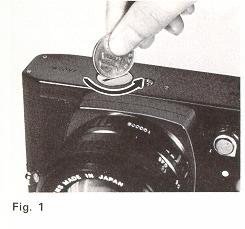
1. Remove Battery Compartment Cover (32) by unscrewing it counterclockwise
with a coin (Fig. 1).
|
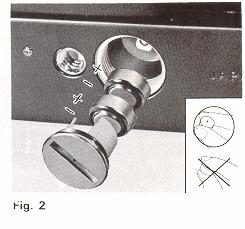 |
2. Place the two batteries into
the compartment with the plus side down. as illustrated in the battery
holder of Battery Compartment Cover (32) (Fig. 2). Make sure that the
batteries are correctly placed. If incorrectly placed, Exposure Meter
Needle (40) in the viewfinder will not move at all.
3. Replace
Battery Compartment Cover (32) by screwing it clockwise until it stops
but do not force. |
Tips for Better Results
* Before loading, wipe off the surfaces of the batteries with a clean and
dry cloth to ensure they are free of fingerprints or stains.
* When your camera is not used for a long period. remove the batteries and
keep them in a cool. dry place.
The batteries will last for about one year in normal use. We suggest you
replace them regularly once a year on your birthday or sooner.
* The batteries may explode if disposed of in fire.
BATTERY CHECK
Check the power of the silver-oxide batteries after loading them.
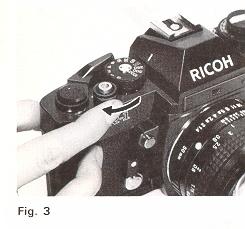 |
1. Turn Battery Check Ring (12)
clockwise until it stops (Fig. 3).
2. If Exposure Meter Needle (40) in the viewfinder swings to Battery
Power Check Mark "C" (42), the batteries have sufficient power (Fig.
4).
|
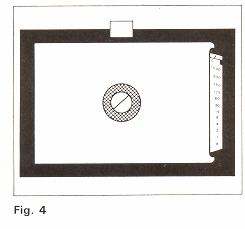 |
3. If Exposure Meter Needle (40)
does not move or stays below Battery Power Check Mark "C" (42), the
batteries must be replaced. For replacement, use Mallory MS76, Eveready
S76 or equivalent.
|
Tips for Better Results
* Do not turn Battery Check Ring (12) often in order to avoid unnecessary
consumption of the batteries.
FILM LOADING
Your XR-1 is designed to accept any standard 35 mm color or black and white
film roll in cartridge (12, 20. 24 or 36 exposures).
 |
1. First of all. press Shutter Release
Button (9) to see that the shutter has been released.
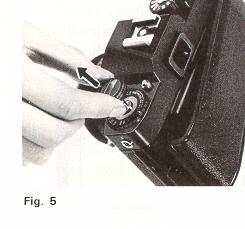
2. Pull up Film Rewind Knob (1) until Back Cover (36) snaps open
(Fig. 5). Then. pull it out all the way to allow for insertion of the
film cartridge.
|
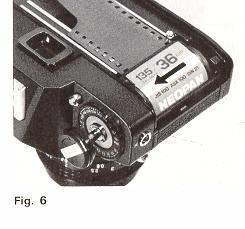 |
Swing open Back Cover (36) and place
a film cartridge into Film Chamber (31) (Fig. 6). |
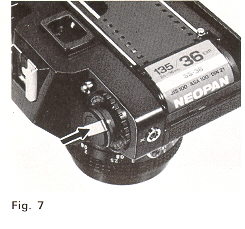 |
4. Push down Film Rewind Knob (1)
to its original position by turning Film Rewind Crank (2) clockwise
or counterclockwise so that Film Rewind Shaft (30) engages the film
cartridge and that the film cartridge is seated in place (Fig. 7). |
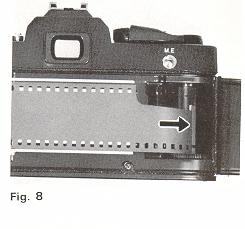 |
5. Draw the film leader across the
camera back and insert it into one of the slits of Film Take-up Spool
(35) (Fig. 8). To bring the slit into a convenient position. rotate
Film Take-up Spool (35) in the direction of arrow with your finger. |
 |
6. Rotate Film Take-up Spool (35)
by advancing Film Advance Lever ( 1 1 ) to take up any slack in the
film and check to see that the film tip is firmly hooked onto Film Take-up
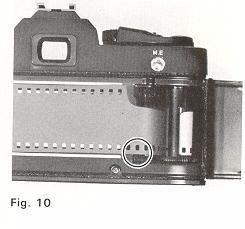
Spool (35) (Fig. 9) and that sprocket holes on the film are fully engaged
on Sprocket Teeth (24) (Fig. 10).
7. Close and press Back Cover
(36) firmly until it snaps shut. |
 |
8. Advance Film Advance Lever (
11 ) two or three times. after depressing Shutter Release Button (9)
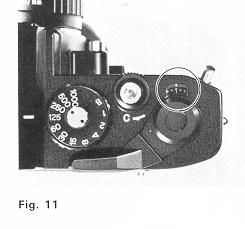
each time. until the number 1 is opposite the index line in Exposure
Counter (1,3) (Fig. 11), because the first portions of the film
can not be used for picture taking as they have already been exposed
to light and two or three blank exposures should be made before taking
your first picture. Now it is ready for your first picture. |
Tips for Better Results
* Always load your camera in the shade or in a poorly-lit place, never in
direct sunlight or other bright light.
* As you advance Film Advance Lever (11), Film Rewind Knob (1 ) will simultaneously
rotate counterclockwise indicating that the film is properly advanced.
SETTING FILM SPEED
Each type of film, color or black and white. has its own sensitivity to light.
This sensitivity is assigned by a numerical value described as an ASA rating
(U.S.A. Standard) or a DIN rating (Europe and most other countries). In most
cases. both ASA and DIN ratings are imprinted on the film package. as well as
the data sheet packed with the film and the film cartridge itself. The higher
the film speed rating. the more sensitive the film is to light; that is. less
light is required for a proper exposure. The film speed. therefore. is an important
element in insuring that the through-the-lens metering system of your camera
determines the correct shutter speed and f-stop combinations for a given lighting
situation.
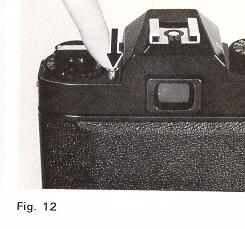 |
1. Depress Film Speed Lock Button
(4) (Fig. 12) and rotate the outer ring of Film Speed Dial (3) until
the ASA (or DIN) number of your film is exactly opposite the index line
on the outer ring of Film Speed Dial (3) and click stops. |
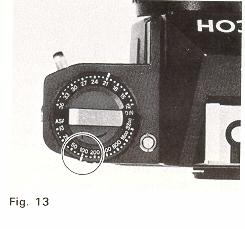 |
For example. if the film is
ASA 100, make the correct setting at "100" (Fig. 13).
2. Take your finger off Film Speed Lock Button (4) to lock the film
speed setting in the camera.
|
Tips for Better Results
* Each time a film with a new film speed rating is loaded in your camera.
the film speed must be set to assure accurately exposed photographs.
METER/SHUTTER "ON-OFF" CONTROL
Film Advance Lever (11) controls exposure meter "ON-OFF'' and shutter release
"LOCK-UNLOCK" to protect your camera from unnecessary depletion of the batteries
and accidental shutter release when not taking pictures. 40°pre-advance and
135°advance angle assures faster winding and permits continuous operation for
sequence photography.
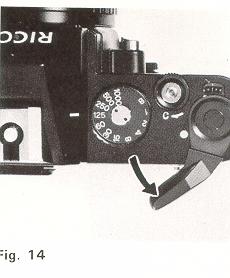 |
1. When Film Advance Lever (11)
is moved to "ON" position (Fig. 14), the electric circuit is switched
on and Shutter Release Button (9) is unlocked. |
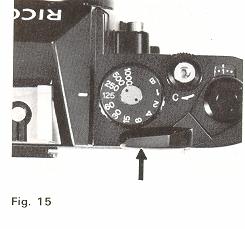 |
2. Whenever picture-taking is completed.
be sure to move Film Advance Lever (11) to "OFF'' position (Fig. 15).
The electric circuit is switched off and Shutter Release Button (9)
is locked. |
Tips for Better Results
* To prevent unnecessary consumption of the batteries, be sure to move Film
Advance Lever ( 11 ) to ''OFF'' position when not taking pictures.
CORRECT EXPOSURE
Your XR-1 has a built-in through-the-lens full aperture CdS exposure meter
which measures the light coming through the lens and enables you to set the
proper exposure for a given lighting condition. The correct exposure is obtained
by setting the shutter speed and f-stop in the correct combination for the film.
subject and lighting conditions.
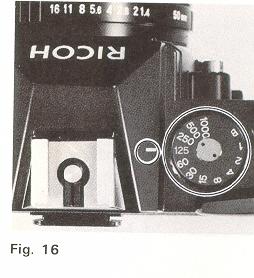 |
1. Set the desired shutter speed
opposite Shutter Speed Index Line (6) by rotating Shutter Speed Dial
(7) (Fig. 16). (Read ''SETTING THE SHUTTER''). Shutter Speed Indicator
(41) in the viewfinder indicates the shutter speed you just set. |
|
|
2. Move Film Advance Lever (11)
to ''ON'' position (Fig. 14) |
 |
3. Hold your camera. look at your
subject through the Viewfinder Eyepiece (27) and check Exposure Meter
Needle (40). |
 |
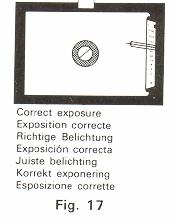
4. Rotate F-Stop (lens opening)
Ring (22) and align Exposure Meter Needle (40) with Shutter Speed Indicator
(41 ) (Fig. 17). F-stop is visible through Aperture Readout Window (43). |
 |
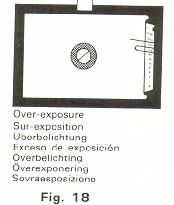
If Exposure Meter Needle (40) goes
above Shutter Speed Indicator (41), this means "overexposure"'' (Fig.
18); select a faster shutter speed or a smaller lens opening. On the
contrary.
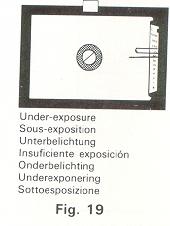
If the needle goes below Shutter Speed Indicator (41).
this means ''underexposure'' (Fig. 19); choose a slower shutter speed
or a larger lens opening. |
If you want to use a specific f-stop for depth of field control.
you may set the f-stop first and then the shutter speed. while other procedures
are the same as above.
This setting may be used when you take a portrait or the like, intentionally
making your subject attractive with the background or the scene in front of
it blurred. How your subject turns out in the picture depends on the f-stop
setting. (Refer to ''DEPTH OF FIELD''). The chart (Fig. 20) shows the exposure
value range (shutter speed and f-stop combinations) of your camera's metering
system for selected film speeds.
Exposure Compensation
Though you learned how correct exposure is obtained, in unusual lighting
conditions, the desired effect or the correct exposure will not be obtained
in the final picture and exposure compensation is necessary.
Back-lit subjects
When the light is behind the subjects,
1. Move close to the subject for meter reading, then. move back. focus and
shoot.
2. If it is impossible to approach the subject, adjust either shutter speed
or lens opening to overexpose. When you adjust the lens opening, open up the
aperture by 1 or 2 stops.
Spot-lighted subjects and dark backgrounds
1. Move close to the subject for meter reading, then. move back. focus and
shoot.
2. If it is impossible to approach the subject, adjust either shutter speed
or lens opening to underexpose. When you adjust the lens opening. close down
the aperture by 1 or 2 stops.
Tips for Better Results
* When the Shutter Speed Dial (7) is set at ''B'' (Bulb). set the desired
f-stop and expose manually because metering with the built-in exposure meter
is not possible.
* Do not make an exposure setting by pressing Depth of Field Preview Button
(16) or turning Battery Check Ring (12) because these will incorrectly influence
the meter's reading.
* Outside of the meter's coupling range, the exposure meter will not respond
correctly. For example, coupling range for ASA 100 film is from 1/4 sec. at
f/1.4 to 1/1000 sec. at f/16 (EV3 - 18) (Fig. 20). If the light is too dim,
use supplementary lighting.
SETTING SHUTTER SPEED
The shutter controls the length of time the light is allowed to strike the
film. The speed at which the shutter opens and closes is measured in fractions
of a second that correspond to the numbers on Shutter Speed Dial (7). For example.''1000"
is 1/1000 sec., "125" is 1/125 sec., ''4" is 1/4 sec., "1'' is one full second
and so on.
|
|
* Simply turn Shutter Speed Dial
(7) until the desired shutter speed is set opposite Shutter Speed Index
Line (6) (Fig. 16).
|
Generally speaking. when shooting outdoors in bright or hazy sunlight.
"125'' (1/125 sec.) is suitable for most pictures. When taking your subjects
in motion. "250" (1/250 sec.) to "1000" (1/1000 sec.) should be used .... Faster
speeds will "freeze" extremely fast moving subjects (sports, racing cars. etc.).
When indoors in a well-lit room, "60" (1/60 sec.) should be sufficient to take
your subjects. depending upon the film you are using. When in poorly-lit places,
or to achieve the maximum depth of field, "30" (1/30 sec.) to "1" (1 sec.) are
available. When set at "B", the shutter will remain open as long as Shutter
Release Button (9) is depressed (preferably by a cable release). The "B'' setting
is used for long night exposures using street lights or electric signs as a
light source, or under poor lighting conditions when flash cannot be used.
Tips for Better Results
* When using slow speeds (below 1/30 sec.). use a tripod or other firm support
to prevent the movement of the camera and blurred pictures. In shooting with
a telephoto lens, be careful to minimize the camera shake especially.
* Do not set Shutter Speed Dial (7) between marked speeds. but at a click
stop in accordance with indicated speeds only.
* Shutter Speed Dial (7) does not revolve between "1000" and "B".
SETTING APERTURE
The lens opening determines the amount of light entering the lens and exposing
the film. The smaller the f-stop (f/2.0. f/2.8 etc.). the wider the lens opening
and the greater the amount of light entering the lens. The larger the f-stop
(f/16, f/1 1, etc.). the smaller the lens opening and the smaller the amount
of light entering the lens. As the lens opening is moved from f/16 to f/11.
the amount of light entering the lens is doubled. As the lens opening is moved
from f/2.0 to f/2.8. the amount of entering light is cut in half (Fig. 21).
* Rotate F-Stop Ring (22) until the desired f-stop is opposite the aperture
index line (Fig. 22). Click stops are provided to prevent accidental movement
from the setting made.
Tips for Better Results
* If necessary you may set F-Stop Ring (22) between two f-stops.
VIEWING AND FOCUSING
Since you are viewing through the lens. there is no parallax problem What
you are viewing in the viewfinder will exactly appear in your picture. This
enables you to determine the exact composition of your subjects before pressing
Shutter Release Button (9).
Even when you shoot close-ups. there is no danger of accidentally cutting
off a portion of your picture. To assure the sharpest possible pictures your
XR-1 has a three way focusing screen with diagonal Split-image Spot (39) Microprism-image
Band (38) and Fresnel field and you can select three way focusing according
to your subject.
 |
1. Look into Viewfinder Eyepiece
(27) to compose your picture. |
2. Split-image Focusing ... is helpful for the subject
with either vertical or horizontal lines.
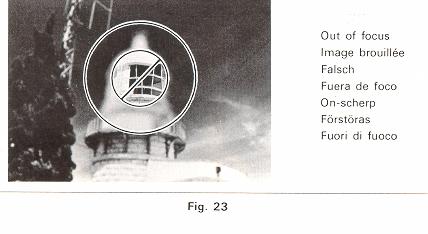
Rotate Focusing Ring (19) until
the split image in Split-image Spot (39) forms a single image. When it is out
of focus. your subject is split into two parts (Fig. 23).
3. Microprism Focusing ... is good for the subject which lacks
clear vertical or horizontal lines.
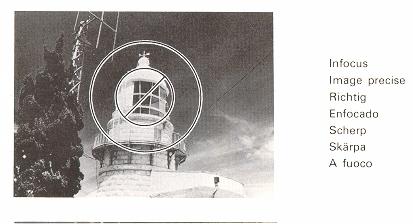 |
Rotate Focusing Ring (19) until
the image in Microprism-image Band (38) appears sharp (Fig. 23).
4. You can also focus with any part of the area surrounding Microprism-image
Band (38). This is most useful when taking pictures with ultra telephoto
lenses or in close-up photography with bellows unit. macro lenses or
extension rings because the other focusing aids may darken appreciably. |
UNLOADING FILM
 |
After the last picture on the roll of film has been taken. rewind
the film and unload your camera.
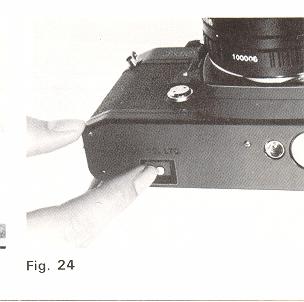
1. Press Film Rewind Release Button (34) (Fig. 24).
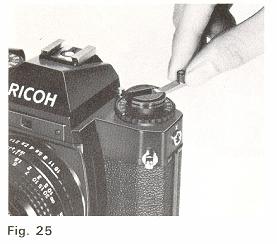
2. Lift up Film Rewind Crank (2) and turn it clockwise until Film
Rewind Release Button (34) stops revolving and you feel the film tension
released (Fig. 25). This indicates that the film has been completely
rewound into the cartridge.
|
 |
3. Open Back Cover (36) by
pulling up Film Rewind Knob (1).
4. Remove the film cartridge and have the film processed as
soon as possible.
|
Tips for Better Results
* Always unload your camera in the shade or in a poorly-lit place. never
in direct sunlight or other bright light.
* When you reach the end of the roll of film, Film Advance Lever (11) will
tighten and refuse to advance. If this happens. do not advance Film Advance
Lever (11) by force for "Just one more shot". otherwise the film will be torn
out of the cartridge.
* Film Rewind Release Button (34) will remain in place once it is pressed,
and return automatically to its original position when Film Advance Lever (11)
is advanced.
MULTI-EXPOSURE
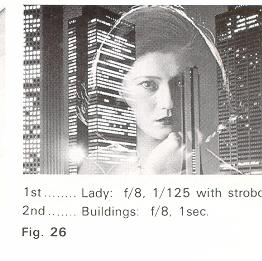 |
Your XR-1 has a multi-exposure device
which will give you a lot of creative fun (Fig. 26).
1. Make
the first picture in the normal way. |
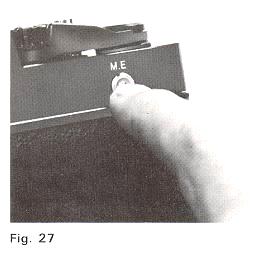 |
2. For the second exposure. advance
Film Advance Lever ( 1 1 ) while keep pressing Multi-exposure Button
(25) firmly with the other hand (Fig. 27).
This will set the
shutter for the second exposure without advancing the film and Exposure
Counter (13). |
Tips for Better Results
* Good results in multi-exposure depend on careful shutter speed and lens
opening setting. This means. in order to prevent overexposure of the final picture.
we suggest that the first picture should be underexposed by adjusting either
shutter speed or lens opening.
* If you want, repeat the same action for the third exposure or afterwards.
* Whenever advancing the Film Advance Lever (11 ) for second exposure or
afterwards. make sure that the Multi-exposure Button (25) is pressed firmly
with the other hand and watch to see that Exposure Counter (13) is not advanced.
indicating that multi-exposure picture is ready to be taken.
Take practice shots to get yourself accustomed to the multi-exposure technique
and take creative pictures of your own.
TAKING FLASH PICTURES
You can use a flash at night or in a dimly lit room as well as for supplementary
lighting in outdoor photography. The camera and electronic flash will be fully
synchronized with the shutter speed at "B'' and 1 sec. to 1/125 sec.
A. Cordless Electronic Flash Unit
If you are using an electronic flash unit with a built-in hot shoe contact.
it can be attached directly to Hot Shoe (5) on top of the camera pentaprism.
B. Flash Equipment with Connecting Cord
If your flash unit does not have a built-in hot shoe contact. attach it to
Hot Shoe (5) and plug the flash cord into the X" Flash Terminal (29).
 |
Tips for Better Results
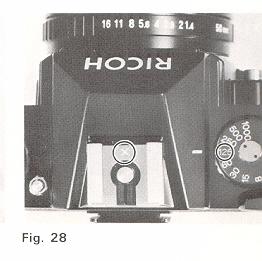
* 125 (1/125 sec.)
on Shutter Speed Dial (7) and "X on Hot Shoe (5) are marked in red as
a reminder for electronic flash synchronization (Fig. 28).
* When using PF M or MF class bulb. refer to the Chart (Fig. 29),
showing the synchronizing ranges of shutter speeds. (Mike: Not used
anymore dudes)
|
C. Exposure for Flash Photography
The exposure is determined by the guide number of the flash bulb or electronic
flash unit. The guide number represents a relationship between the light output
of the flash and the speed of the film. Guide numbers for flash
bulbs can be found on the package and guide numbers for electronic flash units
are found in the technical specifications. Using the guide number. you can determine
the correct f-stop for a given flash situation using the following formula:
F-stop = Guide number divided by Flash-to-subject distance.
For example. if your flash unit has a guide number of 16(m) or 52.8 (ft.)
for the type of film you are using and your subject is 2 meters (6.6 ft.) from
the flash unit as indicated on Distance Scale (20) after focusing divide 16
(52.8) by 2 (6.6). The answer is 8; therefore. set F-Stop Ring (22) to 8 (f/8).
Tips for Better Results
* If you are using an auto electronic flash unit with power ratio control,
follow the instruction sheets packed with the flash unit.
* Most electronic flash units have a built-in dial or exposure table which
enables you to quickly compute F-stops based on flash-to subject distances.
USING SELF-TIMER
 |
Your XR-1 has a built-in Self-timer which delays the shutter release
about maximum of 10 seconds. This enables you to include yourself in
your own pictures and is also of benefit in taking close-ups or photomicrographs
where camera movement must be avoided.
1. First. advance Film Advance Lever (11).
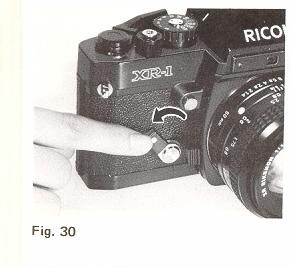
2. Merely move
Self-timer Lever (15) counterclockwise (Fig. 30). According to
the degree you have moved it down. you can adjust the operating time.
For the maximum delay, move it until it stops.
3. Press Shutter Release Button (9) to start the self-timer moving.
|
Tips for Better Results
* You can set Self-timer Lever (15) firstly and then advance Film Advance
Lever (11).
* The Self-timer Lever (15) can be returned to its original position aver
setting the lever, however. be careful that the self-timer mechanism will not
be disengaged.
* The camera should be placed on a tripod or other sturdy support when using
self-timer.
* When using a tripod with a long thread length (more than 5.7 mm). be careful
not to forcibly screw in the thread further than the depth of the socket.
CHANGING LENSES
 |
To mount the lens on the camera
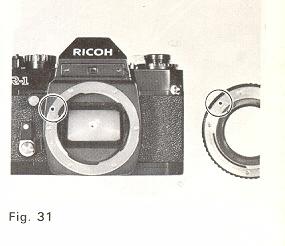
1. Mount the lens by lining up the red dot on the lens mount with the
matching dot on the camera mount (Fig. 31).
2. Grasp the lens
firmly around the lens barrel and turn it clockwise until it clicks
into place.
|
To remove the lens from the camera
 |
1. Grasp the lens firmly around
the lens barrel in one hand.
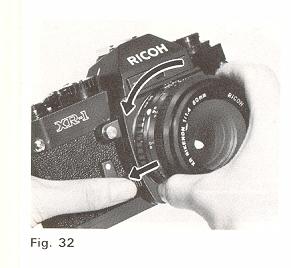
2. With the other hand. hold the camera body and press Lens Release
Lever (17) and turn the lens counterclockwise until it stops (Fig. 32).
The lens now can be removed.
|
You can also change lenses easily without looking even in the dark
by means of Lens Locator Node (18). Line up Lens Locator Node (18) with Lens
Release Lever (17) and turn the lens clockwise for mounting the lens. For removing
the lens. press Lens Release Lever (17) and turn the lens counterclockwise until
Lens Locator Node (18) and Lens Release Lever (17) line up.
Tips for Better Results
* Whenever a lens is mounted on the camera. make sure that the lens is perfectly
mounted.
* Do not touch any of the internal parts or permit dust or dirt to enter
the camera body when removing or attaching lenses.
* Protect the inside of the camera by putting on the body cap whenever the
camera is carried or kept with the lens removed.
DEPTH OF FIELD
When you focus on a specific subject. an area in front of and behind the
subject will appear acceptably sharp in your picture.
This area of acceptable sharpness is called "Depth of Field". The depth of
field is determined by the f-stop you select and the distance from the in-focus
subject to the film plane. As you get closer to your subject, or as you open
your lens (for example. from f/16 to f/2.8), the depth of field becomes shallower.
By stopping the lens down (for example. from f/2.8 to f/16). the depth of field
becomes deeper. The depth of field can be pre-determined in the following ways:
A. Depth of Field Preview Button
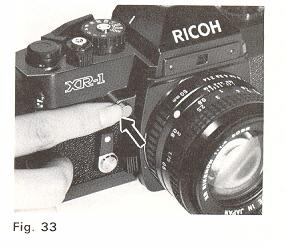 |
Pressing Depth of Field Preview
Button (16) (Fig. 33) will set the lens at the corresponding opening
you previously set on F-Stop Ring (22). This will enables you to preview
the area of acceptable sharpness in the picture you take. The viewfinder
will become dark corresponding to the f-stop you previously set on F-Stop
Ring (22). Depth of Field Preview Button (16) will automatically return
to its original position when you release it and the viewfinder will
become as bright as before. |
B. Depth of Field Scale
After you have set the lens opening and have focused the camera. the area
of acceptable sharpness in front of and behind your subject can be also determined
on Depth of Field Scale (21).
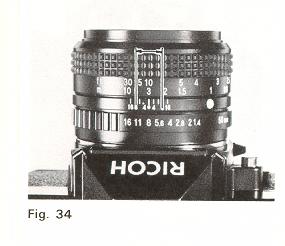 |
Locate on Depth of Field Scale (21
) the two numbers corresponding to the f-stop you have set on F-Stop
Ring (22). The distance between these two F stops on Distance Scale
(20) will be an area of acceptable sharpness in your picture. For example.
if your lens is focused at 3 meters (10 h.) and you shoot at 8 (f/8),
the area of acceptable sharpness will be from 2.2m (7.3 I.) to 5m (16.5
I.), by reading Distance Scale (20) opposite the both sides of the "8"
numbers on Depth of Field Scale (21) (Fig. 34). |
Tips for Better Results
* Do not depress the Shutter Release Button (9) when depressing Depth of
Field Preview Button (16).
INFRARED PHOTOGRAPHY
For infrared photography using infrared films. a correction of Distance Scale
(20) is necessary because "infrared light rays" focus on a film plane slightly
behind that of "visible light rays".
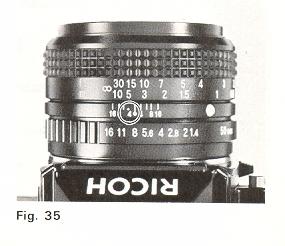 |
1. Normally focus on your subject
and note the camera-to-subject distance opposite the distance index
line on Distance Scale (20).
2. Turn Focusing Ring (19) until this camera-to-subject distance
setting is opposite the infrared index line. For example. if Distance
Scale (20) reads 5m (16.5 ft.) after focusing. merely shift the ''5"
(16) scale to the "a" (red) position (Fig. 35).
|
Tips for Better Results
* Infrared radiation varies with the degree of infrared light rays in the
atmosphere.
* For exposure. follow the instruction sheets which are packed with the film.
INTERCHANGEABLE LENSES AND ACCESSORIES
A wide range of XR RIKENON interchangeable lenses including extremely wide
angle lenses. telephoto lenses, zoom lenses and various accessories are available
to enable you to expand the pleasure of your picture-taking. XR RIKENON interchangeable
lenses and accessories are made of selected high quality materials under strict
quality control to assure you of high performance and full satisfaction. Select
XR R1 KENON interchangeable lenses and accessories that will meet your needs.
Since the camera is designed to accept any lens with the "K" type bayonet
mount, your XR-1 affords you the opportunity to select any interchangeable lens
or accessory of the "K'' type bayonet mount available on the market.
PROPER CARE OF YOUR CAMERA
* Always carry your camera with its carrying case and neck strap.
* Use the lens cap to protect the lens when not taking pictures.
* Protect your camera from dust, dirt, water, rain, dampness, salt air and
rough handling.
* Never expose your camera to excessively high or low temperatures for an
extended period of time. In extremely hot climates, do not leave your camera
inside closed automobiles during the daytime or in direct sunlight. In extremely
cold climates, expose your camera to the outer air only when in use.
When using, expose your camera gradually to the outer air to prevent the lens
from clouding.
If exposed to an extremely cold climate, the exposure meter batteries may
fail to operate properly. Keep your camera inside your clothing until taking
a picture.
* Never touch the surfaces of the lens, metal focal plane shutter curtain.
reflex mirror, etc. with your fingers.
* To clean the lens, gently wipe it in a circular motion with a lens cleaning
paper or a soft, clean and lintless cloth.
* Do not wipe the camera body with chemicals. such as benzine. thinner, etc.
use only soft cloth or cotton swab sprinkled LIGHTLY with alcohol on the camera
body. Do not use them on
* When your camera is not in use for an extended period of time,
put the lens cap, remove the batteries, place your camera in its carrying case
together with silica gel or other desiccant and store it in a dry and cool place.
Never store your camera in places where the temperatures are excessively high
or low or become humid.
* Do not attempt to disassemble or repair your camera yourself. If service
is necessary, get in touch with your dealer or authorized Ricoh service station.
MAJOR SPECIFICATIONS OF XR-1
Camera Type:
35 mm SLR with metal focal plane
shutter.
Film Format:
24x36 mm
Film Size and Capacity:
35 mm perforated film in 12. 20,
24 or 36 exposures.
Standard Lenses:
50 mm XR Rikenon f/1.4 (Multi-coated). 6 groups 7 elements
50 mm XR Rikenon
f/1.7 (Multi-coated), 5 groups 6 elements
50 mm XR Rikenon f/2.0, 5 groups
6 elements
Filter size: 52 mm screw-in type Lens Mount:
"K" type bayonet with 65° rotating angle Shutter: Vertically
moving Copal FC-523 metal focal plane shutter with speeds from 1 to 1/1000 sec.
plus B. Viewfinder: Fixed eye-level pentaprism
F-stop, Shutter
speeds. "B" (Bulb), Exposure meter needle (also
acts as battery checker).
Shutter speed indicator and battery check mark visible.
Viewing magnification
0.88X.
Field of view covers 93% of actual picture area. Focusing:
Diagonal Split-image spot in microprism band surrounded by Fresnel field.
Exposure Meter: Three CdS photocells TTL full open metering
for center-weighted average light reading coupled to shutter speeds, film speeds
and F-stops. Exposure Coupling Range: EV 3 - 18 (ASA 100 film
with 50 mm f/1.4 lens) Film Speed Range: ASA 12 - 3200 (DIN
12 ~ 36) Exposure Meter Power Supply: Two 1 .5V silver-oxide
batteries (JIS G 13, Mallory MS76. Eveready S76 or equivalent). Flash
Synchronization: X Synchronization for electronic flash unit at "B"
and 1 sec. to 1/125 sec. Flash Terminal: "X" flash terminal.
"X" contact (with electric shock prevention mechanism) on hot shoe for cordless
electronic flash unit. Film Loading: Multi-slit easy loading.
Film Wind: Single stroke film advance lever with 135° winding
angle (40° play). Film Rewind: Film rewind crank by pressing
film rewind button on base of camera. Exposure Counter: Additive,
automatic resetting. Other Features:
Self-timer
Hot shoe
Depth of field preview button
Shutter release
lock (with film advance lever)
Meter on/off switch (with film advance
lever)
Battery check ring (around shutter release button)
Multi-exposure
button
ASA/DIN dial lock
Cable release socket
Tripod socket
Dimensions:
139.9 (width) x 91.3 (height) x 48.0 (depth) mm (Body only)
Weight:
550g (Body only)
* Specifications are subject to change without notice.
 ,
M. Butkus, N.J.
,
M. Butkus, N.J.