and historical purposes, all rights reserved.
This page is copyright© by
 ,
M. Butkus, NJ.
,
M. Butkus, NJ. This page may not be sold or distributed without
the expressed permission of the producer.
I have no connection with any camera company.
This camera manual library is for reference
and historical
purposes, all rights reserved.
This page is copyright©
by
,
M. Butkus, NJ.
This page may not be sold or distributed without
the expressed
permission of the producer.
I have no connection with any camera company.
On-line camera manual library
If you find this manual useful,
how about a donation
of $3 to:
M. Butkus, 29 Lake Ave.,
High Bridge, NJ 08829-1701
and send your e-mail
address
so I can thank you.
Most other places would charge
you
$7.50 for a electronic copy
or $18.00 for a hard to read Xerox copy.
Back to main camera manual page
CLICK HERE FOR PETRI MF-3
PDF MANUAL
Petri MF-3 Bedienungsanleitung
Petri MF-3 Mode
d'emploi
Petri MF-3
istruzioni per l'uso
Petri MF-3 Manual
de Instrucciones
Click here for Petri MF-3 PDF version
made from html
page
- Better printing
PETRI MF-3
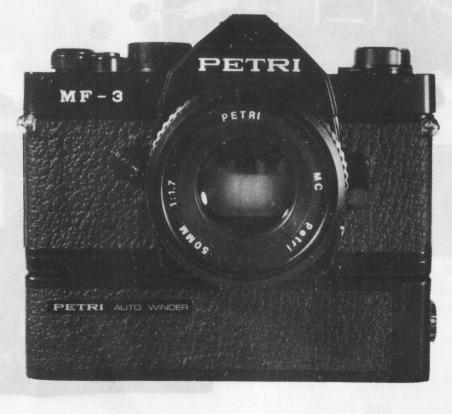 |
Welcome to the exciting world of PETRI. You new camera is one of a family of professional quality cameras designed with the serious photographer in mind. And the name PETRI is your assurance of superbly crafted optics and outstanding mechanical performance and reliability. |
Description of Controls
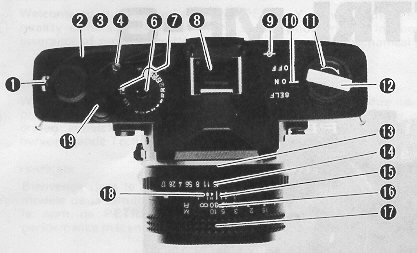 |
1. Exposure Counter Window 2. Film Advance Lever 3. Shutter Speed Index 4. Film Rewind Button 6. Shutter Speed Dial 7. Film Speed ASA Window 8. Hot Shoe 9. Film Plane Reference 10. Main Switch 11. Film Rewind Knob 12. Film Rewind Crank 13. Lens Flange 14. Aperture Ring |
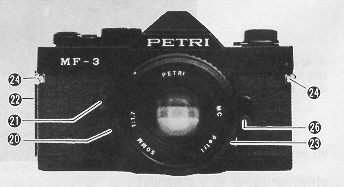 |
15. Aperture/Distance Scale Index Line 16. Depth of Field Scale 17. Focusing Ring/Distance Scale 18. Infrared Mark 19. Shutter Release Button 20. Lens Mount Release Button 21. Self timer LED 22. Removable Door Hinge |
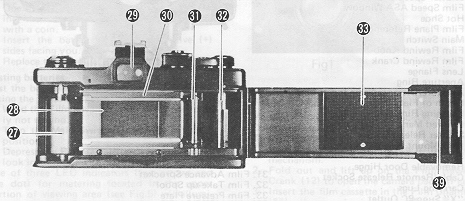 |
23. Cable/Remote Release Socket 24. Carrying Lugs 26. "X" Sync PC Outlet 27. Film Chamber 28. Film Aperture 29. Viewfinder 30. Film Guide Rails |
 |
31. Film Advance Sprocket
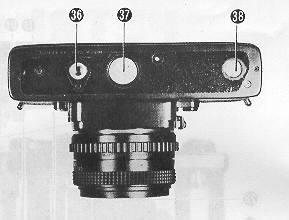
32. Film Take-up Spool 33. Film Pressure Plate 36. Tripod Socket 37. Battery Compartment Cover 38. Auto-winder Coupler 39. Back Cove |
POWER SUPPLY
 |
Your MF-3 is powered by two,
1.5 volt silver oxide batteries (Eveready S-76, Mallory MS 76, G
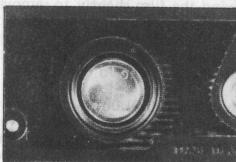
13 or equivalent). Battery installation 1. Open the battery compartment by unscrewing the battery compartment cover (37) with a coin. 2. Insert the batteries with the positive (+) sides facing you. (Fig.1) 3. Replace the cover and tighten it firmly. |
Testing batteries
Test the batteries
for sufficient power levels by taking the following procedure:
1. Wind
the Film advance Lever (2) if previously not wound.
2. Turn the Main
Switch Lever (10) to "ON" position.
3. Depress the Release Button (19)
slightly and look into the viewfinder.
One of three LED
indicators (two arrows and one dot) for metering located in the upper
portion of viewing area (see Fig.5) will illuminate if there is
sufficient power. If batteries are below the operational voltage of the
camera system, replace them with a fresh set.
 |
1. Press the release button to clear the camera mechanism.
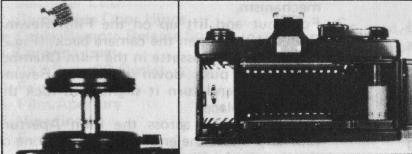
2. Fold out and lift up on the Film Rewind Crank (12) to open the camera back. (Fig.2) 3. Insert the film cassette in the Film Chamber (27), then push down the Film Rewind Knob (11) and turn it slightly to lock the cassette in place. |
4. Pull film leader across the Film Aperture (28)
and insert the end of leader into one of the slots in the film take-up spool.
(Fig.3)
5. With the film rewind crank in the folded out position,
rewind the film slightly to remove any slack in the film cassette. Recheck
to see that the film remains secured to the take-up spool and that it is
properly aligned with the Sprocket (31). Fold down rewind crank.
6.
Close the Back Cover (39) until you hear an audible click, which indicates
that the cover is locked in the closed position. Advance the film by alternately
winding the advance lever and pressing the shutter release button until
the number "1" appears in the Film Counter Window (1). As the advance lever
is wound, the film rewind knob should rotate, indicating that the film is
advancing properly.
SETTING FILM SPEED
For properly exposed photographs, your MF-3's electronically controlled
metering system must be set for the correct ASA (or DIN - for DIN equivalents,)
rating of film you are using.
To set the film speed:
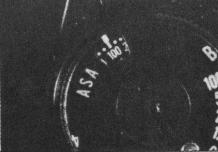
1. Lift the collar on the Shutter
Speed Dial (6).
2. Turn the collar until the ASA rating for
your film appears in the ASA Window. (Fig.4)
3. Release the
collar to lock the setting in place.
SHUTTER SPEED SELECTION
 |
The MF3 has a shutter speed range of 4 seconds to 1/1000 second, plus "B" (Bulb) for Time Exposures. To set the shutter speed, turn the shutter speed dial until the desired shutter speed is aligned with the Shutter Speed Index (3). When using shutter speeds below 1/30 of a second, it is advisable to use a tripod and a cable release or the exclusive remote controller to eliminate the possibility of vibration due to the camera movement. The MF-3 is equipped with a threaded Cable Release Socket (23) and Tripod Socket (36) for use with these accessories. |
TIME EXPOSURES
FOCUSING THE CAMERA
1. Center the split-image rangefinder on your key subject and turn the
Focusing Ring (17) until the upper and lower portions of your subject become
one, clear vertical image.
2. The surrounding microprism collar will
a) appear fragmented when the image is entirely out of focus, b) appear
shimmering but viewable when image is nearly in focus and c) appears clear
when your subject is in focus. It is especially useful when there are no
pronounced vertical lines on your subject, making the use of the horizontal,
split image rangefinder difficult.
3. The entire focusing screen may
be used for both focus and composition of your photograph. The human eye
tends to ignore minor differences in sharpness. Therefore, the horizontal
split image rangefinder and/or the microprism collar should always be used
for critical focus when possible.
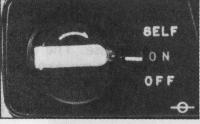 |
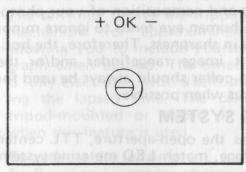
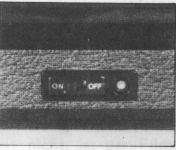
1. Advance the film. 2. Set the Main Switch (10) to "ON". (Fig. 6) 3. Select a desired shutter speed by rotating the shutter speed dial. |
4. Depress the shutter release button quite slightly so that one of the
LED indicators in viewfinder illuminates. (Fig. 7)
5. The LED indicators
will tell you whether the present setting is over, under or correct exposure.
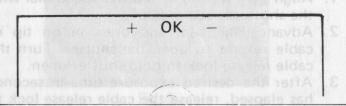 |
6. When the red warning light (+) lights it is meaning of Overexposure In this case the diaphragm ring of the taking lens should be turned to the I-) illumination or the shutter speed dial should be turned to a higher speed until the OK signal lamp lights. |
7. When the red warning lamp I-) lights, it is meaning of Under-exposure.
In this case the diaphragm ring of the taking lens should be turned to the
direction the (+) illumination or the shutter speed dial
should be turned to the opposite direction until the OK signal lamp lights.
8. The proper exposure of film is obtained whenever the OK signal lamp
lights. The range that the OK signal lights is 0.3 EV.
DEPTH OF FIELD
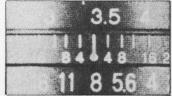 |
The aperture setting determines the near and far areas in which items other than your key subject will remain acceptably sharp. This "zone of focus" is referred to as depth of field. Your lens features a depth of Field Scale (16), which allows you to select the zone of focus which will appear in the final photograph. (Fig. 9) |
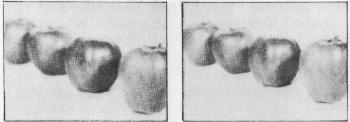 |
Under normal lighting conditions, selecting a larger aperture opening (eg: F2.8 or F4( will allow you to keep your key subject in sharp focus while putting distracting elements in out of focus the foreground or background of your photograph. Under same conditions, selecting a smaller aperture opening (eg: F11 or F16) will bring both near and distant objects in focus. (Fig.10 & 11) |
SELF TIMER
The self timer delays the tripping of
the shutter mechanism for approximately 10 seconds, allowing you to include
yourself in the photograph when desired. The timed delay function is fully
electronic, with a self timer LED displaying the lapsed time. The camera
should be tripod-mounted or placed on a firm support when this feature is
used.
To activate the
self timer:
1. Focus and compose photograph.
2. Adjust controls for correct exposure display.
3. Turn
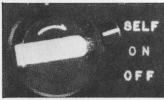
the main switch lever to "SELF" position. (Fig.12)
4. Press the
shutter release button.
5. Position yourself in photograph area
within 10 seconds.
NOTE: If you decide not to use the self timer after setting it, turn back the lever to the original position. Also after photographing with self timer, turn back the lever to "ON" or "OFF" position unless you intend to take the next one with self timer. Mount the eyepiece cover (inserted in hot shoe) on the eyepiece whenever you photograph without looking through the viewfinder.
FLASH PHOTOGRAPHY
REMOVING FILM
 |
1. Push in the Film Rewind
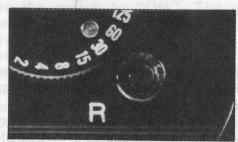
Button (4). (Fig.13) 2. Fold out the film rewind crank and turn in direction of arrow. 3. When the crank turns freely (without tension or "drag"), pull up on the crank to open the camera hack. The film counter will automatically reset to zero. 4. Remove the exposed cassette for processing. Insert a fresh roll of film while the camera back is still open, or close the back for storage. |
NOTE: Do not load or unload your camera under direct sunlight.
CARING FOR YOUR CAMERA
SPECIFICATIONS
Camera Type: 35mm
electronic single lens reflex camera with TTL, open-aperture, exposure balance
system
Film Format: 24mm
x 36mm
Lens Mount: K
type bayonet mount
Flange back focus distance:
 |
 |
1. Couple the winder with the
camera body. (Fig.18) 2. Tighten the screw. (Fig.19) 3. Set the switch to "ON". The winder advances the film, if the film has not been advanced. 4. Set the exposure and focus. |
5. Depress the release button fully to activate the shutter. The winder
will immediately start advancing the film. At this moment, if you release
your finger from the release button, only a single shot is made. If you
keep depressing it, continuous shots at a rate of 2 f/sec. can be made.
6. When you have finished exposing the last frame in your film cassette,
take procedures as described in "REMOVING FILM". You need not remove the
winder from camera body when removing film