and historical purposes, all rights reserved.
This page is copyright© by
 ,
M. Butkus, NJ.
,
M. Butkus, NJ.This page may not be sold or distributed without
the expressed permission of the producer
I have no connection with any camera company
On-line camera manual library
If you find this manual useful,
www.PayPal.me/lynnbutkus CONTINUE TO HTML BELOW
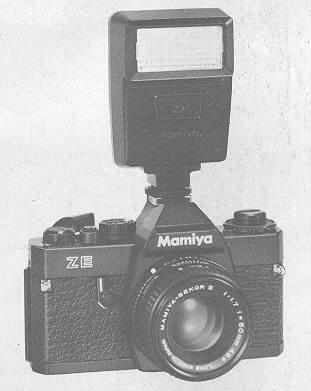
Mamiyalite ZE
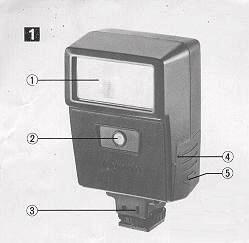
Names of Parts (Fig.1) 1. Flash Window 2. Light Sensor 3. Sync Cord Socket 4. Alignment Dot 5. Battery Chamber Lid
how about a donation
of $3 to:
M. Butkus, 29 Lake Ave.,
High Bridge, NJ 08829-1701
and send your
e-mail address
so I can thank you.
Most other places would charge
you $7.50 for a electronic copy
or $18.00 for a hard to read Xerox copy.
buy new manuals, and
pay their shipping costs.
It'll make you feel better, won't
it ?
If you use Pay Pal, use the link below.
Use
the above address for a check, M.O. or cash.
Venmo is @mike-butkus-camera
Ph 2083
<<< IF YOU WOULD LIKE THIS OR ANY PDF FILE
PRINTED, BOUND AND MAILED TO YOU,
SEE THIS OUTSIDE COMPANY'S OFFER >>>
Back to main camera manual page
CLICK
HERE FOR MAMIYA ZE FLASH PDF
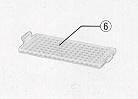
| 6. Wide-angle Diffuser
7. Red Index Mark 8. Blue Index Mark |
 |
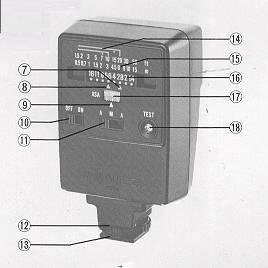 |
9 ASA Index Mark 10 Main Switch 1 1. Flash Mode Selector Switch 12. Fastening Ring 13. Mounting Foot 14. Automatic Flash Range Marks 15. Distance Scale 16. Aperture Scale Slide 17. ASA Numbers 18. Pilot Lamp/Test Button |
Loading Batteries
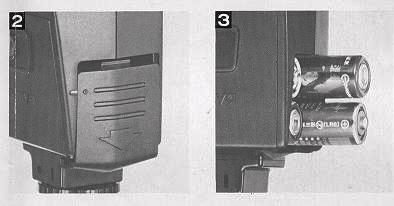 |
Open the Battery Chamber by depressing
the Lid slightly with the thumb and pulling it in the direction of the
arrow. To replace the Lid, align the Dot and Line at the side and push
the Lid up until it snaps into place (Fig. 2). When loading the batteries, make sure the poles are placed exactly as indicated by the guide marks inside the Chamber ( Fig. 13). |
· Turn off the main switch when the flash is not
in use.
|
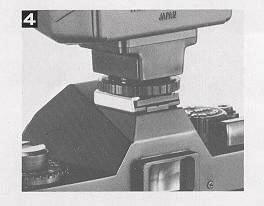
Mounting on the Mamiya ZE Camera
First, turn off the Main Switch and loosen the Fastening Ring of
the Foot. Next, slide the Foot into the camera shoe until it stops and
lock the Mamiyalite ZE tightly into the shoe by turning the Fastening
Ring (Fig.4) |
 |
Setting Film Speed (Fig. 5-1)
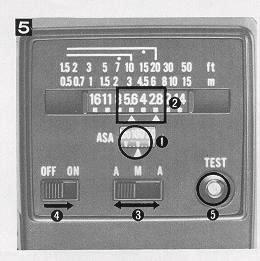 |
Align the ASA number of the film being used with the white ASA Index Mark by sliding the Aperture Scale Slide right or left. The ASA number set must be the same as the one set on the camera. |

Setting the Aperture (Fig. 5-2)
Using the Wide-angle Diffuser (Fig. 6) You will find the Wide-angle Diffuser in the pocket of the vinyl
case. To use, snap it onto the Flash Window as shown in the picture.
Proper exposure will be obtained without changing any settings when
using the automatic flash mode. But note that the automatic flash exposure
range becomes smaller, as shown on the Distance Scale by the dots.
After the ASA rating of the film has
been set, the Aperture Scale will have a large aperture aligned with the Red
Aperture Index Mark and a small aperture aligned with the Blue Aperture Index
Mark. Either of these apertures may be set on the lens aperture ring to obtain
correct exposure automatically. Set the lens aperture ring to the desired aperture.
If the recommended apertures are between the marked numbers, set the
lens aperture in the same way.
To select which of the two apertures
to use choose the larger (smaller f-number) when the subject is at a distance
and the smaller when the subject is close, or when you need more depth-of-field.
After deciding which aperture to use, turn the Mode Selector Switch
to the red or blue "A", depending on the color of the Aperture Index Mark of
your aperture (Fig.5-3).
Main Switch and Pilot Lamp
Turn on the Main Switch (Fig. 5-4). A few seconds later,-the Pilot
Lamp will light to indicate that the flash is ready to shoot. (Fig.5-5).
Regardless of the shutter speed to which the Mamiya ZE camera is set, it
will automatically shift to the flash sync speed when the Pilot Lamp lights.
You can check the recycling of the flash without looking at the Pilot Lamp each
time by checking when the LED in the viewfinder shifts to "60" because the Mamiya
ZE stays in the normal automatic exposure mode when the Mamiyalite ZE is not
fully charged and the Pilot Lamp is not lit.
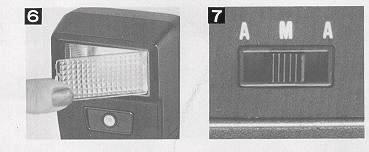
Manual Mode (Fig. 7)
Set the Flash Mode Selector
Switch to the "M" in the middle. The Mamiyalite ZE always flashes at full power
in this mode. To find the proper aperture, first focus on the subject and read
the distance shown on the lens focusing ring; then read the f-number shown below
the Distance Scale of the Mamiyalite ZE for this same distance. This f-number
is the one to which you should set the lens aperture ring.
When using
the Wide-angle Diffuser, set the aperture one f-stop larger than shown on the
Aperture Scale.
Using the Mamiyalite ZE
on a Camera Without a Hot-shoe
Connect the Mamiya Sync
Cord MSC-2 (sold separately) to the socket. The hot-shoe contact on
the bottom of the mounting foot will then retract to prevent misfiring.
Connect the Sync Cord to the X-sync terminal of the camera.
Specifications
Type: Automatic exposure control, dedicated electronic flash.
Coupling system: Hot-shoe with unique Mamiya ZE contact,
regular hot-shoe or Mamiya Sync Cord.
Guide number:
17 (ASA100, in meters): 12 with Wide-angle Diffuser. 56 (ASA100, in feet); 39
with Wide-angle Diffuser.
Angle of coverage: 45° vertical,
60° horizontal. Provides coverage for 28mm wide-angle lens with Wide-angle Diffuser.
Recycling time: Alkaline-manganese AA-type: 6 sec. or less.
Ni-Cad AA-type: 5 sec. or less.
Number of flashes:
Alkaline-manganese: more than 300. Ni-Cad: more than 90.
Auto
flash range selector switch: three-mode selection of two auto flash
ranges using red and blue to distinguish one automatic setting from another,
plus a manual setting. (Using ASA100 film, the red mark indicates f/2.8 and
the blue mark indicates f/5.6.)
Auto flash range: Two
color-coded f-stop settings.
Red Index Mark:
Normal 0.5 to 6.0 m (1ft. 8in.
to 20ft.)
Wide 0.5 to 4.3 m (1ft. 8in. to 14ft.)
Blue Index Mark:
Normal 0.5 to 3.0 m (1ft. 8in. to
Loft.)
Wide 0.5 to 2.1 m (1ft. 8in. to 7ft.)
Film speed setting: ASA25 to ASA800. Dots for one-third step
increments between marked figures.
Shutter speed setting:
When attached to the Mamiya ZE, the shutter speed is automatically set when
the unit is fully charged (except when the camera is set at X or B).
Power source: Four alkaline-manganese or Ni-Cad AA-type
batteries.
Dimensions: 64 (W) x 45 (D) x 104 (H) mm
(2-1/2 x 1-3/4 x 4-3/32 in,) Weight: 150 9. (5.3 oz.), without batteries.
· All specifications are subject to change without notice.
Notes:
·The Guide Numbers given were measured with
new batteries 30 seconds after the Pilot Lamp lit.
· Recycling Time
is the shortest interval required between three consecutive flashes using fresh
batteries or fully charged Ni-Cad batteries.
· The Number of Flashes
is the count found by discharging the flash continuously at 30-second intervals
until 30 seconds were required for the Pilot Lamp to light with a set of fresh
batteries or fully charged Ni-Cad batteries.
Notes on Batteries
1. Remove the batteries when the Mamiyaiite ZE is
not to be used for an extended period in order to prevent possible damage due
to leakage.
2. Manganese batteries can also be used but the recycling time
is longer and fewer flashes are possible.
3. Battery performance is less
under low temperature conditions, so Ni-Cad batteries should always be used
fully charged. Alkaline-manganese batteries should be kept warm during use.
4. All four batteries should be replaced at the same time. Never mix new
and old batteries, or batteries of different brands, as leakage may result.
5. Battery life varies depending on the type of battery, the storage after manufacture,
the amount of time that has elapsed since manufacture, whether usage is continuous
or intermittent and the ambient temperature.