and historical purposes, all rights reserved.
This page is copyright© by
 ,
M. Butkus, NJ.
,
M. Butkus, NJ. This page may not be sold or distributed without
the expressed permission of the producer
I have no connection with any camera company
On-line camera manual library
If you find this manual useful,
how about a donation
of $3 to:
M. Butkus, 29 Lake Ave.,
High Bridge, NJ 08829-1701
and send your e-mail
address
so I can thank you.
Most other places would charge
you
$7.50 for a electronic copy
or $18.00 for a hard to read Xerox copy.
buy new manuals, and pay
their shipping costs.
It'll make you feel better, won't it ?
Use the above address
for a check, M.O. or cash.

Venmo is @mike-butkus-camera Ph 2083
<<<
IF YOU WOULD LIKE THIS OR ANY PDF FILE
PRINTED, BOUND AND MAILED TO YOU,
SEE
THIS OUTSIDE COMPANY'S OFFER >>>
CLICK HERE
TO CONTINUE TO
Mamiya CPW MS WORD Style Document
CLICK HERE
TO CONTINUE TO
Mamiya CWP PDF made from HTML Page
NOMENCLATURE
The Mamiya/Sekor CWP with IMPORTANT In switching light meter
sensitivity selector (4) from high (H) to low (L), or vice-versa, be
sure to press down with fingers 2 levers in front and back of shutter
speed selector knob. To conserve on batteries, always make sure to have
light meter sensitivity selector (a) on high range side unless light
condition demands shifting to low range necessary. LOADING FILM
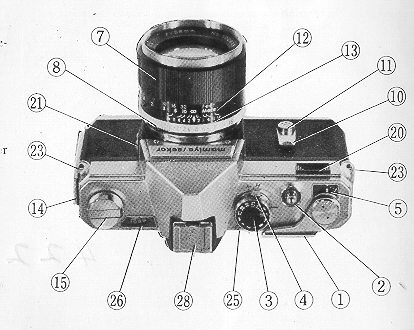
1. Film Advance Lever
2. Shutter Release Button (with cable release socket)
3. Shutter Speed Dial
4. Light Meter Sensitivity
Selector
5. Exposure Counter
6. Viewfinder
7. Focusing
Ring
8. Lens Aperture Ring
9. Depth of Field Preview
Lever
10. Self-timer Lever
11. Self-timer Actuating
Button
12. Distance Scale
13. Depth of Field Scale
14 Slide Lock for Back Cover
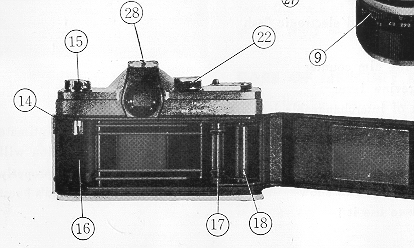
15. Film
Rewind Crank
16. Film Chamber
17. Sprocket
18.
Take-up Spool
19. Sprocket Release
20. Light Meter Window
21. Flash Terminal
22. Film ASA Scale
23. Strap
Eyelets
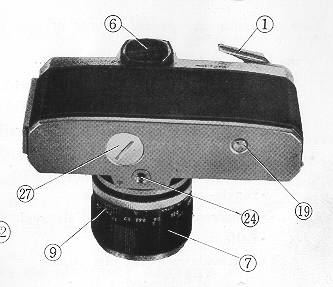
24. Tripod Socket
25. Focusing
Indicator
26. Exposure Meter Indicator Window
27. Battery
Cover
28. Accessory Shoe
• Fast 58mm, 6 element, F 1.7
lens with high resolution Built-in CdS light meter
• Through-the-lens
viewing no parallax problems
• Instant-return mirror for
before and after viewing
• Shutter speed range: Time to 1/1000
• Single-stroke film advance
• Synchronized for bulb and electronic
flash Self-timer 10 seconds
• Automatic re-setting film
counter Depth of field preview lever
• Full complement of interchangeable
lenses and accessories available
The time spent reading this Instruction
Book will be repaid in excellent pictures. Intimate knowledge of the various
parts of your Mamiya/Sekor CWP and their function will make ease of handling
second nature-your pictures will be sharp, clear and properly exposed. Pictures
you will be proud to show because you have one of the world's
finest cameras and you know how to use it !
GETTING READY
Take your Mamiya/Sekor CWP in hand and
notice the fine balance and convenient location of the controls.
LIGHT METER BATTERY
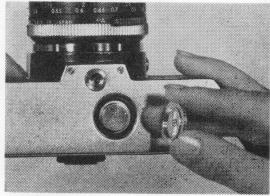
Now,
turn the camera over and turn the battery cover (27) counterclockwise
with a coin to open. Insert provided battery (1. 3V) so that positive
(+) side faces the back of the cover. Replace cover. Your meter is now
ready to use.
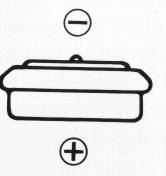
Positive (+) side and negative (-)
side of the battery are as shown by drawing. The battery will last approximately
one year depending on the frequency of use.
Dispose of the exhausted
battery in a safe place. It is dangerous to take it apart or throw into
a fire.
You need a replacement Wein Air battery.
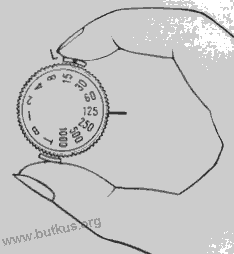
Sometimes,
you may have to open back cover with winding lever half stroked because
old roll is at the end. Before loading a new roll, be sure to push winding
lever all the way to the end of the stroke in order to reset frame counter
to start position (S).
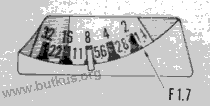
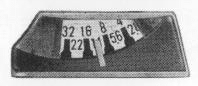
The point which corresponds to F
1. 7 in the exposure indicator is the center between 2 and 1.4 and is
indicated by the arrow in the figure on the right.
All 35mm film, black and white, color, 20 or 36 exposures
can be used. Always load film in subdued light.
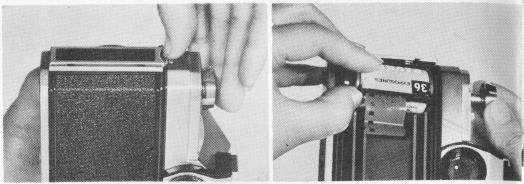
1. Open back of camera by pulling
out the slide lock. Pull up the rewind crank knob (15) and insert the
35mm cartridge in the chamber (16). Return the rewind crank to its former
position if it does not position itself turn handle
to right or left until it fits in place with a click.
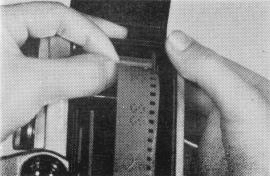 |
2. Turn the take-up spool (18) until the slit appears ; insert end of the film in the slit (fold end of film for tight fit, if necessary), wind the film on the spool for one turn. Be sure the lower edge of the film is against the lower flange of the spool and that the sprocket teeth engage the film perforations. |
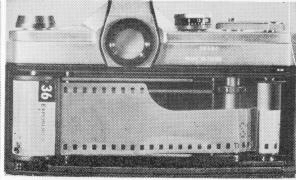 |
3. Next, turn the rewind crank (15)
in direction of the arrow until all film slack is taken up. Check again
to make sure the sprocket teeth engage the film perforations close
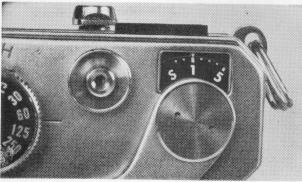
and lock the back. 4. The letter S appears opposite the arrow in the exposure counter window (5). Advance film a single stroke and depress shutter release button after each stroke. Continue this until the figure 1 appears opposite the arrow. The camera is now ready for the first picture. |
 |
6. Each time the film is advanced
the rewind lever will turn this assures proper film
action in the camera. 7. The shutter is wound when film is advanced ; next frame can only be advanced after shutter is released. |
USING THE EXPOSURE METER
The Mamiya/Sekor CWP incorporates a most advanced
and sensitive CdS meter.
It's wide range opens up new picture-taking opportunities
. . . . this is how to use it:
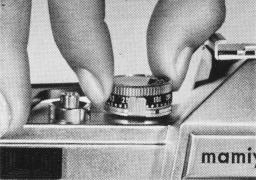 |
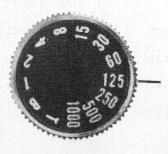
1. Lift the shutter speed dial (3)
and by turning match the ASA film speed (22) with the red mark on the
lower portion of the dial. The meter is now coupled to the film speed.
2. Under normal light conditions the sensitivity selector lever (4) is set on H. This position conserves battery life. For low light conditions set the selector lever at L. |
 |
 |
3. Now, point the camera at the subject or scene to be photographed. One of two choices is now possible: (1) If the shutter speed is important (as in sports events) this should be set first and then the correct exposure regulated by turning the lens aperture ring (8) until the pointer is centered in the exposure meter window (26). (2) If the depth of field is important (as in scenery, etc.) set the lens aperture ring to the desired F stop. Then turn the shutter speed dial (3) until the pointer is centered in the exposure meter window (26). |
 |
4. Shutter speeds are set in click
stops. If meter indicates an in-between speed, move shutter to nearest click
stop and make adjustment with aperture for proper exposure. Portraits Landscapes Backlighting Photography FOCUSING AND VIEWING
5. When pointer
stays in the red portion in either H or L position it indicates too much or
insufficient light for picture taking.
The exposure meter is a reflected
light type meter; used properly, excellent exposures can be expected every time.
Here are some helpful hints on exposure:
Since this type exposure meter
measures the light reflected from the object to be
photographed, it is necessary
to take a meter reading as near to the object as possible
and thereby exclude
extraneous light which can affect the exposure.
Approach the subject and take the meter reading
close to the face. If part of the face is darker, measure both light and dark
areas and use the average.
To expose properly for landscapes, tilt the camera
slightly downward, thereby restricting the amount of light from the sky, which
would affect the meter reading.
When shooting a silhouette, measure
the light from the bright part of the background. When an object is to be photographed
by backlighting, measure the light from the object at close range so that the
light from the background will not influence the meter reading. When the object
and the background are to be photographed at the same time, first measure the
darkest part of the object, then measure the light from the background and use
the average value.
The Mamiya/Sekor CWP
is a single lens reflex you see your picture and take your
picture through the same lens. What you see you will get on the film when yon
press the shutter release. There are no problems of parallax. You obtain perfect
composition with any lens and you can check the depth of field at any time before
clicking the shutter. Furthermore, you can follow the action up to and immediately
after the picture is taken.
FOCUSING
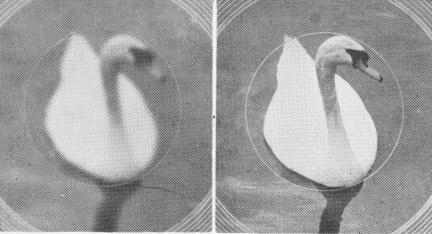
The focusing ring (7) is turned
in either direction until the image in the small circle of the finder
is sharp. The micro-diaprism disappears at this point, indicating the
sharpest point of focus. It reappears when out of focus.
DEPTH OF FIELD
 |
To check the depth of field, the preview lever on the lens (9) is depressed until 'M appears. This closes the diaphragm to the preselected F value and you can now see exactly the area of sharpness which will appear in the picture. When the lever is returned, `A' appears and aperture adjustment becomes automatic. When in "manual" aperture the viewfinder will become dark until it returns to "A" automatic. |
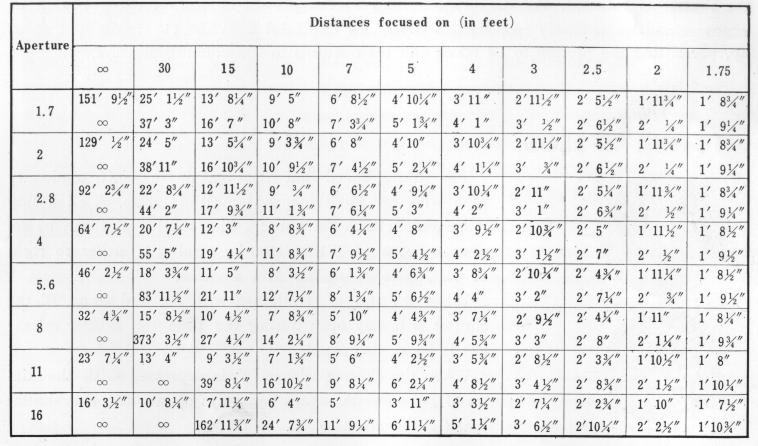
DEPTH OF FIELD TABLE
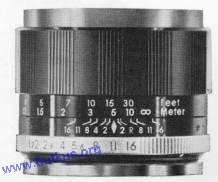
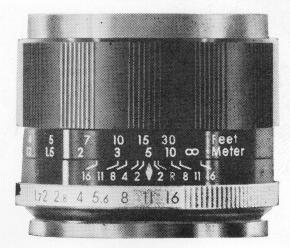
Depth of field can also be determined
by consulting the scale on ring(13). This is helpful when the lens is
stopped down so that it cannot be checked with the preview lever due
to low light transmission.
For example, with the standard lens
and the aperture set at F 11, focused at 16 feet, the F ii on ,the depth
of field ring (13) will point to approximately 10 feet and infinity.
This indicates the range of sharpness within which all will be in focus.
Consult table for other distances and apertures on page 12.
Mamiya/Sekor F1.7, 58mm (circle
of confusion, 1. 7/1000 inch) -
depth-of-field chart
The lens has an automatic
pre-set diaphragm. While focusing, it is wide open and provides the maximum
brightness in viewfinder for ease in composing and focusing. When the shutter
is released, the diaphragm closes to the pre-set aperture for the instant of
exposure and immediately reopens thereafter. In this brief time the viewing
screen snaps up, permitting the picture to be taken and then returns to the
viewing position.
SHUTTER SPEEDS
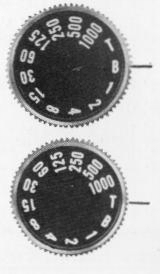 |
The shutter speed dial (3)
is a single shaft, stationary type with an equally spaced multiple scale.
A click stop is provided for each speed. The shutter dial can be set
over a range of T to 1/1000 by turning it either to right or left, before
or after film advance. When the shutter is released with the dial set on 'B', the shutter will stay open during the time the shutter release (2) is being depressed. When the shutter release (2) is depressed with the dial on `T', the shutter opens and stays open until the shutter dial (3) is moved to 'B'. |
SELF-TIMER
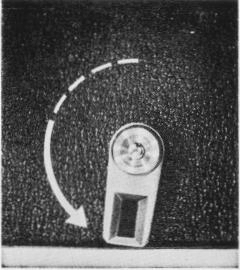 |
This feature makes it possible for
the photographer to get in the picture. It can also be used for slow
speeds with camera mounted on a tripod or held against a stationary
object by the photographer. When the self-timer lever (10) is turned counterclockwise approximately 180°, the timer allows ten seconds before it trips the shutter. Time can be adjusted freely over a range of 70° to 180° with the lever. When the self-timer actuating button (11) on the lever shaft is depressed, the timer starts to operate. After the self-timer has been set, the shutter can still be released by pressing the shutter release button (2). In this case, the self-timer action stops. |
Further, before actuating the self-timer, the shutter must first
be wound. When releasing the shutter with the self-timer, the automatic aperture
control mechanism works in the same way as when the shutter is released by depressing
the shutter release button.
HOLDING THE CAMERA
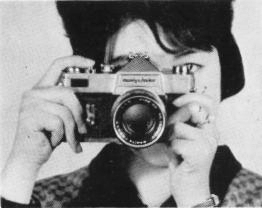 |
Lightly support the bottom of the camera with the palm of the left hand ; adjust the position of the camera so that the thumb and forefinger of the left hand can reach the focusing ring (7). Place the palm of the right hand against the end of the camera body. Then the forefinger of the right hand will automatically be near the shutter release button (2) and the thumb will be on the film advance lever (1). Bring the finder window to the level of the eyes and rest against the forehead. This will assure steady holding of the camera. |
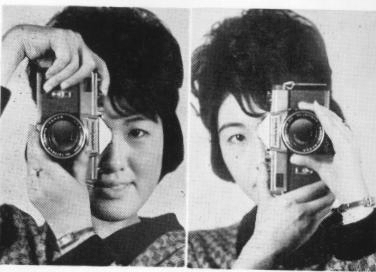
| In taking vertical pictures, the camera is to be held with the film advance lever upward. Procedure is the same as for horizontal pictures. Hold the camera with the left elbow as close to the body as possible. |
|
|
|
When the camera is to be held with
the film advance lever (1) downward, with the right thumb on the shutter
release button (2), support the camera with the palm of the right hand.
Place the left thumb and forefinger on the focusing ring (7). Hold the
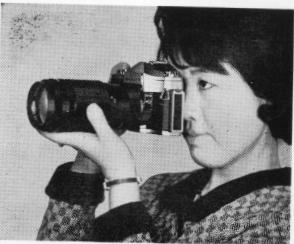
right elbow close to the body. The above camera positions are the same when other lenses are used. When taking pictures with speeds of less than 1/30 second, use a tripod or rest the camera on a steady supporting base to prevent movement when the shutter is released, or when using the self-timer. |
FLASH PHOTOGRAPHY
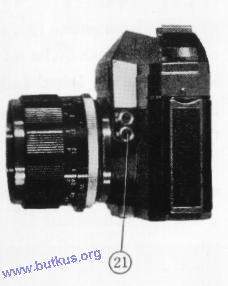 |
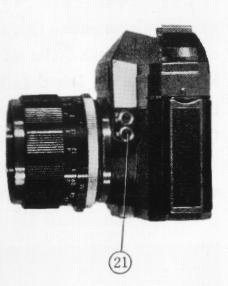
The flash terminal (21) has two
fittings, one for FP and one for electronic (X contact). The relationship between terminal, exposure time and flash bulb is shown in the table below. The flash terminal and the shutter speed time dial are synchronized and indicated by symbols of the same color. When using the FP flash you can use any of the shutter speeds marked in green on the shutter speed dial (3). When using the electronic flash you can use any of the shutter speeds marked in orange on the shutter speed dial (3). |
CHANGING LENSES
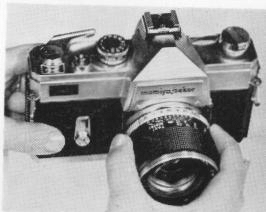 |
To change
the lens, hold the lens cylinder in the right hand and turn counterclockwise.
When mounting a lens, turn clockwise until it stops. When mounting or
detaching a lens, hold the section where the depth of field scale (13)
is marked. When the lens is detached, the reflecting mirror becomes visible. Never touch this mirror. If dust is found on this mirror, remove by blowing it away with a rubber bulb or brushing with a camel's hair brush. |
| Terminal
|
FP (Green)
|
X (Orange)
|
| Exposure
time |
1/1000
sec.-1/60 sec. |
1/30 sec.-1
sec. |
| Flash
bulb |
Focal
plane flash bulbs |
Electronic
or flash bulbs F and M classes |
USING INFRA-RED FILM
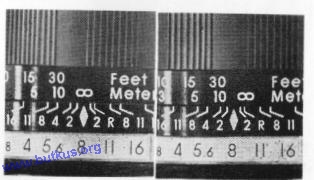 |
With this film, use the red ''R'
as the marker on the depth of field scale (13). After focusing through
the viewfinder note the distance on the distance scale, then turn the
ring until the `R' is opposite the same distance. If trying IR, go Digital. Lots of options available. |
UNLOADING FILM
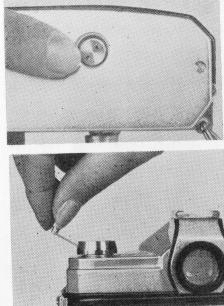
|
After 20 or 36 exposures have been
taken, press the sprocket release button (19), raise the film rewind
crank (15) and turn in direction of arrow. A slight tension can be felt
as the film comes off the take-up spool. Remove the film cartridge from
camera. The sprocket release button (19) returns to its normal position when the film advance lever is operated. Important : Do not force film advance lever when at end of film. Press the sprocket release button (19) to relieve tension and then rewind film. |
ACCESSORIES
The following are available:
Interchangeable
lenses
|
Type Length |
Speed (F)' |
Construction (element-group) |
Angle |
Diaphragm |
Filter Size (p=0.75) |
Hood Type | ||||||
| Wide | 28mm |
2.8 |
5-7 |
77° | Preset |
58mm |
||||||
| Angle | 35mm |
2.8 |
5-6 |
63° |
Auto |
52mm |
Screw-in |
|||||
| Standard | 58mm |
1.7 |
4-6 |
40°50' |
Auto |
52mm |
Screw-in |
|||||
|
135mm 200mm 400mm
|
2.8 |
4-5 |
18°20' |
Auto |
62mm |
Attached to lens |
||||||
|
Telephoto |
4.5
|
4-4 |
12° |
Preset | 58mm |
Screw-in Attached to lens |
||||||
|
6.3
|
3-3 |
6° | Preset | 72mm |
Screw-in Attached to lens |
|||||||
Extension ring for close-ups 4 per set
Extension bellows
Microscope adapter (for microphotography)
Angle finder (waist level viewing and focusing)
Lens frame (for eyesight correction lens)
HELPFUL HINTS
Storage of the Mamiya/Sekor C WP when camera will not be used for a long period of time).
1. Store without winding the shutter. This relieves spring tension.
2. Set the light meter sensitivity selector on `H'.
3. Remove mercury battery.
4. Remove camera from carrying case and place inside an air-tight box with a drying agent (silica gel).
CARE AND CLEANING
1. Never expose camera to direct sunlight for an extended period of time.
2. When any abnormality is found in the camera, do not attempt to disassemble or
lubricate. Contact the camera shop where you purchased the camera, or a service
division of this company.
3. High temperatures of over 100` F and low temperatures of less than freezing, moisture and salty atmosphere are injurious to any camera. Every precaution should be taken for proper care.
Lets Review
1. Load camera-advance film and trip shutter until exposure 1 appears. 2. Set ASA speed.
3' Set aperture (scenery, etc.) or shutter speed (action) first.
4. Line up pointer in light meter by turning either aperture ring or shutter speed dial (sec page 7).
5. Focus and compose.
6. Press shutter release button smoothly.
Presto! : You have taken a perfectly exposed picture with your Mamiya/Sekor CWP and we hope it's a prize-winner!