and historical purposes, all rights reserved.
This page is copyright© by
 M. Butkus, NJ.
This page may not be sold or distributed without
the expressed permission of the producer.
I have no connection with any camera company.
This camera manual library is for reference
and historical
purposes, all rights reserved.
This page is copyright© by
M. Butkus, NJ.
This page may not be sold or distributed without
the expressed
permission of the producer.
I have no connection with any camera company.
On-line camera manual library
If you find this manual useful, Back to main camera
manual page Click here for
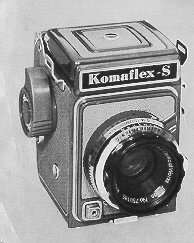
KOMAFLEX Komaflex-S is the worlds only 1 5/8" x 1 5/8 (Super slide)
single-lens reflex camera. Combining the best features of the conventional
35mm and twin-lens reflex it is an all-purpose camera of unrivaled convenience
and versatility. With its new Seikosha-SLV (EVS) shutter and high resolution
Prominar lens Komoflex-S insures professional results both in color and
black-and-white. Through-the-lens viewing (free of parallax) guarantees
perfect framing of all close-ups portrait studies and scenic shots.
how about a donation
of $3 to:
M. Butkus, 29 Lake Ave.,
High Bridge, NJ 08829-1701
and send your e-mail
address
so I can thank you.
Most other places would charge
you
$7.50 for a electronic copy
or $18.00 for a hard to read Xerox copy.
This will help me to continue to host this site,
buy new manuals, and pay
their shipping costs.
It'll make you feel better, won't it ?
If you use Pay Pal, use the link below.
Use the above address for a
check, M.O. or cash.
Kowa Komaflex-S
PDF version - better printing
SPECIFICATIONS
1. Rare-earth 65mm Prominar f2.8 lens color corrected and hard coated.
2. New Seikosha-SLV (EVS) shutter fully synchronized with speeds of 1, 1/2,
1/4, 1 /8, 1 /15, 1 /30, 1 /60, 1 /125, 1 /250, 1 /500 sec. and B. and built-in
self-timer. The shutter is cross-coupled for the Exposure Value System.
3. Semi-automatic film transport.
4. Automatic exposure counter.
5. Automatic pre-set aperture diaphragm: the subject is always seen at full
aperture on a bright focusing screen. The Fresnel field lens provides a clear bright
image to the very edges of the picture. The magnifier is used far critical focus.
6.Die-cast body with hinged rear cover and attractive two tone finish.
7. Twelve exposures 1 5/8" x 1 5/8" on 127 Roll film.
8. Telephoto and
wide-angle auxiliary lenses are available.
CAUTION - The sliding
button far the release of the winding lever (part # 18 Fig 3) should I only in the
cases described in "LOADING THE CAMERA ", Paragraph 9, and in "LOOKING FINDER WHEN
THE CAMERA NOT LOADED. "
PARTS
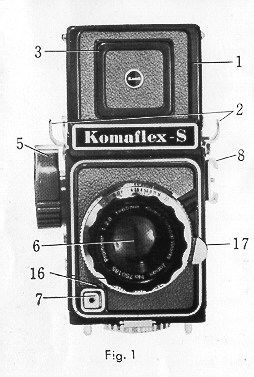 |
1. Finder cover 2. Neck strop eyelet 3. Direct view-finder frame 4. Magnifier for critical focusing 5. Film winding ratchet knob 6. Lens 7. Shutter release button 8. Accessory shoe 9. Combined self-timer and synchro-setting lever 10. Flash terminal |
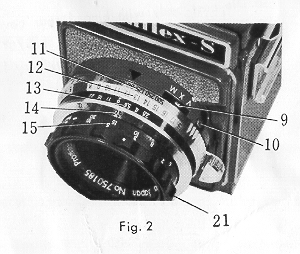 |
11. Shutter speed scale |
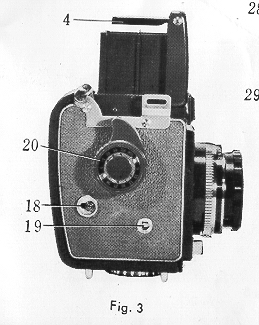 |
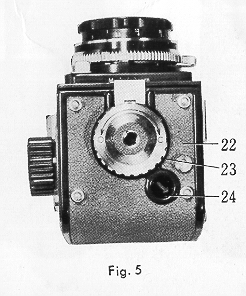
17. Shutter winding lever 22. Rear cover 23. Rear cover lacking disc 24. Film number window |
|
|
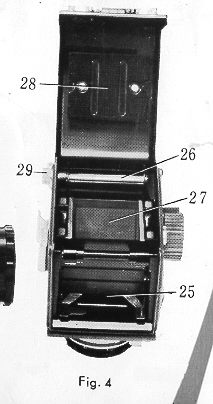
25. Film chamber 26. Take-up spool 27. Reflex mirror 28. Film pressure plate 29. Spool knob
|
LOADING THE CAMERA CAMERA
Komoflex
S uses 127 roll film color or black-and-white. When loading always avoid direct
sunlight.
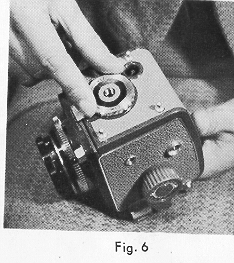 |
1. Rotate the locking disc of the rev cover in the direction
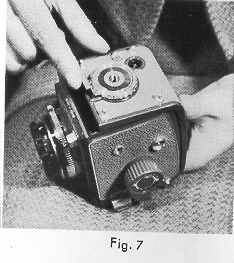
of "0" (open). (Fig.6) 2. Raise the loosened lock and open the rear cover. (Fig. 7)
|
 |
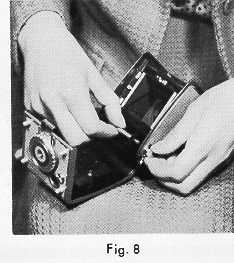 |
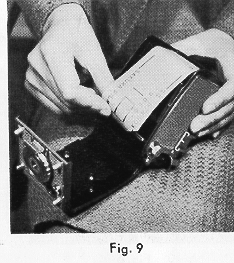
3. Put the empty spool in the take-up chamber while
pulling out the spool knob. (Fig. 8) 4. Break the seal of the film and place the roll in
the film camber. 5. Slip the end of the film into the longer of the two slob of the empty spool (Fig.9) holding the roll rightly to prevent it from loosening and being careful not to unwind too much paper. |
 |
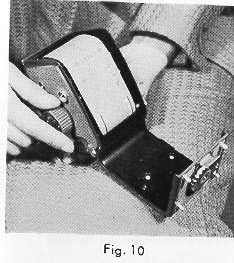
6. Start to wind a little film on the take up spool
by slowly working the film winding ratchet knob while checking to see that
the film is correctly loaded. (Fig.10). 7. Grasp the rear cover and rotate the locking disc in the direction of "C" (close). This completes the loading of the film.
|
 |
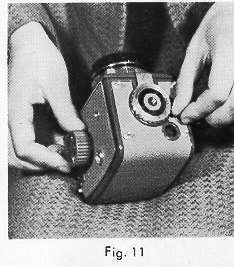 |
8. Unmask the film
number window by turning the adjacent knurled knob in the direction of the
arrow (Fig 11) . Work the film winding ratchet knob as many times as necessary
until number 1 appears in the film window. If the knob stops working before
number 1 appears in the window do not force it but press shutter release
button. Now repeat this operation until number 1 Appears in the window.
|
 |
 |
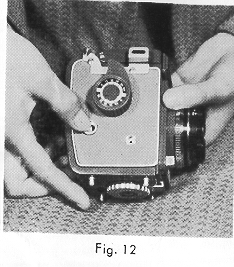
9. Slide the button for the release of the shutter winding
lever back all the e way and a red triangular mark will appear in the exposure
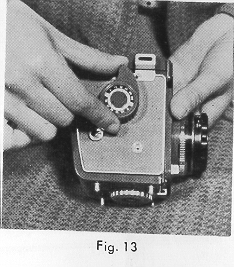
counter. (Fig. 12) 10. Operate the ratchet knob until it stops. Number
1 will appear in the exposure counter (Fig.13). Your camera is loaded and
ready far the first exposure. 11. As soon as the film has been loaded it is advisable to set the ASA Exposure Index of your film on the recording disc located on the winding knob. |
LOOKING INTO THE FINDER WHEN THE CAMERA IS HOT LOADED
Turn the film winding ratchet knob one full turn to bring down the mirror. Slide
the button for the release of the shutter winding lever back all the way hold it
there and wind the shutter by pushing the lever down as far as it will go. You con
now look into the finder.
CAUTION
Do not force the lever. If the release button is not held all the way back,
damage will result from exerting pressure on the lever.
FOCUSING AND SHOOTING
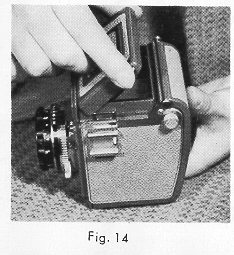 |
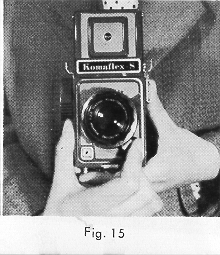
l. Open the finder cover by lifting up the rear edge. (Fig.14) 2. Operate the film winding ratchet knob until it stops (more than one turn will be necessary). This will advance the film one frame and lower the reflex mirror. 3. Wind the shutter by pushing the shutter winding lever as far as it will go (Fig.15). The diaphragm is now at full aperture and the image appears on the screen. |
 |
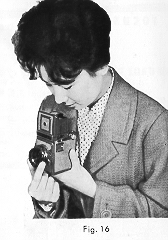 |
4. While looking into the screen turn the focusing ring
until the subject is at its sharpest. (Fig.16). 5. When the shutter release button is depressed to take a photograph the diaphragm closes to the pre-set aperture the reflex mirror retracts and the shutter operates at the pre-set speed instantly and automatically.
|
 |
6. The view finder image is literally full-size. What
you see in the finder is exactly what the film registers always free of
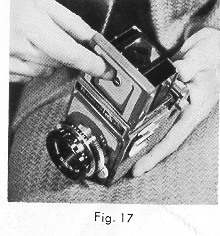
parallax. 7. For hairline focusing use the magnifier. Press in the top port of the direct view finder frame plate; the magnifier will automatically swing into position. (Fig. 17). |
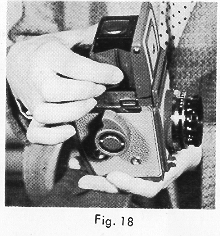 |
8. To use the direct view-finder frame for rapid eye-level shooting press
the frame plate down - flat. The frame plate can be returned to its original position
by slightly pushing inward the sides of the finder cover. (Fig. 18).
DETERMINING THE EXPOSURE
Until the
advent of the Exposure Value System (EVS) it was necessary to set the shutter speed
and the aperture separately The EVS system however which has been incorporated in
the Komoflex S expresses with one number the proper relationship between the shutter
speed and the aperture for correct exposure. The conventional methods of setting
the speed and aperture separately con of course also be used if so desired.
This camera is so designed that the shutter speed can be changed with the shutter
wound.
HOW TO USE THE EXPOSURE VALUE SCALE
At the top part of the lens barrel, closest to the camera body, there is a red arrow;
next, the shutter speed scale; next, the Exposure Value Scale, and then the diaphragm
scale with a yellow dot under number 8 The range of the Exposure Value System Scale
is from 3 to 18. To determine the proper Exposure Value number far any scene to
be photographed, measure the brightness of the scene with your exposure meter, holding
it near the camera and pointed at the subject. If your meter indicates an Exposure
Value of 12, for example, simply set the yellow dot of the camera diaphragm scale
to number 12 of the Exposure Value scale by turning the diaphragm setting lever.
Your camera is now set so that regardless of the shutter speed you wish
to use (within the aperture range of the lens) the correct corresponding f /number
will automatically be positioned. In the case of Exposure Value 12 for instance
the available combinations of shutter speed and diaphragm aperture are: 1/500 sec.
at f2.8 I /250 at f4 1/125 at f5.6 1/60 at f8 1/30 at fill, 1/15 at fl6 and 1/8
at f22. (Fig. 1a)
Any of these combinations may be used according to the
circumstances and purposes of your photograph with no change in effective exposure.
For instance if you wish to photograph at 1/60 sec. set the shutter speed at the
red arrow by turning the knurled barrel; you will automatically obtain the correct
aperture of f 8.
USING THE DEPTH OF FIELD SCALE
The depth of field in any photograph (the area which is in acceptable focus)
varies with the aperture used and the distance from camera to subject.
As
shown in Fig. 20 when focusing on a subject 10 feet away with the aperture set at
F11 the depth of field extends from about 8 to 15 feet All objects within this range
will be acceptably sharp. The depth of field is greater as the distance to the subject
is increased or the lens aperture is reduced. The depth of field corresponding to
any given aperture and distance can easily be determined by referring to that portion
of the distance score falling between the two figures on the depth of field scale
which correspond to the aperture being used.
HOW TO USE BULB AND SELF-TIMER
Rotate
the knurled shutter speed ring until "B" (Bulb) is opposite the red painter.
Press the shutter release button and continue to hold it for as fang a time as you
wish to expose. The shutter will close as soon as the button is released. A tripod
and a cable release are recommended when "B" is used. The self-timer is
set by making the synchro-lever to the "V" position prior to winding the shutter.
The self-timer allows ten seconds before the shutter is released.
FLASH PHOTOGRAPHY
Flash is used as the
main source of illumination under poor lighting conditions or as a secondary light
source outdoors in daylight to lighten heavy, dark shadows.
The Kamoflex
S is equipped with "M" and "X" synchronization. "M" is synchronized at all speeds
for flashbulbs such as No. 5 and No. 25. "X" is synchronized at all speeds and is
used for electronic flash. "X" is also used for cross "F" bulbs. for shutter speeds
up to 1/60 sec. "V" (self-timer) is also "X" synchronized.
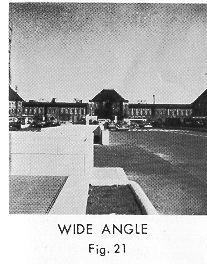
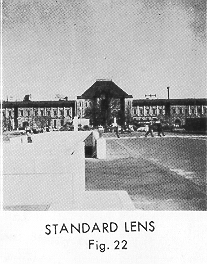
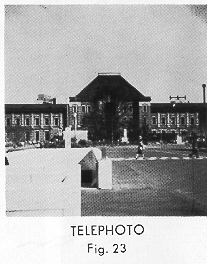
TELEPHOTO AND WIDE ANGLE AUXILIARY LENS
When compared to the standard lens the telephoto auxiliary lens increases the size
of the subject image 1.5 times; the wide-angle auxiliary lens increases the field
or angle of view 1.4 times. The auxiliaries are screwed directly into the standard
lens barrel. The Kamoflex-5 being a single-lens reflex needs no mask or other framing
device. The focusing screen shows exactly what the film will record regardless of
the lens used.
|
|
|
|
HOW TO HOLD THE CAMERA
Be sure
to hold your camera steady to avoid blurred pictures.
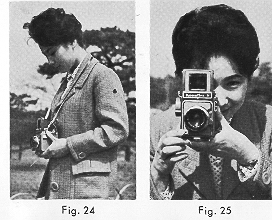 |
l. Waist-level position. This is the most common position
for a reflex of this type. (Fig 24). 2. Eye-level position. This position is used for snap
shots. When sighting in the direct view-finder press the back of the camera
firmly against your face. (Fig.25).
|
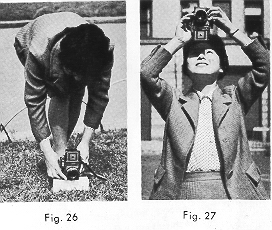 |
3. Ground-level position. Steady camera by putting it
on a solid support. (Fig. 26). 4. Above eye-level position. This position is quite convenient in shooting over the heads of a crowd. (Fig. 27).
|
UNLOADING THE CAMERA
After number
12 has been exposed. operate the film winding ratchet knob until there is no more
resistance indicating that the entire film is rolled up on the take-up spool. After
removing the film in subdued light it must be sealed tightly. It is advisable to
wrap the exposed film in a light-proof paper such as tin foil.
CARE OF THE CAMERA
1. Take extreme care
in cleaning the lens. Remove dust with a dry, soft brush or hand blower, then wipe
with lens tissue. 2. After taking photographs at the seashore or in damp weather,
wipe the camera thoroughly with a dry, soft cloth.
3. Do not leave the camera
with the shutter wound for a long period of time as this will strain the mechanism.
4. If you should drop the camera in water wash it with alcohol or another volatile
liquid immediately and have it repaired as quickly as possible.
DO NOT FORCE SHUTTER WINDING LEVER
When there is no film in the camera the shutter winding lever will not operate unless
the sliding release button is held back all the way. Otherwise damage will result
from exerting pressure on the lever.
TO LOOK INTO
THE FINDER WHEN THE CAMERA IS NOT LOADED:
1. Turn the film winding
ratchet knob one full turn.
2. Slide the button for the release of the shutter
winding lever all the way back and hold it there.
3. Push the shutter winding
lever down as far as it will go.