Coronet 3D
posted 6-16-'04
This camera manual library is for reference
and historical
purposes, all rights reserved.
This page is copyright©
by
 ,
M. Butkus, NJ.
,
M. Butkus, NJ.
This page may not be sold or distributed without
the expressed
permission of the producer.
I have no connection with any camera company.
On-line camera manual library
If you find this manual
useful,
how about a donation of $3 to:
M. Butkus, 29 Lake Ave.,
High Bridge, NJ 08829-1701
and send your
e-mail address
so I can thank you.
Most other places would charge
you $7.50 for a electronic copy
or $18.00 for a hard to read Xerox copy.
This will help me to continue to host this site,
buy new manuals, and
pay their shipping costs.
It'll make you feel better, won't it
?
If you use Pay Pal, use the link below.
Use the above
address for a check, M.O. or cash.
Back to main camera manual page
CLICK HERE TO CONTINUE TO
Coronet 3D PDF MANUAL
- better printing -
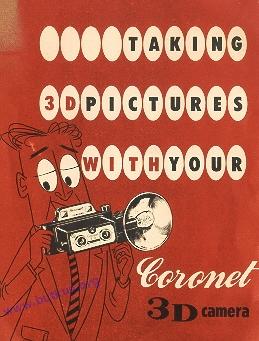
NOW you can take those breathtaking 3-D stereo pictures with all the simplicity
of taking ordinary snapshots. No Fuss! No gadgets!
Your Coronet 3-D camera
is a precision instrument designed to give true-to-life 3-D pictures with ease,
convenience, and economy.
Here is the amazing new 3-D for your enjoyment.
-IMPORTANT!
3-D Stereo pictures must be
made in pairs. Your Coronet 3-D camera does this for you automatically. You
get 4 pairs of 3-D photographs on a #127 film. Therefore, take your 3-D pictures
ONLY on the odd numbers-1, 3, 5, 7. Always be sure that both lenses are open
when shooting 3-D pictures.
• FOR LIFE-LIKE 3-D PICTURES
OUTDOORS
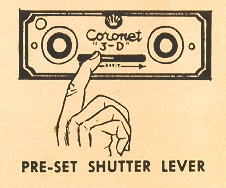 |
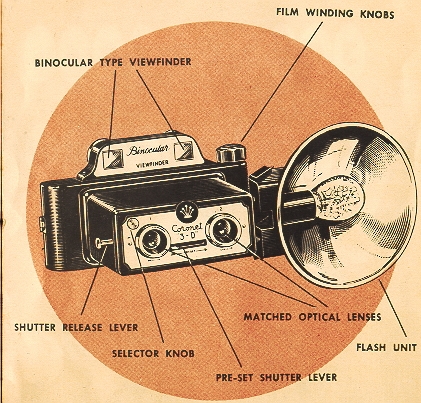
Set the shutter by moving the preset
lever on the face of the camera. Hold the camera up to your eyes. Your
Coronet 3-D camera has a binocular-type viewfinder allowing the use
of both eyes for maximum comfort and accurate 3-D composition. Hold
the camera at level with subject and steady. |
This is important for good 3-D pictures. Frame the subject in your viewfinder
and, holding the camera steady, gently push in the shutter release lever to
take your 3-D picture. After the first picture has been taken, turn the winding
knob to #3. Repeat this operation using only the odd numbers - 1, 3, 5, 7. Remember
to re-set the shutter each time.
• REMOVING THE FILM
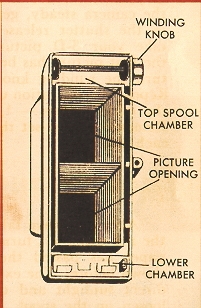
After you have taken the last of your 4 pairs (on #7 in the red window), turn
the winding knob until the end of the paper has passed the red window. Remove
the back as shown before. The exposed roll can now be removed. Avoid direct
sunlight and take care not to let the roll of film loosen on the spool. Fasten
the end with the glued paper found on the roll of film. You may find it easier
to fold under about half an inch of the paper before sealing.
IMPORTANT-If
you have the film developed locally, emphasize that it is a 3-D stereo film
and that you want the negatives printed in pairs. (see Page 8)
GOOD INDOOR PICTURES WITH FLASH
Use the
same procedure as above except that you add the flash unit to the camera as
follows:
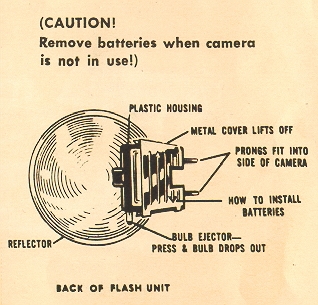
Remove the metal cover from back of the flash unit. (Fig. 1) Insert
2 penlight batteries with the tops in opposite directions as illustrated on
the metal cover. Snap the metal cover back into place by pressing lightly with
thumb.
(CAUTION! Remove batteries when camera is not in use!)
Insert the flash unit by pushing flash gun pins into its receptacle in the side
of the camera. Flash bulbs are inserted by slipping into the socket and pushing
down gently until you hear it click into place.
Use Amplex #5 G.E. #5 or Sylvania #25 flash bulbs or equivalent. After
taking the picture, eject bulb by pulling straight back on the lever on the
side of flash unit housing. This releases the bulb which can then be removed.
Flash bulbs remain "hot" for a moment after use.
When taking flash pictures,
use steady continuous motion on shutter release lever to insure proper synchronization
of flash bulb and shutter.
NOTE: Your Coronet 3-D camera may also be used to take
ordinary snapshots. In the upper left corner of this camera face plate
is a small round knob. This is the selector knob. To take 8 ordinary
snapshots, turn this knob counter clockwise. This closes #1 lens.
You can then use every number (1 - 8) in the red window to get 8 ordinary snapshots.
CHECK THESE RULES FOR BETTER PICTURES
1. Hold
the camera steady and push the shutter release lever smoothly to avoid blurred
pictures. Hold the camera level with subject.
Load your camera out
of direct sunlight.
2. Remember that you get 4 pairs of 3-D pictures.
Use only odd numbers 1,3,5 and 7. Wind film immediately after taking each picture
to avoid double exposures.
3. Keep the sun over your shoulder. Your subject
should © be in bright sunlight or in open shade under a clear
sky.
4. Your shutter must be pre-set each time before you
can take a picture.
5. The main subject should be no more than 4 to 10
feet from camera. Your background will automatically be in focus. If you get
closer, your picture may not be sharp.
6. Have each
roll of exposed film developed as soon as possible after it is exposed.
7. When using flash attachment, remember to insert a new bulb for each picture.
Keep your batteries fresh for peak performance.
8. Clean your lenses
carefully only with a dry, soft cloth or lens tissue or lens brush. Never use
your fingers on your camera lenses.
9. Remember for true 3-D pictures
keep subjects separated from background . . . this will give depth to your pictures.
TO VIEW 3.D PICTURES.
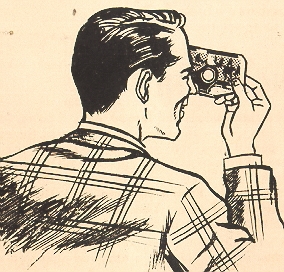 |
If you have the film developed locally,
emphasize that it is a 3-D stereo film and that you want the negatives
printed in pairs. The prints must be trimmed to proper size 1 3/4" to
fit viewer and they must be transposed before you can get the full 3-D
stereoscopic effect. That is, the pair of pictures must be cut down
the center and the right hand picture put into the left hand side of
the viewer and vice versa. The pictures should be taped across the backs
to keep this position permanently. |
EXTRA VIEWERS $1.98 each
NOTE - FINISHERS ARE NOT YET EQUIPPED FOR
THIS NEW DEVELOPMENT IN PHOTOGRAPHY, WE CANNOT GUARANTEE THAT THEY WILL DELIVER
PRINTS TO THE ABOVE EXACT SPECIFICATIONS. UNTIL LOCAL FINISHER IS READY -
TO INSURE PERFECT 3-D PICTURES WE HAVE MADE SPECIAL ARRANGEMENTS FOR LABORATORY
FACILITIES TO
Fine Grain Develop and Print Your Pictures on Heavy Weight
Glossy Paper ... Already Reversed . . . and Ready For Viewing (same as sample
print with viewer).
Use handy mailing bag enclosed with your kit. Be sure
to print name and address clearly. Enclose cash, check, money order or express
draft.
Single Roll $ .60
2 Rolls 1.00
Additional 3-D Prints From Your Negatives 4 for 50¢ (minimum order 50¢)
IMPORTANT -- NEVER CUT ANY PAIR OF NEGATIVES APART
Within
48 hours after receipt, your 3-D pictures will be on the way back to you with
your negatives (plus another mailing bag).
Mail Film To Photo Lab Nearest
You
3-D PHOTO LABS, INC. P. 0. Box 109 • Madison Sq. Sta., New York 10,
N. Y.
3-D PHOTO LABS P. 0. Box No-8652 • Hollywood 46, Calif.
3-D PHOTO PRINTS Box 579, Adelaide St. P. 0. a Toronto 1, Ont.
3D camera corporation 50 WEST 24th STREET, NEW YORK 10, N. Y